dailynewsnblog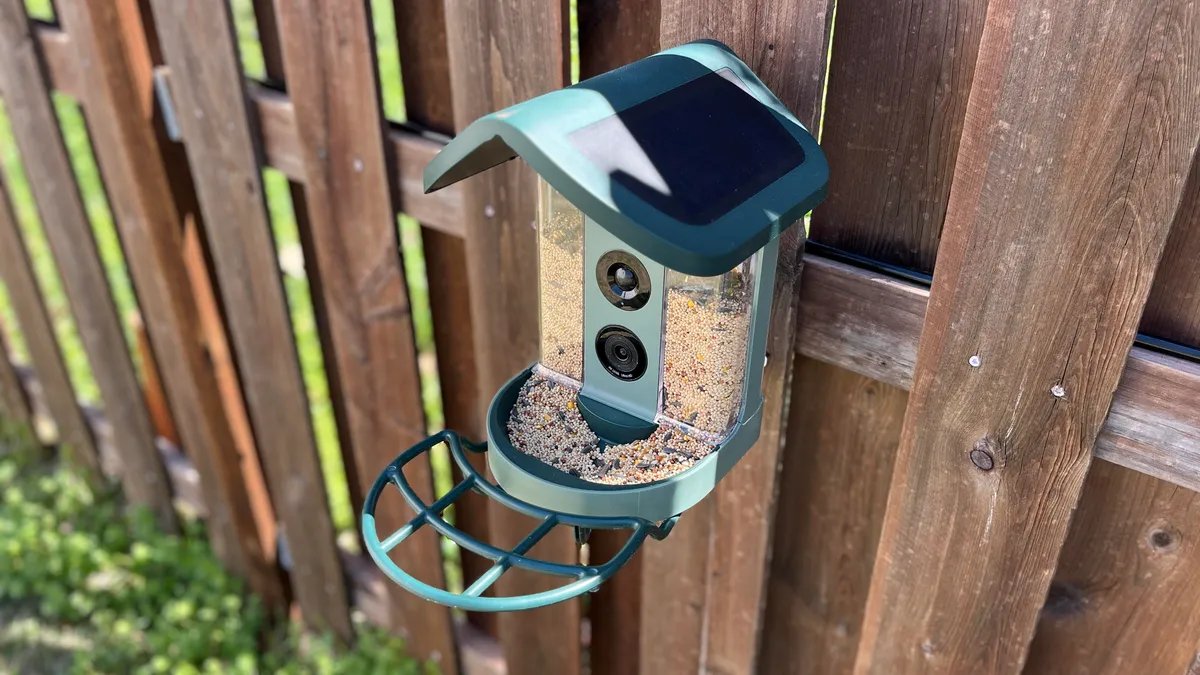
This Kiwibit Bird Feeder 2 features a 4K camera.
I’m mere months from turning 30, so I guess it was only natural that I began to find myself admiring the birds in my backyard. With luck on my side, around the same time, I had the chance to test several smart bird feeders to see how they stacked up.
Over the past couple of months, I tested four smart bird feeders with different features and dug into camera quality, the app experience and even how they withstood more than one tornado warning this spring. (That last part was unplanned, but useful knowledge nonetheless.) I also learned about the devices’ privacy features.
If you’re ready to take the leap into backyard birdwatching, here is the No. 1 smart bird feeder I recommend.
Best smart bird feeder overall: Kiwibit Bird Feeder 2
Dozens of visitors visit the Kiwibit feeder every morning.
The Kiwibit Bird Feeder 2 features a 4K camera and built-in solar panels so you don’t have to worry about charging it manually.
I love the design of this bird feeder, and that the camera is built into it. The removable bird seed holder makes filling it easy as can be, and it also comes with multiple options, such as pole, fence or tree mounting, for placing your bird feeder in different areas of your yard.
Although I love how the smart bird feeders looked mounted to my fence, I wouldn’t recommend this location because squirrels can easily overtake the feeder.
With the free version of the Kiwibit app, you get live viewing, one-day cloud storage, 10-second videos and the ability to save as many videos as you want to your camera roll. With Kiwibit Plus ($4.49 per month), you get 60-day cloud recording, longer video recordings and AI identification. After giving the free version a whirl for a couple of weeks, I upgraded to premium and found the AI identification to be accurate, and I loved that the camera would capture close-up photos of the avians, too.
The Kiwibit Bird Feeder 2 is currently listed for $190 or $240 with a lifetime AI subscription.
Are there any privacy features?
The only people who can view your camera feed are those who have the login, which the user creates with a personal email.
“Kiwibit devices and video feeds are not publicly accessible by default,” a spokesperson for the brand told CNET. “Users maintain full control over shared access permissions and can choose whether to invite family members or friends to access footage through the app’s optional sharing feature.”
AI identification is an extra cost, but it will also snap close-up photos of the bird at your feeder.
Additionally, the cloud storage is encrypted, and Kiwibit doesn’t sell or share data with third parties, nor does it share specific user location information, the spokesperson said. However, the app may still use third-party service providers, according to the privacy policy.
Other smart bird feeders I tested:
Birdbuddy Solar: This feeder has a built-in solar panel on one side of the roof, and it keeps the camera charged as long as that side faces the sun. I like the compact design and the notifications sent to your phone that identify the type of bird visiting the feeder, even with the free version of the app.
I was a big fan of the color of the bird feeder.
However, I ran into a couple of issues during testing. While setup was quick and easy, I experienced frequent connection issues. At first, I thought my Wi-Fi was the issue, but all of the other bird feeders I tested worked without problems. I also noticed condensation forming inside the camera, which occasionally made the video appear foggy.
When the feeder was connected, the camera quality looked great, and the app experience was excellent. I especially like the BB TV tab that shows bird visitors from other people’s Birdbuddy feeders around the world if they choose to share those videos.
Birdbuddy Solar is currently 50% off and available for $179. The premium version of the app, which provides extended AI identification with more information about the birds provided and higher camera quality, costs $70 per year.
Coolfly Aura Smart Bird Feeder: The notifications for this feeder were a little less sensitive than the Kiwibit and Birdbuddy, but you could still open a live feed at any time to see what was going on at the feeder.
On the free version of the app, it saves the previous three days of visitors, and you can also browse the For You feed to see the visitors other people are getting at their feeders if they decide to share those videos to the feed. Think of it as TikTok, but for birders.
The main issue I had with the Aura feeder was that it seemed like the birds sometimes struggled to get the seeds (especially if there was only a small amount left) as easily from the tray because of the metal cover, but on the reverse side, neither could the squirrels, and that was a plus in itself.
The Aura is also the most expensive of this bird feeder bunch at $290. However, it’s currently on sale for $220.
One of the most unexpected features I ended up enjoying was that, in addition to browsing through videos on the app, you can also search for birds to learn more about them. The sounds they make, a description of the bird, fun facts and favorite foods are included.
According to the Coolfly app, the blue color on Blue Jays is actually “caused by scattering light through modified cells on the surface of the feather barbs.”
There’s also a birding game you can play if you want to sharpen your bird identification skills.
Gearit’s Adomii Smart Bird Feeder Camera: This bird feeder has a solar-powered panel attachment, AI bird identification and a removable camera.
I loved this bird feeder for a few weeks, but it was sadly torn to shreds by the wildlife pretty quickly. Although all the tested bird feeders had frequent visits from squirrels, this one seemed to have the most issues with them because they tore up the wood and, at one point, even pulled the entire camera out of the feeder. Although it still functions as it should, I think I’d go with a plastic bird feeder over wood, even though I preferred the natural look of this one.
The bird feeder after about four weeks of use.
One standout feature of this feeder is that the solar panel attachment works with other devices. It even charged my nephew’s tablet.
What to consider before buying a smart bird feeder
Type of birds
The first factor to consider is the type of bird you want to attract. If you want hummingbirds, for example, the feeders above aren’t the right choice. Instead, you’ll need a dedicated hummingbird feeder.
But if you don’t have a specific bird species in mind, then any feeder and seed mix will work. It’s worth looking up which birds are common in your area, though, so you can provide them with a feast they’ll love.
Cost
From the bird feeders above, the Gearit Adomii Smart Bird Feeder Camera is the most affordable at $140. However, as mentioned, it also held up the worst. Despite the cosmetic issues, it still works as intended, so if you’re looking for the cheapest option, it might be a good choice as long as you can fend off squirrels.
However, it’s worth noting that these bird feeders often go on sale, especially during major shopping events, so keep an eye on pricing.
Wi-Fi
Without a Wi-Fi connection, your smart feeder will function as a regular bird feeder. Having a stable Wi-Fi connection is a must if you want to access the smart features and camera.
Squirrels
When a squirrel first arrived at my feeder, I couldn’t help but think it was adorable. Its little hands cracked open sunflower seeds before it scarfed down the mix. But then, more squirrels showed up, and before I knew it, the bird seed was completely gone without a bird even getting a nibble.
Squirrels gorge on bird seed if they can reach the feeder.
To deal with squirrels, I eventually mounted the feeder on a pole. I know that squirrels may still climb it, but so far, I’ve had success with feeding birds rather than attracting more squirrels into my yard.