dailynewsnblog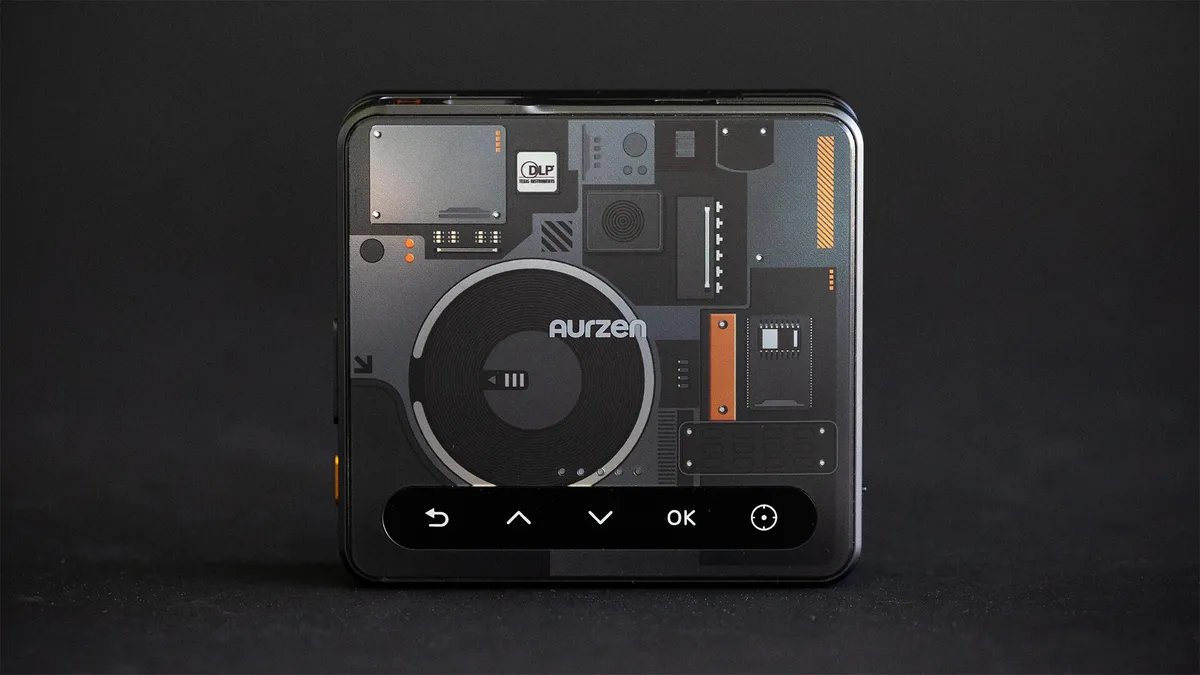

Pros
- Preem cyberpunk aesthetic
- Folds up tiny
- Dongle add-ons greatly increase usability
Cons
- Dim, though similar to other small portables
- No HDMI input
- Connectivity challenges
I’m trying to think of what the twisty Aurzen Zip Cyber most looks like. Perhaps a new ultra-foldable phone. Or a little robot snake. Maybe the Zat gun from Stargate. What it doesn’t look like is a projector. Well, except for the light which blasts from the front of it. With its cyberpunk-inspired decorations, the Aurzen looks quite futuristic.
With its 720p resolution and a claimed 100-lumen brightness, its performance matches its diminutive size. Then again, it’s one of the only projectors I’ve seen that can literally fit in your pocket. With a 5,000-mAh battery, it can give you a TV-sized screen just about anywhere. Anywhere that’s fairly dark.
The main issue with the Zip is its lack of an HDMI input. Some devices can connect to the Zip wirelessly, but are limited to non-copyrighted content (so no Netflix, etc). For that, you’ll also need to get either the CastPlay Pro or CastPlay HDMI wireless dongles. For a pocket-sized PJ, though, the Aurzen Zip Cyber is still pretty neat.
Specs and such
- Resolution: 720p
- Lumens spec: 100 (claimed)
- Zoom: No
- Lens shift: No (though you can tilt the sections)
- Battery: 5,000 mAh, 1.5h claimed playtime
- Light source type and life: Not listed, likely LED
Cyberpunk is one of my favorite genres of sci-fi, and having recently re-read Gibson’s Sprawl trilogy for the 4th or 5th time, played about 250 hours of Cyberpunk 2077, plus enjoying countless other media, I am certainly, let’s say “predisposed,” to like the aesthetic. The Zip Cyber’s looks are preem, choom, though it’s basically cosmetic with a really good sticker and a different colored power button compared to Aurzen’s regular Zip. The suggested retail price is $30 more for the Cyber, or 7.5%. Personally, I’d pay the extra for the look, but as mentioned, I’m into it.
Stickers aside, it’s the form of the Zip that is unique. This is a squat little box that expands via two hinges that can rotate roughly 90 degrees each. Fully upright, the projector forms a right-angled “Z” or “S” shape depending on your perspective. Adjusting the two non-base segments is how you angle the projector, and automatic keystone correction tries to maintain a rectangular image. This feature can be disabled in the menu.
There are control buttons up top, which can be duplicated in the Aurzen app (which annoyingly requires you to create an account). Next to the power button on one side are volume controls, and on the other is a toggle for the high brightness mode. The latter kicks the fans into overdrive, making them quite noticeable, but results in an about 40% increase in brightness. This sounds like a lot, but subjectively it’s just a bit brighter.
As you’d probably expect, given the size and price, that brightness isn’t going to set any records. I measured approximately 88 lumens, which, given the differences in measurement techniques, is pretty close to their claims. Also, I wasn’t able to do my usual measurement suite because of the Zip’s main drawback, which is…
Connections
- HDMI inputs: 0
- USB port: 1 USB-C
- Audio output: 2 speakers, 1-watt total
- Internet: None
- Streaming interface: None
- Remote: N/A
There’s no HDMI input, just a single USB-C connection, which is also how you charge the battery. You can cast wirelessly to the Zip, or at least some devices can. Certain devices just can’t. For those devices, Aurzen also sells the CastPlay Pro, a USB-C dongle that connects to a source like your phone or tablet and streams its screen to the Zip. This is also the only way to send DRM-enabled (copy-protected) content like Netflix, Disney+, HBO and so on. Most USB-C iPhones and iPads should work; some Switch tablets work, as do many laptops. If you know your device supports video output from the USB-C connection, it should work. My Pixel 9 Pro, for example, wouldn’t cast to the Zip directly, but worked just fine with the dongle. My TCL tablet wouldn’t work with the dongle, but did cast directly, though not with DRM content.
Aurzen also has a CastPlay Wireless HDMI Dongle, which connects to an HDMI source to broadcast to the Zip, but this wasn’t available during my review, and as of this writing is sold out in most regions.
So the Zip is a bit odd to review because, depending on your devices and what accessories you add, you’ll have a radically different experience. I made a chart:
Aurzen Zip Compatibility
| System | Compatability | Result |
|---|---|---|
| Zip | Most devices that can cast/mirror their display, but not Google Cast-enabled devices | No DRM-enabled content (Netflix, Disney Plus, etc) |
| Zip + CastPlay Pro USB-C | Most USB-C devices with video out (DisplayPort Alt Mode) | Any content |
| Zip + CastPlay Wireless HDMI | Any device with HDMI | Any content |
Basically, most modern iOS and non-Google devices should work with the Zip by itself, though you can’t watch DRM-enabled, copyrighted content (like what you get from the major streaming services). YouTube, Instagram, TikTok and similar will work fine, however. To connect other phones and devices, as long as it can output video via USB-C, the CastPlay Pro dongle will let you watch Netflix and other DRM-enabled streaming services (basically anything that’s not user-created). If you want to connect to a gaming console like a PlayStation or a streaming device like Roku, you’ll want the CastPlay HDMI. I think a lot of this confusion would have been solved with the addition of a Micro HDMI input somewhere, but I’m sure that would have added cost.
Picture quality
Due to the compatibility challenges mentioned above, I wasn’t able to do my full measurements with the Zip. I’m confident these results are close, though, especially since they’re pretty similar to those of other inexpensive portable DLP projectors I’ve measured, like Anker’s Nebula Capsule Air.
While light output, in the high-brightness mode, was around 88 lumens, it was around 63 in the much quieter, lower-brightness mode. This is within a few lumens of the Capsule and Capsule Air, close enough that you’d be unlikely to notice any difference in light output. These are all small, dim projectors, among the dimmest I’ve tested. That’s fine, as it’s an understandable consequence of the size and price. As long as you keep the projected image to around TV-sized, it’s bright enough to enjoy in a dark room.
Contrast is also fairly low, but within the same range as the competition. I measured an average contrast of approximately 401:1, which is about the same as the Capsules as well as some larger, more expensive portables like the Mars 3 Air (405:1). This is only slightly less than standouts like the TCL PlayCube (492:1) and even full-size projectors like the Epson Flex Plus (468:1). So while the image doesn’t pop as much as higher-end, and much larger/more expensive projectors, it’s still contrasty enough that it doesn’t look overly washed out. Again, size and price are the main attributes of the Zip, so it’s great to see that it also looks decent, graded on a curve with other small portables.
The TCL PlayCube, Aurzen Zip Cyber, and Anker Nebula Capsule Air.
Color is a bit of a mixed bag, however. The overall color temperature is a little on the cool/blue side, but not enough that it’s distracting. Some colors, like blue and cyan, look fine. Greens are quite accurate too, which is a surprise. Most projector companies sacrifice a realistic green for more light output. Anything involving red is a bit off, however, with red itself being quite undersaturated, magentas are somewhat blue, and yellows are rather green. The most noticeable result is that many skin tones look a little pasty, and anything that should have a solid red looks more pastel.
Perhaps the most useful feature in the Zip speaks to how Aurzen expects people to use it. If you lay the Zip on its side, it will rotate the image 90 degrees. This means if you’re primarily watching 9×16 content like TikTok, it will fill the DLP chip, and you can take advantage of the entire 720p resolution. This makes watching vertical content much more satisfying compared with a heavily letterboxed image that only takes up the center portion of the projected image. Flipping it sideways does make it harder to position correctly, since there’s no rotation in the hinges in that direction, but oh well. Easy enough to just prop the front up with whatever’s handy.
The unit’s two tiny speakers don’t play particularly loudly, nor do they have any bass, no surprise there, but as long as you’re sitting close, they get the job done.
Blade running
For the most part, I really like the Aurzen Zip Cyber. It’s a clever design that looks futuristic even without the cyberpunk clothing. It’s one of the smallest projectors I’ve ever tested, and it performs similarly to its slightly larger portable competitors. The colors it produces aren’t great, but they’re better than many small, inexpensive projectors I’ve tested, like the various AAXA models.
My hesitation is with the connectivity. I think I have a worse perspective on this than most people since I have a Pixel phone and a tablet without DisplayPort Alt Mode, so neither works entirely with the Zip. Depending on your gear, you’ll have different luck. The lack of an HDMI input also means that to watch content from the main non-YouTube streaming providers, you have to get one of the dongles, adding $100 to the total price.
That said, if you’re expecting to watch an endless scroll of TikTok or YouTube videos, and you have a device that will cast without the dongle, the Zip is a cool-looking gadget that can fit in a pocket and give you a TV-size image in rooms, vans or anywhere it’s fairly dark.