dailynewsnblog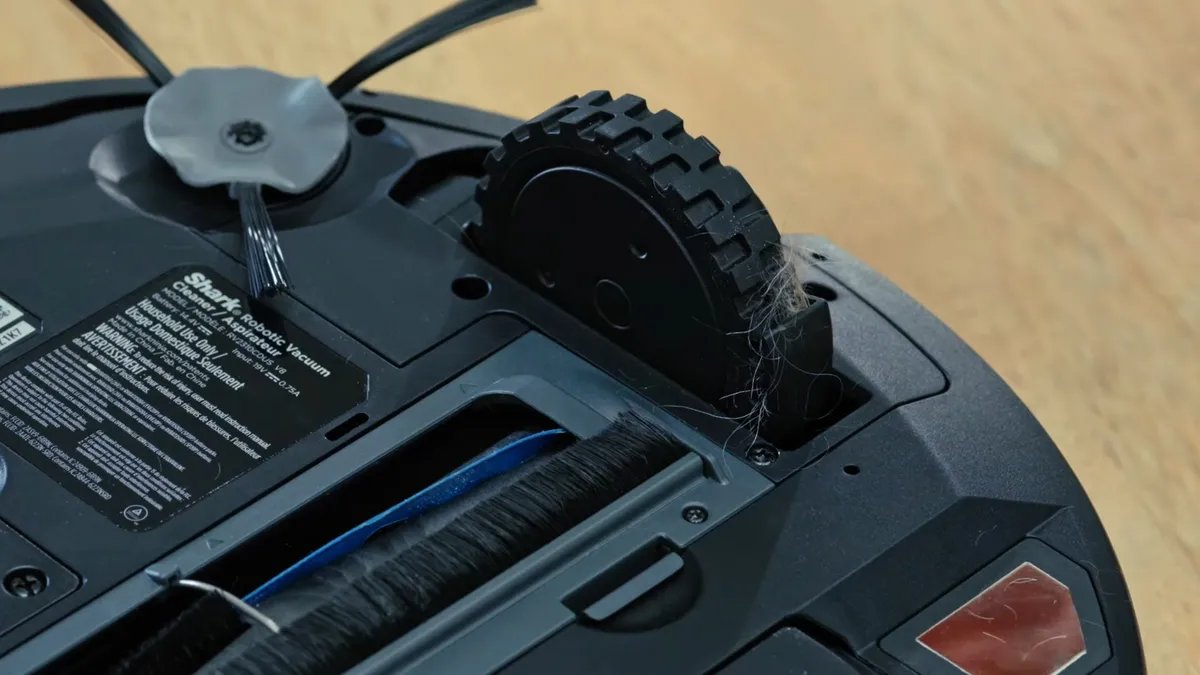
While the hands-off nature of robot vacuums makes them incredibly convenient, it can also lead to neglect. As dust, hair, grease, allergens and fine debris build up, your machine may lose suction, sensors may become blocked and motors may begin to strain. This is a problem that can arise even with self-emptying robot vacuums; the base station needs a little maintenance, too.
Keeping your robot vacuum in fighting shape is simple enough if you keep up with it, and making the occasional deep clean a part of your spring cleaning routine means the next one won’t be such a major undertaking. Here’s how you can get your robot vacuum sparkling in under 20 minutes, without splurging on any special cleaning tools.
For more vacuum cleaning tips, check out five ways to help your robot vacuum clean even better. You can also see our guide to help you choose between buying a robot or a cordless vacuum, and the cheapest vacuums we recommend.
Why do you need to clean your robot vacuum?
A comparison of the two robo vacuums, one with hair stuck on the roller (left).
Isn’t the whole point of a vacuum that it cleans? While it may be frustrating to have to clean your cleaning tool, regular maintenance has serious benefits, including increasing the longevity of your robot vacuum. The lifespan of a robot vacuum varies depending on the frequency of use, floor conditions and, importantly, user maintenance.
Since these machines are almost fully automated, they’ll go days — or weeks — collecting dust, crumbs and pet hair without much help. Eventually, they’ll start to show signs of wear, with brushes getting tangled, sensors getting dirty and charging contacts failing to work as smoothly. The good news? You can fix all of that with just a few minutes of routine maintenance. With proper care and cleaning, your robot vacuum can last a long time, according to Ryan Stocking, Roomba product manager at iRobot.
The lifespan of vacuum cleaners, according to a Consumer Reports survey, is on average eight years, depending on how often you use your vacuum and how regularly you maintain it. Robot vacuums are somewhat more complicated, with more moving parts such as brushes, legs that help them get over obstacles and robotic arms to sort items. In some cases, they could last as long as a vacuum cleaner, but they can also be more prone to issues. If you’re unsure of when to replace or upgrade your vacuum or robot vacuum, follow our guide for warning signs.
What you’ll need to clean a robot vacuum
Cleaning all parts of your robot vacuum is important to keep it in tip-top shape.
You may not realize it, but you likely already have everything you need to thoroughly clean out your robot vacuum. You mostly just need some common household cleaning supplies:
- Paper towels or a microfiber cloth
- Warm water
- Compressed air (optional)
- Mild dish soap
- An old toothbrush
- A toothpick or wooden skewer
- Hair dryer (optional)
- Scissors
- A dry towel
How to clean your robot vacuum
Every so often, you’ll need to deep clean your robot vacuum’s brushes.
If you’re unsure where to start cleaning your robot vacuum, consult the manufacturer’s maintenance guide. Your specific robot vacuum model may require specific care. That said, there’s a fairly uniform cleaning routine, regardless of brand or style.
CNET connected with Stocking to get some expert-approved tips for maintaining your trusty robot vacuum and ensuring its best performance this summer.
“Generally, maintenance includes cleaning or replacing air filters, inspecting and cleaning the brushes and rollers, and occasionally wiping down sensors located on the bottom of the robot, such as the cliff detect sensors and charging contacts,” Stocking said via email. “Modern, Wi-Fi-connected robot vacuums can also provide maintenance tips and reminders via the companion app, even offering health status updates on various components, such as filters and roller brushes.”
Most newer robot vacuum models, including the Roborock Saros 20 and Dreame X60 Max Ultra, will notify you when the mopping brushes are worn down and need to be replaced, or when the sensors need cleaning.
How often should you clean out your robot vacuum?
A closer look at the Dreame X50 brush roller. It can be removed easily if you ever need to clear anything that might get caught between the dual rollers.
Your robot vacuum likely came with a guide on the recommended cleaning frequency, but the timelines are usually consistent from model to model. On average, you’ll want to give your vacuum a thorough once-over every month. For households with pets, particularly ones that shed heavily, you’ll want to up the frequency to once every two or three weeks. This is also true in particularly dusty environments, such as older homes or homes near outdoor dust sources, such as highways or the desert.
The frequency for robot vacuum maintenance procedures ranges:
- Daily: Emptying the bin, checking wheels for stuck debris.
- Weekly: Cleaning brush rolls and wheels.
- Monthly: Charging contacts and cliff sensors; removing and deep cleaning the brushes.
Stocking said iRobot specifically provides illustrated guidance on how to perform common maintenance procedures, which is available in the iRobot Home App. Other robot vac brands such as Dreame, Roborock and Eufy also provide extensive usual manuals that cover how best you should upkeep and maintain your device.
If dusty, take a cloth to clean the underside and wheels of your robot vacuum.
How to clean your robot vacuum in just 20 minutes
Cleaning your robot vacuum doesn’t need to take forever. The guide below shows you how to clean most models in just five easy steps, using existing household tools you already have.
Step 1: Prep the vacuum
It may be hard to identify, but this is what a clean and emptied dustbin on a robot vacuum looks like.
Before you get started, make sure the vacuum is fully powered down (don’t just dock it). Then remove and empty the dustbin of any accumulated debris, and wipe it out with a paper towel. Some robot vacuums specifically warn against washing the dustbin, but otherwise, you can wash it out with some warm water and a drop of dish soap. Dry with a towel and then set it aside. Ensure it’s completely dry before you return it to the machine.
Finally, remove the filter and set it aside. If you have a can of compressed air, you can refresh the filter by taking it outside and giving it a thorough blast to blow out trapped dust (even just giving it a shake can remove some detritus). Alternatively, you can take an old toothbrush and brush out the filter on both sides.
Step 2: Clean the brushes and rollers
You should be able to remove the main brush entirely in order to clean.
All robot vacuums — whether Roomba, Shark, Roborock, Dreame, Eureka, Eufy or another popular brand — have at least one main brush that pulls dirt, lint and hair into the dust chamber. Like the wheels, the main brush can get entangled with hair, strings and other debris.
Next up, you’ll want to remove the main and side brushes. Using a pair of scissors, cut away any hair that’s become wrapped around the roller. You can then pull away stubborn remaining hair and any trapped debris with a toothpick.
After, give the rollers a thorough wash with some warm water and some mild dish soap. Once you’ve rinsed them off, leave them until they’ve thoroughly dried. As with the dustbin, you don’t want to return a damp roller to the vacuum, so ensure both the interior and exterior are fully dry before you pop them back into the machine.
Most robot vacuums also have side brushes to help you get corners. You can remove them as well for cleaning.
The side brushes on a robot vacuum are smaller than the main brush and are tasked with pulling debris into the main brush’s reach. These smaller brushes will need some extra care to keep working well, too.
If the bristles on the side brush have gotten warped or twisted out of position, you can optionally heat them up with a quick, hot blast from a hair dryer. The warm bristles will be more pliable, and you can smooth them back into position with your fingers, then hold them in place while they cool.
Step 3: Clean out the wheels and undercarriage
Cleaning the robot vacuum’s wheels are just as important as the rest of its body.
When robot vacuum wheels get grimy, caked with dirt or tangled with hair, they don’t turn as well, causing your little machine to move less efficiently and even scratch your floors. Clean wheels provide better traction and reduce strain on the vacuum’s motor, ultimately extending the life of your machine. After you’ve sorted the bristles, spin each wheel of the vacuum and wipe it down with a damp cloth.
If anything is stuck in the wheel well or wrapped around the wheel, remove it with the scissors or a toothpick. Our old advice was to check for tangles weekly, but most newer robot vacuum models will notify you if there’s anything tangled in the wheels. For particularly stubborn gunk, consider using a toothbrush or even a bit of steel wool to remove it.
If there are air intake vents on the underside of the vacuum and you’ve got some compressed air, give them a blast to remove any lingering dust. Then give the entire underside of the vacuum a thorough wipe down with a damp cloth, including the air vents, and follow up with a paper towel to dry. You can also run the toothbrush over those vents to ensure they’re fully clear.
Step 4: Clean the sensors and charging contacts
- The robot vacuum sensors are small, but incredibly important bits to keep clean. You can often find them on the bottom or sides of the robot vacuum.
Using a dry microfiber cloth, or a very slightly dampened soft cloth of any kind, give the cliff sensors, camera lenses and IR windows a gentle polish. Move on to the charging contacts on both the vacuum itself and the dock and wipe them down to ensure clean contact while the machine charges.
Be careful not to use rough materials when cleaning sensors, as they may scratch the lens and impair the vacuum’s ability to detect obstacles.
Step 5: Reassemble and reset
The X12’s roller mop is longer and automatically tucks behind a cover when transitioning to carpet.
Once all the components are completely dry, you can reassemble the vacuum. Reattach the brushes/rollers, and slot the dustbin back into place. Return the robot to its dock or charger and make sure it’s fully charged. Some robot vacuums include an app with a maintenance counter to help you keep up with regular cleaning. If this is the case on yours, make sure you reset the maintenance counter after you’ve completed your deep clean if your robot isn’t smart enough to do it on its own.
Don’t underestimate the importance of keeping your robot vacuum clean
A clean vacuum means a cleaner home. The better your robot vacuum functions, the cleaner it will get your home, and one of the easiest ways to keep it operating at peak performance is to keep it gunk-free. Regular cleaning and maintenance can even extend your machine’s life, so it can potentially save you money in the long run.
For more vacuum tips, explore the the five common mistakes sabotaging your robot vac, analyze whether you should buy a self-emptying robot vacuum and figure out why your robot vacuum might be costing you more money than you might expect.