dailynewsnblog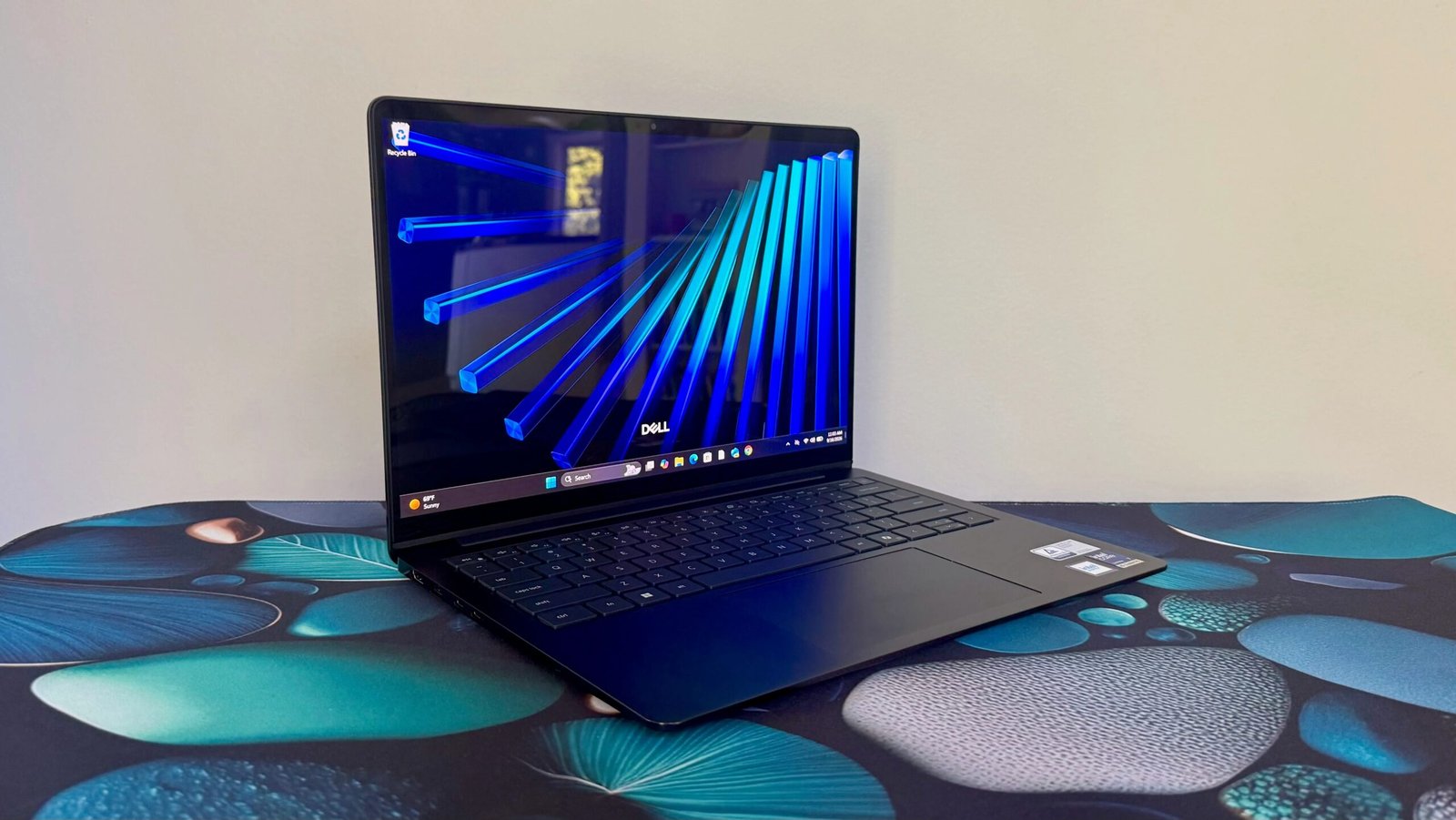

Pros & Cons
-
Sturdy, all-aluminum build -
Solid mainstream performance and long battery life -
Option for OLED display -
Plenty of ports
-
Heavy for its size -
OLED or no, you are stuck with a 1,920×1,200-pixel resolution -
Display’s limited brightness and glossy finish is challenging in certain lighting conditions
Dell largely has itself to blame for my tepid endorsement of its Dell 14S laptop. Let me explain. The midrange Dell 14S is a sensible step down from the premium XPS 14, forcing some trade-offs in design and display resolution for a lower price. The Dell 14S starts at $1,400, and the system Dell sent me with CPU and display upgrades rings in at $1,600. Meanwhile, a similarly configured XPS 14 costs more than $2,000. Saving $400 to $500 for a chunkier but still all-metal chassis is an attractive proposition. The Dell 14S suddenly looks less appealing, however, when you put it up against Dell’s own XPS 13.
With the same Intel Core Ultra 7 processor, 16GB of RAM and 512GB SSD, the XPS 13 is actually $200 cheaper than the Dell 14S I tested. The biggest difference between the two is the display: The XPS 13 has a smaller 13.4-inch IPS panel but with a higher 2.5K resolution, and the Dell 14S offers a 14-inch OLED panel at 1,920×1,200 pixels. I don’t like missing out on the OLED with the XPS 13, but I’d take the higher-resolution and the $200, please. And offsetting the slightly smaller screen is the XPS 13’s much sleeker and lighter design.
For those who refuse to accept less than a 14-inch display or spend more than $2,000, which would rule out the too-small XPS 13 and too-expensive XPS 14, I have tested other options I like better than the Dell 14S. Both the HP OmniBook 5 14 and Lenovo Yoga Slim 7x Gen 11 offer more RAM and storage at lower prices while providing the same OLED display in trimmer packages.
| Price as reviewed | $1,600 |
| Display size/resolution | 14-inch 1,920×1,200 OLED touch |
| CPU | Intel Core Ultra 7 355 |
| Memory | 16GB LPDDR5-7467 |
| Graphics | Intel Graphics |
| Storage | 512GB SSD |
| Networking | Wi-Fi 7 and Bluetooth 6 |
| Ports | 2x USB-C Thunderbolt 4, 2x USB 3.2 Gen 1, HDM 2.1, combo audio |
| Operating system | Windows 11 Home 25H2 |
| Weight | 3.3 lbs (1.5 kg) |
The Dell 14S is based on Intel Panther Lake processors and a 14-inch display with a 1,920×1,200-pixel resolution. Dell offers four different Panther Lake processors for it and four display options. You can choose a Core Ultra 5, 7 or 9 chip as well as a Core Ultra X7 CPU that brings with it Intel’s integrated Arc B390 GPU with 12 Xe graphics cores. You can’t upgrade the display’s resolution, but you have the choice between an IPS LCD or OLED panel, each of which comes with or without touch support.
Memory and storage options are more limited: 16GB or 32GB of RAM and either a 512GB or 1TB SSD. You also have a choice between two similar blue hues – celestial or frost blue – but each color is tied to different configurations so you might not be able to get the color you want with the specs you’re after.
Pricing starts at $1,400 for a Core Ultra 5 322 processor, 16GB of RAM, a 512GB SSD and non-touch IPS display. My test system features two upgrades – the Core Ultra 7 355 chip and touch OLED panel – and costs $1,600. In this era of RAMaggedon, that’s not a terrible price but not as good as a similar XPS 13 build for $1,400.

Pricing climbs above $2,000 with further upgrades. The Dell 14S with the Core Ultra X7 358H CPU, 32GB of RAM, 1TB SSD and 14-inch touch OLED will set you back $2,300. That’s stretching the definition of mainstream, but it’s still $400 less than the XPS 14 with those same specs and a higher-res 2.8K OLED.
The Dell 14S starts at £1,299 in the UK and AU$2,499 in Australia.
There’s also a larger, similarly priced Dell 16S that offers the same configuration options as the 14S, with the difference being the 16-inch model’s OLED upgrade bumps you up to a 2.5K resolution.
How is the Dell 14S’ performance?
In testing, the Dell 14S didn’t blow the doors off any particular benchmark, but provided a solid mix of performance and efficiency. It matched the XPS 14 with the same component lineup, which isn’t surprising, but still a win for the 14S because it provides this same level of performance at a lower price.
The Dell 14S finished between the HP OmniBook 5 14 and the Lenovo Yoga Slim 7x Gen 11 on most tests, which creates some interesting comparison points. Each of these competitors is based on a Qualcomm processor; the OmniBook 5 14 has a Snapdragon X Plus, and the Yoga Slim 7x has a Snapdragon X2 Elite. The Slim 7x is the fastest of the three, with the Dell 14S and OmniBook 5 14 closer in performance to one another. The Dell 14S had slightly better multicore results than the OmniBook, but the OmniBook had the edge in single-core performance.
In battery testing, these three systems excelled. The Dell 14S ran for 23.5 hours on a single charge on our YouTube streaming battery drain test. That couldn’t match the OmniBook 5 14’s time of more than 28 hours, but it was more than an hour longer than the Yoga Slim 7x.
 Matt Elliott/CNET
Corporate looks, solid build
The Dell 14S is rather unassuming-looking. Its design certainly won’t offend, but it’s also hard to get too excited about it. It looks like a corporate workhorse your company might issue you, except that in certain light, the dark celestial blue color adds a hint of personality. In different lighting, the blue is so deep that it appears as standard corporate black.
The all-metal build is solid to a fault. The aluminum enclosure is very rigid and doesn’t flex or creak, but the laptop tips the scales at 3.3 pounds. That’s heavy for a 14-inch model, but not uncommon for Dell; the XPS 14 is also heavy at 3.2 pounds. The HP OmniBook 5 14 and Lenovo Yoga Slim 7x Gen 11 will both be easier on your shoulder; each weighs less than 3 pounds. If you’re willing to drop down in display size, the XPS 13 with its 13.4-inch display weighs just 2.3 pounds — a full pound lighter than the Dell 14S.
Keyboard design is the biggest difference in appearance between the 14S and XPS models. The 14S serves up a traditional chiclet key layout as opposed to the latticeless XPS keyboard, where one key ends and another begins with no space between them. The keyboard is roomy, but the keys felt a bit mushy with a touch too much travel. I prefer snappier feedback for faster typing.
 Matt Elliott/CNET
The touchpad is generously proportioned, but it’s a standard mechanical unit and not the haptic touchpad you get with the XPS 14 (but not XPS 13). I prefer a haptic touchpad’s consistent click response across its entire surface to a mechanical touchpad, where clicks feel firmer and are more difficult to initiate the further up its area you go. Still, for a mechanical touchpad, the Dell 14S is above average with minimal diving board effect. Clicks near its bottom edge never get so loose that the touchpad feels flimsy and clacky.
It’s nice to have the option to upgrade to an OLED panel on a midrange laptop, even if it’s a bit disappointing when a bump in resolution doesn’t accompany it. But it’s a familiar mainstream laptop recipe; both the HP OmniBook 5 14 and Lenovo Yoga Slim 7x Gen 11 offer 1,920×1,200 OLED displays, too. Text and images are crisp enough, but I would want a 2.5K or higher resolution if I were going to use the Dell 14S for work or school and would need to stare at text or numbers for long stretches.
The OLED benefits of deep black levels and vivid colors are readily apparent, and the panel proved to be color accurate in testing with a Spyder X Elite colorimeter. It covered 100% of the sRGB and P3 gamuts and 91% of the larger AdobeRGB space. Along with its limited resolution, the panel’s weakness is its brightness or lack thereof. It’s rated for a pedestrian 300 nits and hit a peak of 288 nits on my tests. The glossy screen finish, combined with its limited brightness, makes the Dell 14S a poor choice for outdoor use.
 Matt Elliott/CNET
The Dell 14S lacks the XPS 14’s quad-speaker array, but its pair of stereo speakers produces decent laptop audio. Volume reaches an impressive level, and the audio stays fairly clear of distortion at max volume.
The 1080p webcam is serviceable with a semi-noisy image that should get the point across, even if you won’t look crystal clear on video calls. And the camera has an IR sensor, so you can set up facial-recognition logins via Windows Hello. Without a fingerprint reader, this is the laptop’s only secure biometric feature.
Port selection is one area that favors the Dell 14S over the XPS 14. It has both USB-C and USB-A ports along with an HDMI port. And both USB-C ports support Thunderbolt 4. With the XPS 14, you get a trio of Thunderbolt 4 ports, but neither USB-A nor HDMI ports.
 Matt Elliott/CNET
Should I buy the Dell 14S laptop?
If you don’t have any Windows-on-Arm hangups, then I would steer you toward the HP OmniBook 5 14 or Lenovo Yoga Slim 7x Gen 11 instead. Each delivers the same 14-inch OLED display, but in a lighter package for less, while also supplying double the RAM and storage. But if you won’t feel too cramped with a 13.4-inch display, Dell’s own XPS 13 is a fantastic choice. Its display may be slightly smaller and not an OLED, but it comes with a sharper resolution. And its 2.3-pound weight makes it much easier to tote around.
How we test computers
The review process for laptops, desktops, tablets and other computer-like devices consists of two parts: performance testing under controlled conditions in the CNET Labs and extensive hands-on use by our expert reviewers. This includes evaluating a device’s aesthetics, ergonomics and features. A final review verdict is a combination of both objective and subjective judgments. The list of benchmarking software we use changes over time as the devices we test evolve. The most important core tests we’re currently running on every compatible computer include Primate Labs Geekbench 6, Cinebench 2024, PCMark 10 and 3DMark Fire Strike Ultra. A more detailed description of each benchmark and how we use it can be found on our How We Test Computers page.
System configurations
| Dell 14S | Microsoft Windows 11 Home; Intel Core Ultra 7 355; 16GB DDR5 RAM; Intel Graphics; 512GB SSD |
| Dell XPS 13 (8GB) | Microsoft Windows 11 Home; Intel Core 5 320; 8GB DDR5 RAM; Intel Graphics; 512GB SSD |
| Dell XPS 13 (16GB) | Microsoft Windows 11 Home; Intel Core 5 320; 16GB DDR5 RAM; Intel Graphics; 512GB SSD |
| Dell XPS 14 | Microsoft Windows 11 Home; Intel Core Ultra 7 355; 16GB DDR5 RAM; Intel Graphics; 512GB SSD |
| Acer Aspire 14 AI | Microsoft Windows 11 Home; Intel Core Ultra 5 226V; 16GB DDR5 RAM; Intel Arc 130V Graphics; 1TB SSD |
| HP OmniBook 5 14 | Microsoft Windows 11 Home; Qualcomm Snapdragon X Plus X1P-42-100; 32GB DDR5 RAM; Qualcomm Adreno Graphics; 1TB SSD |
| Lenovo Yoga Slim 7x Gen 11 | Microsoft Windows 11 Home; Qualcomm Snapdragon X2 Elite X2E-88-100; 32GB DDR5 RAM; Qualcomm Adreno X2-90 Graphics; 1TB SSD |
| Microsoft Surface Laptop (13-inch) | Microsoft Windows 11 Home; Qualcomm Snapdragon X Plus X1-P42-100; 16GB DDR5 RAM; Qualcomm Adreno Graphics; 512GB SSD |
| M5 MacBook Air | Apple MacOS Tahoe 26.3.1; Apple M5 (10‑core CPU, 10‑core GPU); 16GB LPDDR5; 1TB SSD |

See full bio