dailynewsnblog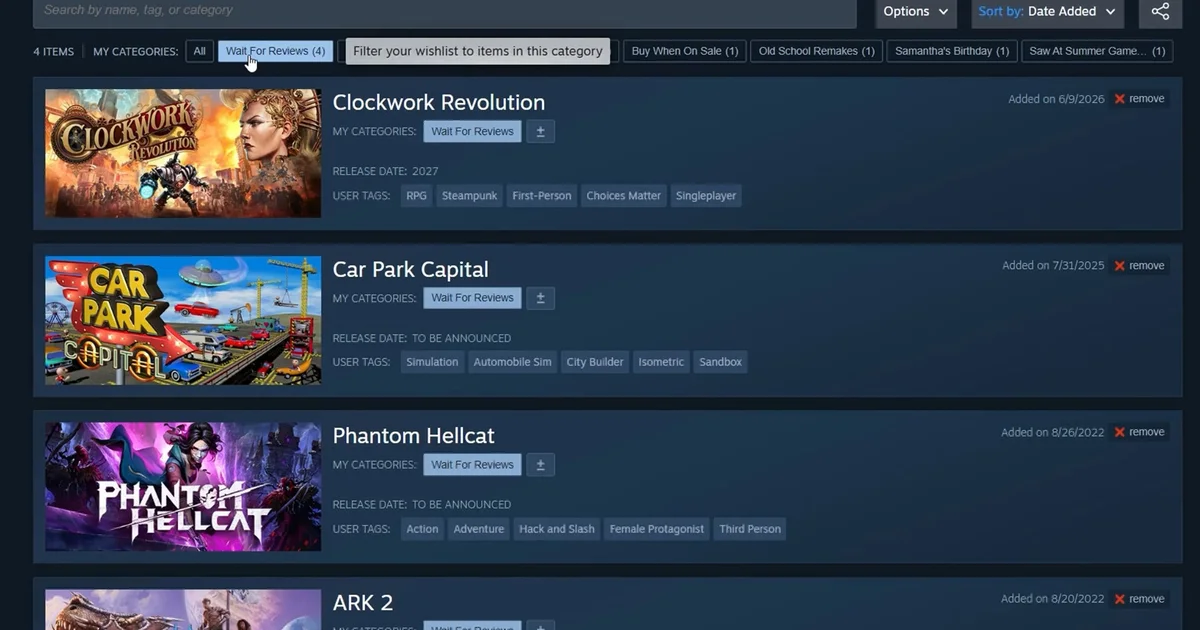
If there’s anything I know about Steam users, it’s that they bloody love that wishlist system. Hundreds, if not thousands of games, all plonked in a single list that we can pretend we’ll go through eventually to pick out some corkers we know we’ll love, even though we know we’ll just play the same thing we always do because the exhaustion of daily life limits what we can take in? Bloody lovely that is! And now, we’ll be able to organise that even further, as categories are being added in.
“With so many amazing games on Steam, players are wishlisting more and more titles,” Valve explain in a blog post announcing the new feature. “Existing options like ranking and filtering are great, but players have asked for even more ways to manage their Steam wishlists. Today we’re adding categorization as well as improved search and sharing to the wishlist.”
The categories themselves are up to you. You could do it by genre, what year they released, how they’re reviewed, alphabetically, whether or not they’re legally playable in the UK due to current age restrictions and the only way you can verify your age is through a credit card. Endless options to choose from! And then once you’ve made your categories and added some games to them, you can filter your wishlist to only look at said categories.
Plus, when adding a game to your wishlist, you can put it in specific categories if you so choose, and you’re even able to select what kind of notifications you get about those games now too. And on top of all of that, you’re even able to share your wishlist with friends and family. Which brings me on to the next Steam update: gifting is easier now!
As Valve explain, a guest checkout was added to the store in 2024, but this was limited to digital gift cards and hardware. Now, however, you can use the guest checkout to buy any game on Steam. That wishlist link you can hand out can be used by said friends and family to buy you games you’ll probably not play for a few years, too!
Or alternatively, you can directly gift a game to someone’s email account. Handy if you don’t actually know a person’s Steam username, and as Valve note, “don’t worry if your nephew’s email address is the same one they use for their Steam account. The email will include a link to let them sign in to their account and accept the gift.” Oh, and there’s cross-region gifting now too, meaning you can buy your friends games no matter where they are. All pretty helpful, and all definitely just more ways to put money in Valve’s pockets.