dailynewsnblog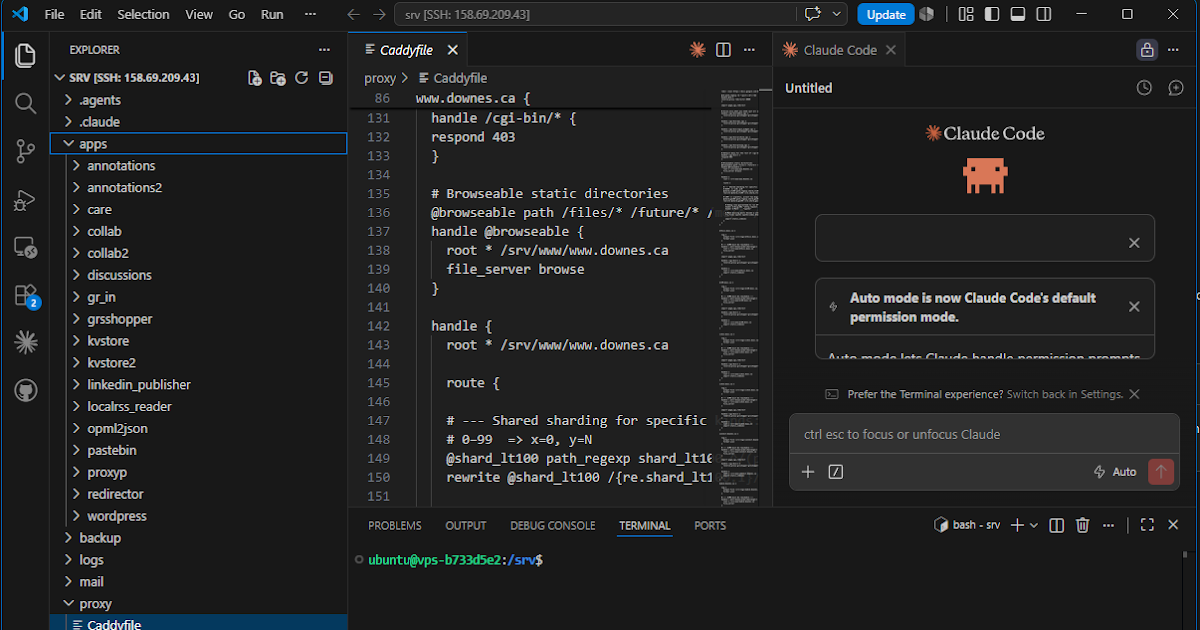
Oh, is it that time of the year again?
Everything I do is a learning experience, so my ‘top learning tools’ are basically ‘my top tools’. So what am I using this year?
1. Firefox
So few people list the browser at the top of their list, and yet so many of their other tools depend on it. For me, the choice of browser is especially significant since I have a deep aversion to advertising, and Firefox is one of the few browsers that allows me to effectively block it. Firefox is the first thing I start up when I start my computer and the map of where I go from there, as witnessed by my (hand-coded) Start Page.
2. LocalRSS
This is an RSS reader I wrote myself (with the assistance of AI so I could built it in a few days rather than a few months). It doesn’t do any fancy AI filtering or summarizing – I’ve found that AI doesn’t see the world the way I do. But it does sort results to make sure the post from the feed that offers one item a month isn’t drowned in the sea of posts from feed that publish dozens, or even hundreds, of items a month. There’s also some chronological ordering, so the results stay fresh, and stuff disappears after a month.
3. Mastodon
Now that I’m retired I’m not in any formal community, which means Mastodon is the place where I find and talk to my colleagues. The discussions (unfortunately) are not deep, and mostly we exchange quips and links to blog posts and items we find interesting. People are busy these days, and I think there isn’t room on most people’s plate for much more than this. I need to find other avenues to connect and keep contributing. But Mastodon won’t go away.
4. Thunderbird
This is my email client; my email is currently hosted by Google, because managing email is such a pain, but Gmail isn’t a very friendly environment to work in, and Thunderbird manages my email very well. Email, obviously, is how I connect most formally – companies and institutions are reluctant to send messages and files by instant messenger or some such thing. Also, I subscribe to a number of email lists, usually from sites that don’t have RSS feeds.
5. gRSShopper
This is the content management system I’ve built over the years for myself. It’s where I create OLDaily and store references to my publications and presentations (the actual files are stored on Amazon S3, though I’m looking to change this). At some point over the year I’m going to run some analytics on the database to see what topics and trends have been important over the years, and to see if I can surface some insights I’ve missed. I think it would be neat to offer it as an interactive resource people can use to think about the topics that have been important to me over the years.

6. Visual Studio Code
VS Code is an integrated development environment (IDE) and I’ve used it a lot over the last year to migrate my web presence from a dozen different servers on Reclaim to a single virtual private server (VPS) on OVH. I’m really happy with what I’ve done to set it up; it all runs behind a reverse proxy (Caddy) and shared data store, which individual services run in Docker containers. VS Code allows me to connect directly to the VPS (so, no more uploading files!) and navigate the many resources, to edit files and manage the GitHub workflow, and to work directly with the terminal. I’ve learned a ton over the last year and could confidently set up pretty much web environment I wanted right now.
7. Claude
I have $20 accounts with both Claude and ChatGPT (and a Google Workspace account, which I think includes Gemini) but Claude has been the workhorse for me over the last six months or so. What has made Claude the winner recently is a Claude plugin for VS Code, so I can work directly with my server. You may be thinking, isn’t that risky? I am super-careful and I back up everything, and nothing happens on my server that I don’t approve directly (so I’m far ‘less efficient’ than I could be). People say you experience ‘cognitive offloading’ with AI but my experience is the opposite. If I don’t know something I have to find an answer somewhere – I used go use manuals and Stack Overflow and take all day, but now I use Claude and take a few minutes. The amount of time actually reading the solution is the same – the only thing I’m skipping is the time I spend first not finding a solution.
8. Pocket Casts
This is my podcast player, and I use it quite a bit, especially when I’m cycling. My main listens are This Week in Tech (TWIT) and Intelligent Machines, both hosted by Leo Laporte. Other regular listens include On the Media, Armageddon Update, the Debaters, and KEXP.
9. YouTube
I rarely just sit and watch YouTube, except in late evening, but it’s usually background when I’m working (it’s nice to have multiple monitors). I watch a lot of concerts (I prefer the live recordings over studio work) but also a lot of content around my various interests: travel (band and bankrupt, Max Roving, Eva zu Beck, Emma Cruises, Steve Marsh, Lewi Blake); geography (josemonkey, Just Icelandic); hiking (Hiking Dancer, Homemade Wanderlust ); cycling (GCN, Everythings Been Done, Ryan van Duzer); comedy (Jimmy Carr, Jimmy Kimmel, Seth Myers, Dry Bar, Taskmaster); music (KEXP, CBC Music, Vinheteiro, Strombo); camping (Joe Robinet, Suvivorman, Wildbeare); news (Denys Davidov, BBC; CBC); tech (Paul’s Hardware, Dave’s Garage); history (Kings and Generals).
10. Google Docs
I am hopeful this will drop and be replaced with a better service, but for now I use Google Docs as a scratch pad to keep notes I can access from anywhere on any computer. From time to time I also share these notes, and sometimes I make them a page on my website (such as ‘Research’, ‘Journals’, or my oft-overlooked ‘Now’ page). I’ve tried over the years to find a good way of integrating sources and references with docs, with no success (I’m sure people will be suggesting something like Obsidian to me, but the last thing I need is another piece of commercial software to pay for). I’ll include Blogger here as well, though so far as I know there’s no useful integration of Docs and Blogger.