dailynewsnblog

Pros & Cons
-
iOS 27 integration offers a seamless experience across both displays -
Versatile passport-size design works well across apps -
48-megapixel wide and ultrawide cameras take crisp photos -
Matte inner display reduces glare and crease appearance, and offers a satisfying feel -
IP68 rating proves sleekness can coexist with top-of-the-line water and dust resistance -
Under-display FaceTime camera makes inner screen more immersive
-
Lack of FaceID detracts from the premium experience -
Without a telephoto camera, ProRAW or ProRes, photo capabilities are more limited than on the iPhone 18 Pro -
FaceTime camera isn’t ideal for photos or video; footage isn’t as sharp as what’s captured on the cover selfie camera -
Multitasking is limited to landscape mode on the inner screen without resizing, while portrait mode only supports multitasking through picture-in-picture video playback -
Right-side controls could be a struggle for left-handed people using the Duo one-handed
Apple may have been late to the foldable phone race, but the iPhone Duo sure hits its stride.
In the week I’ve spent with Apple’s long-awaited foldable phone, the iPhone Duo has shown just how intuitive one can be when hardware and software work in harmony. And while Apple may not have pioneered the passport-size phone, the Duo makes a compelling case for it being the most practical – and fun – foldable design. As such, the iPhone Duo has earned a CNET Editors’ Choice Award.
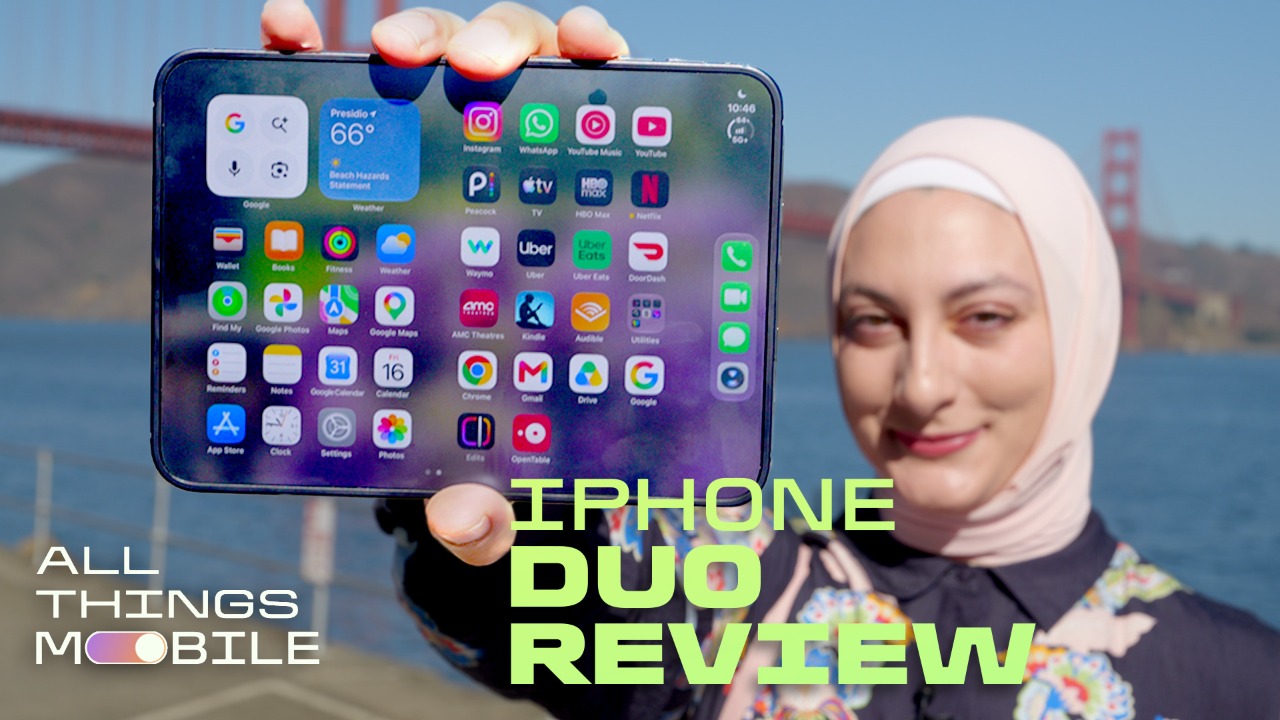
Any first-generation product has its shortcomings. The iPhone Duo’s downsides aren’t dealbreakers, especially for how much it gets right. From the matte surface of the inner display that reduces glare to the durable yet sleek design to software that works seamlessly across both screens, the iPhone Duo’s finer details make the experience feel fluid and cohesive.
The price may be the biggest deterrent: The iPhone Duo costs $1,999 for 256GB, rising to $3,199 for 2TB of storage. While that starting point is high, it’s in line with most foldable phones like the $1,900 Samsung Galaxy Z Fold 8, $2,100 Z Fold 8 Ultra and $1,899 Google Pixel 11 Pro Fold. The iPhone Duo’s steep price sure didn’t stop it from selling out almost instantly when preorders opened last week.
If anything, the Duo’s high cost and limited availability only reinforce that Apple’s foldable isn’t for everyone. But if you’re looking for something compact that unfurls into a tablet-like experience – and you want to stick with iOS – the iPhone Duo could be the right fit. Personally, I have no plans of switching back to a slab phone anytime soon.
The iPhone Duo’s design is the right fit

It’s hard to be covert while using a product as eye-catching and highly anticipated as the iPhone Duo. The passport-size design makes me feel like a secret agent of sorts as I pry it open to jot down thoughts or fire off a text. (I suppose that’ll be even truer once Apple Pencil support drops later this month.) I drew plenty of curious looks while snapping photos around San Francisco and paying with Apple Pay, despite my best efforts to keep a low profile. If you get your hands on one, expect a few extra eyes on you, too.
It’s refreshing to use a phone that breaks from the bar-style design that’s dominated the market for years. Switching between two differently sized displays keeps the experience feeling dynamic. The 5.4-inch cover screen is great for quickly sending a message, checking a notification or snapping a photo. Meanwhile, the 7.6-inch inner display is optimized for watching horizontal videos in landscape mode and scrolling through vertical social content when the phone is rotated to portrait.
When closed, the iPhone Duo fits squarely in my palm and slips easily into just about any pocket — and I say that as a woman who owns clothes with tiny pockets. It unfolds with a slight springiness that makes it easy to open. Unfurled, the Duo resembles a smaller iPad Mini, but with a satisfying matte inner display that reduces glare and makes the center crease virtually invisible. (Tilt the phone with the screen locked and you’ll still see that line, but you won’t notice it while watching a show or scrolling through social media.) Apple says the inner display is also resistant to scratches and dents. I’ve been gentle with the phone, but both screens have held up without any scuffs so far.

One of the Duo’s most pleasing elements is that it opens fully flat – though when set on a tabletop, the camera bump prevents it from sitting completely flush against the surface. The phone doesn’t feel chunky even when closed, measuring 11.3mm thick when folded and 5.2mm when unfolded. That thinness helps the Duo mirror the feel of a tablet when open, making it the perfect size for watching videos or working on the go. In fact, I wrote the script for my accompanying review video entirely on the iPhone Duo, and I was thrilled not to have to lug a heavy laptop around.
The iPhone Duo thankfully has a Camera Control button, which I use extensively to quickly launch the camera. (You can also use it to access Apple’s Visual Intelligence, which gives information about objects and places around you.) The volume buttons are at the top of the Duo, which makes the most sense when the phone is rotated to portrait mode. It took some adjustment, but after a few days, I got used to the placement. When the phone is closed, it’s easy to reach up and access the buttons one-handed, thanks to the shorter screen. There’s no Action button, but I don’t miss it, since I hardly ever touch it on other iPhones. To turn on Silent Mode on the Duo, you’ll need to unlock the phone and go to the Control Center.

One of the iPhone Duo’s biggest drawbacks is the lack of Face ID. To unlock the phone, you’ll need to use Touch ID by placing your finger on the side button or typing in your password. This detracts from an otherwise premium experience; I’m so used to Face ID that its absence feels like a step backward. It’s not a deal-breaker, but unlocking the phone or using Apple Pay isn’t quite as fluid as it could be. Still, Touch ID’s high accuracy and speed help to make up for the slight inconvenience.
Using the iPhone Duo’s displays: Different sizes for different needs
Despite the Duo’s compact 5.4-inch cover screen, it doesn’t feel cramped. I can comfortably do just about anything I would on a bar-style phone, just on a smaller scale. The keyboard is roomy, taking up around half the cover screen, so typing feels seamless and easy. I haven’t grappled with any more typos than usual. I tend to stick to the cover display for less-involved tasks such as checking an email, texting, ordering an Uber or snapping a photo.
When I’m doing something that requires more time or effort, I open the Duo to use its 7.6-inch inner display. That includes working in Google Docs, watching a YouTube video, streaming, scrolling through the Photos app or multitasking. Reading is a delight with the Duo’s matte display, which feels easier on the eyes, including while outdoors. The under-display FaceTime camera, which virtually disappears when not in use for a call or photo, also makes content look more immersive without a gaping black hole.

The Duo supports multitasking with up to two apps open at once, which split 50/50 on the inner screen when the phone is in landscape. Unfortunately, you can’t resize the apps to have one take up more space than another. By comparison, the Z Fold 8 can multitask with up to three resizable apps.
I like having video calls open on one side of the Duo’s screen and iMessage on the other, for instance, or playing a YouTube video while I shop online. It’s also handy being able to drag and drop images and files from one app to another and easily send them to a friend, as you can with other foldable phones. A neat Duo element is being able to “lock” two apps together, so if you swipe out, you can quickly pull the pair back up when scrolling through the App Switcher – no need to place them side-by-side again.

When the Duo is rotated to portrait, multitasking disappears and one app dominates the screen. That’s a bummer given how often I hold the phone vertically, but there is an exception: You can play a video in the upper portion of the screen using picture-in-picture while running another app below it. Instead of a 50/50 split, the video takes up a smaller portion of the screen at the top, with the second app dominating the rest. But if you fold the phone partway, it’ll split 50/50, so nothing is obstructed by the crease, which is a nice touch.
I have larger hands, so I can manage typing on the Duo’s inner screen in landscape, though it feels like a stretch. Typing is more comfortable on the inner display when it’s rotated to portrait, which also lends the screen the familiar feel of a sheet of paper or a physical document.

The Duo holds its position at whatever angle you fold it to. During video calls, I fold it slightly and prop it on the counter to talk to my family while putting away groceries or washing dishes. You can also fold the phone halfway and set it down like a laptop, which is great for watching movies.
I find that opening the Duo slightly and setting it down on its side in tent mode works well for watching movies on the cover screen while tidying up around the house – no stand needed. Because the Duo’s speakers sit on opposite sides of the phone, sound is more balanced than on the Z Fold 8, which has both its top and bottom speakers on one side.
With the iPhone Duo, hardware and software truly coexist

Going from the iPhone 18 Pro Max to the iPhone Duo has been seamless, and not only because of the synchronization baked into Apple’s operating system. I haven’t experienced any hiccups while using iOS 27 on both Duo screens. Instead, the implementation feels intentional, thanks to custom touches.
Folding the phone partway splits the keyboard, for example, making it easier to keep typing. And if an app like the camera is open on the inner display, it’ll shift to one side of the screen when the Duo is partly folded, so none of the controls are awkwardly positioned near the crease.
Controls sit on the right-hand side of the Duo’s cover and inner displays, so it’s easy to access your most-used apps with a quick thumb tap. It’s also nice to have navigation controls here, like the back button. A circular module displaying battery percentage, cellular connection and Wi-Fi also opens up the Control Center. But my condolences to all the lefties, as you can’t shift controls to the other side of the screen.
I’m thrilled that the Dynamic Island lives on with the iPhone Duo, since it’s one of my favorite features. On the Duo, you can access up to two apps via the Dynamic Island, rather than the three on the iPhone 18 Pro, which is good enough for me. I’m just glad I can quickly hop back into Google Maps or check a timer’s status with a tap in the upper-right corner.

Unlike other iPhones, the Duo launches into StandBy mode even when it isn’t charging. With the phone locked, you can prop it up in tent mode or stand it upright with the inner display open to turn it into a mini smart display, with access to widgets like the clock, calendar and weather. You can also view Live Activities, such as tracking a food delivery. I appreciate being able to just set the Duo down and glance at the ETA of my late-night Thai food order, without having to plug it in.
While iOS adapts to the Duo’s displays and configuration, during my testing window, some apps still hadn’t been optimized for Apple’s foldable phone. For example, when watching a YouTube video on the cover screen, a blank black bar lingered on the screen where the controls normally sit. And books on the Kindle app didn’t fill the display; instead, text appeared awkwardly large, and the virtual pages didn’t fill the screen as they do with Apple’s Books app. That’s sure to change as more developers modify their platforms for the Duo’s public release.
But optimized apps like Netflix, Edits and OpenTable looked great on both displays, adequately filling all the available space. Streaming apps, such as Apple TV and Netflix, are especially enjoyable on the Duo thanks to some special touches: When the phone is folded halfway, content plays on the top half of the screen, while controls appear on the bottom panel. This makes it easy to skip forward, rewind, hit pause or turn on closed captions.

Perhaps the most talked-about software design element on the Duo is the cascading animation as content moves from one screen to another. The moment the phone is unfolded, whatever is on the cover display gradually shifts to the inner display, and vice versa. For comparison, on the Z Fold 8, content jumps from the cover screen to the inner one when the phone is unfolded about halfway.
It’s a nice touch that helps the Duo feel refined – even if I did scoff at people who went to great lengths to replicate the effect on their Android phones out of FOMO. Still, it’s one of the attributes that demonstrate how harmony between the hardware and software can add polish, and I’d bet other foldable phone-makers are racing to emulate it.
iPhone Duo durability: Not compromised by sleekness

The iPhone Duo’s satisfying, sleek design also feels sturdy. The titanium frame, Ceramic Shield 2 display and Ceramic Shield backing offer some assurance that it may not be the end of the world if the phone gets dropped. (You should probably still get a case and AppleCare, or be prepared to pay a pretty penny for repairs.) If I apply pressure to the phone when unfolded, it doesn’t budge.
The Duo also has an impressive IP68 rating, meaning it can withstand being submerged in up to 6 meters of water for 30 minutes and is dust-resistant. That rating is a rarity in the world of foldable phones because of their moving parts. The Pixel 11 Pro Fold also has an IP68 rating (though it’s only tested to withstand up to 1.5 meters of water), but the Galaxy Z Fold 8 and 8 Ultra have an IP48 rating, meaning you should keep those devices away from finer particles like sand. With the Duo, you’ll be able to lounge at the beach without worrying about ruining your device if it takes a tumble on the sandy shore.
iPhone Duo cameras: Scaled back but still impressive

Like a lot of people, I use my phone as my only camera. And given how many photos and videos I take for personal use and for work, I was nervous about whether the iPhone Duo’s cameras would pull their weight. Thankfully, I’ve been pleasantly surprised.
The iPhone Duo has a 48-megapixel wide-angle and 48-megapixel ultrawide camera on the back. There’s no telephoto camera, which is mostly a bummer because of the phone’s high price. As much as I’d love to tap into 4x optical zoom, Apple has reserved that capability for its non-folding Pros. Still, I haven’t felt the lack of a telephoto lens particularly strongly. The photos I’ve taken in a variety of conditions have turned out sharp and vibrant – though you won’t find more advanced, pro-oriented formats like ProRAW capture and ProRes video. After using the iPhone Air, which doesn’t have a telephoto or ultrawide camera, I’m just glad I have the latter for more photo variety.
There’s also a 12-megapixel selfie camera on the Duo’s cover display, and what Apple simply calls a “FaceTime camera” on the inner display (no resolution provided), which is a strong enough indication that it’s not the best option for taking photos and videos. On the one hand, I never felt the need to use the phone’s inner display camera to snap selfies, especially when it’s easier to use the cover screen’s camera. Still, I wish the FaceTime camera’s image quality was sharper. It’s good enough for calls, which ultimately is the main purpose.
Here are some of my favorite photos taken with the iPhone Duo.


Here’s a comparison of selfie shots taken on the Duo’s cover screen and inner screen cameras:


Like other foldable phones, the iPhone Duo makes use of its dual screens with a handful of neat photo features. Duo Preview lets you use the cover screen to see how a shot will look. So if you hand your phone to someone who isn’t the best photographer, you can guide them or adjust your pose to your liking. You can also take higher-quality selfies on the rear cameras, with help from the cover screen preview.
Smart Take is helpful for group pictures. It eliminates the need to set a timer and then hurry into the shot. After enabling Smart Take in the Camera app, you can set the Duo down, and it’ll take a snapshot each time it detects that people have changed their pose. Smart Take keeps taking pictures for around 2 minutes, or until it captures about 20 images. Then you can sift through the results in Photos and pick out your favorites. If you turn on Duo Preview, you can also use the cover screen to check framing.

Kid Cue plays a Snoopy animation on the Duo’s cover screen. That way, with the phone open, you can capture a child’s attention and snap photos of them actually looking toward the camera.
Duo FaceTime lets you use both the rear and selfie cameras, so the person you’re calling can see whatever – or whoever – is in front of you while still seeing your face. It’s a great way to bring someone virtually into your surroundings, and the Duo’s spacious inner display is ideal for viewing the perspectives captured by both cameras.
iPhone Duo battery life and performance

The iPhone Duo has a dual-battery system split across both halves of the device. This design helps extend battery life and speed up charging. Given the phone’s spacious inner display and sleek profile, I was initially skeptical about how long the Duo would last on a single charge. But even with my excessively high screen time over the past few days, the battery has consistently held up well.
One day, I started with a full battery at 8:15 a.m., and after a full day of scrolling through social media, working in Google Docs, sending emails, texting, taking pictures, watching YouTube videos and placing a couple of phone calls and a video call, I ended the day with 29% at 11 p.m.
Another day, I started with a full battery at 7 a.m., then spent a couple of hours editing videos in the Edits app, followed by scrolling through Instagram, texting, sifting through photos, watching YouTube videos and joining an hour-long video call. The phone died around 12:30 a.m. On both days, I spent the bulk of my time at home on Wi-Fi, with a few hours out and about on 5G.
In CNET’s 45-minute endurance test, which includes a combination of streaming, scrolling through social media, joining a video call and playing games on the inside screen beginning with a full battery, the iPhone Duo impressively landed at 99%. In the same test, the Galaxy Z Fold 8 finished at 93%, while the Pixel 11 Pro Fold ended up at 96%.
The battery took a more noticeable hit during a longer, 3-hour streaming test. I played a YouTube video over Wi-Fi in full-screen mode at full brightness on the inner display, and the iPhone Duo’s battery dropped from 100% to 84%. That still tops the Pixel 11 Pro Fold’s 82%, but it’s slightly beat by the Galaxy Z Fold 8, which ended with 86% charge.
Luckily, the iPhone Duo charges impressively fast. With a USB-C charging cable and a 67-watt adapter, the phone went from 0% to 65% in half an hour. (To tap into Apple’s fast-charge capability, you’ll need at least a 60-watt adapter, which isn’t included.)
The iPhone Duo supports MagSafe and Qi2 wireless charging up to 25 watts. (MagSafe compatibility is handy for attaching magnetic chargers, but bear in mind the Duo’s more compact design means other accessories like wallets and battery packs may awkwardly hang off the edge of the phone.) In a wireless charging test using a 67-watt adapter and Apple’s MagSafe charger, the phone went from 0% to 39% in half an hour.
So, rest assured that even if you forget to charge your phone, you’ll be able to top it up fairly quickly.

Like the iPhone 18 Pro and Pro Max, the iPhone Duo is powered by an A20 Pro chip. Paired with a thermal management system that includes a vapor chamber, Apple says the Duo delivers up to 35% higher sustained performance compared to the iPhone 17 Pro. This helps support more demanding features, including the Duo’s advanced camera capabilities, gaming and transitions between displays.
Benchmark tests for the CPU in Geekbench 7 place the iPhone Duo well above the Galaxy Z Fold 8, Z Fold 8 Ultra and Pixel 11 Pro Fold.
In a graphics test using 3DMark’s Wild Life Extreme, the iPhone Duo again exceeded the performance of the Z Fold 8 and Fold 8 Ultra, and far outpaced the Pixel 11 Pro Fold.
Final thoughts: Should you buy the iPhone Duo?

Despite how much I’ve loved using the iPhone Duo, I still don’t think it’s for everyone. Most people just don’t need a phone that doubles as a tablet. And while the Duo’s compact cover screen and expansive inner display allow for a more versatile mobile experience, some people will (understandably) prefer to stick to the tried-and-true conventions of slab phones.
Still, foldable phones offer a breath of fresh air in a stagnant industry, and the iPhone Duo is no exception. Details like the matte inner display, under-display inner camera and smooth transitions between screens give the Duo a premium feel that helps to justify its high price tag, at least to some extent. The sleek, durable build proves you don’t have to sacrifice one for the other, while the passport-size design adapts naturally to whatever you’re doing. In a sense, Apple has validated the design, even if it didn’t spearhead it.
Perhaps the biggest draw for those deeply invested in Apple’s ecosystem is that they no longer have to choose between owning a foldable phone and sticking with iOS. Thoughtful software integrations also give the Duo’s unique design a practical purpose beyond the novelty. The result is a foldable experience that feels cohesive, intuitive and genuinely useful, which could help win over more people to foldables in general. But I think that broader appeal is still a ways off.
For now, aside from some minor shortcomings, Apple appears to have stuck the landing with its long-awaited foldable. Hopefully, future iterations will add elements such as Face ID while improving the camera capabilities, either by adding a telephoto lens or bolstering the inner screen’s FaceTime camera. It would be nice to see multitasking become more dynamic in the future, too.
The iPhone Duo took its time getting here, but it’s made quite an entrance.
iPhone Duo specs vs. Samsung Galaxy Z Fold 8, Z Fold 8 Ultra and Google Pixel 11 Pro Fold
| iPhone Duo | Samsung Galaxy Z Fold 8 | Samsung Galaxy Z Fold 8 Ultra | Google Pixel 11 Pro Fold | |
| Cover display size, tech, resolution, refresh rate | 5.4-inch OLED, 2,342×1,080 pixels, 120Hz refresh rate | 5.5-inch AMOLED; 1,972×1,248 pixels; up to 120Hz variable refresh rate | 6.5-inch AMOLED; 2,520×1,080 pixels; up to 120Hz variable refresh rate | 6.5-inch OLED, 2,342×1,080 pixels, 120Hz refresh rate |
| Internal display size, tech, resolution, refresh rate | 7.6-inch OLED, 2,670×1,878 pixels, 120Hz refresh rate | 7.6-inch AMOLED; 2,448×1,848 pixels; up to 120Hz variable refresh rate | 8.0-inch AMOLED; 2,256×2,504 pixels; up to 120Hz variable refresh rate | 8-inch OLED, 2,076×2,152 pixels, 120Hz refresh rate |
| Pixel density | Cover: 460 ppi; internal: 430 ppi | Cover: 428 ppi; Internal: 403 ppi | Cover: 422 ppi; Internal: 422 ppi | Cover: 399 ppi; internal: 372 ppi |
| Dimensions (inches) | Open: 4.6 x 6.5 x 0.2 in; Closed: 4.6 x 3.3 x 0.4 in | Open: 4.88 x 6.35 x 0.18 in; Closed: 4.88 x 3.22 x 0.38 in | Open: 6.23 x 5.6 x 0.16 in; Closed: 6.23 x 2.87 x 0.35 in | Open: 6.1 x 5.9 x 0.2 in; Closed: 6.1 x 3.0 x 0.4 in |
| Dimensions (millimeters) | Open: 117.8 x 164.6 x 5.2mm Closed: 117.8 x 84.1 x 11.3mm | Open: 123.9 x 161.4 x 4.5mm; Closed: 123.9 x 81.9 x 9.7mm | Open: 158.4 x 143.2 x 4.1mm; Closed: 158.4 x 72.8 x 8.9mm | Open: 155.2 x 150.4 x 5.0mm Closed: 155.2 x 76 x 10.1mm |
| Weight (grams, ounces) | 254 g (9 oz) | 201 g (7.09 oz) | 215 g (7.58 oz) | 239 g (8.4 oz) |
| Mobile software | iOS 27 | Android 17 with One UI 9 | Android 17 with One UI 9 | Android 17 |
| Cameras | 48-megapixel (wide), 48-megapixel (ultrawide), 12-megapixel (cover screen selfie) | 50-megapixel (wide), 50-megapixel (ultrawide), 10-megapixel (cover screen selfie) | 200-megapixel (wide), 50-megapixel (ultrawide), 10-megapixel (telephoto), 10-megapixel (cover screen selfie) | 48-megapixel (wide), 10.5-megapixel (ultrawide), 10.8-megapixel (telephoto), 10-megapixel (cover screen selfie) |
| Internal screen camera | NA | 10-megapixel | 10-megapixel | 10-megapixel |
| Video capture | 4K at 60fps | 8K at 30fps | 8K at 30fps | 4K at 60fps |
| Processor | Apple A20 Pro | Qualcomm Snapdragon 8 Elite Gen 5 for Galaxy | Qualcomm Snapdragon 8 Elite Gen 5 for Galaxy | Google Tensor G6 |
| RAM/storage | RAM N/A + 256GB, 512GB, 1TB, 2TB | 12GB + 256GB; 12GB + 512GB; 16GB + 1TB | 12GB + 256GB; 12GB + 512GB; 16GB + 1TB | 16GB + 256GB, 512GB, 1TB |
| Expandable storage | None | None | None | None |
| Battery | NA | 4,800 mAh | 5,000 mAh | 4,806 mAh |
| Fingerprint sensor | Side | Side | Side | Under display |
| Connector | USB-C | USB-C | USB-C | USB-C |
| Headphone jack | None | None | None | None |
| Special features | Apple N1 wireless networking chip (Wi-Fi 7 (802.11be) with 2×2 MIMO), Bluetooth 6, Thread. Camera Control button. Dynamic Island. Apple Intelligence. Visual Intelligence. Siri AI. Dual eSIM. 1 to 3,000 nits brightness display range. IP68 resistance. Colors: black, white. Fast charge up to 50% in 20 minutes using 60-watt adapter or higher via charging cable. Fast charge up to 50% in 30 minutes using 35-watt adapter or higher via MagSafe Charger. | IP48 rating, Corning Gorilla Glass Ceramic 3 (cover screen), Corning Gorilla Glass Victus 2 (Rear), Advanced Armor Aluminum, 5G (sub6, mmW), Wi-Fi 7, 3,000-nit peak brightness, anti-reflective display, 45-watt wired charging, 20-watt wireless charging | IP48 rating, Corning Gorilla Glass Ceramic 3 (cover screen), Corning Gorilla Glass Victus 2 (Rear), Advanced Armor Aluminum, 5G (sub6, mmW), Wi-Fi 7, 3,000-nit peak brightness, anti-reflective display, 45-watt wired charging, 20-watt wireless charging | HiLight LED, 30-watt wired charging, 25-watt Qi 2.2 wireless charging, Gemini, Magic Capture, Creator Suite Rambler, Live Translate with American Sign Language, IP68 dust and water resistance, 7 years of software and security updates |
| US price starts at | $1,999 (256GB) | $1,900 (256GB) | $2,100 (256GB) | $1,899 (256GB) |
How we test phones
Every phone CNET’s reviews team tests is used in the real world. We test a phone’s features, play games and take photos. We examine the display to see if it’s bright, sharp and vibrant. We analyze the design and build to see how it is to hold and whether it has an IP rating for water resistance. We push the processor’s performance to the extremes using standardized benchmark tools such as GeekBench and 3DMark, along with our own anecdotal observations navigating the interface, recording high-resolution videos and playing graphically intense games at high refresh rates.
All the cameras are tested in a variety of conditions, from bright sunlight to dark indoor environments. We try out special features such as night mode and portrait mode, and compare our findings against similarly priced competing phones. We also check out the battery life by using it daily, as well as running a series of battery drain tests.
We take into account additional features such as support for 5G, satellite connectivity, fingerprint and face sensors, stylus support, fast charging speeds and foldable displays, among others that can be useful. We balance all of this against the price to give you the verdict on whether the phone, whatever price it is, actually represents good value. While these tests may not always be reflected in CNET’s initial review, we conduct follow-up and long-term testing in most circumstances.

See full bio