dailynewsnblog
You can keep Instagram from using your activity outside the app to influence the ads you get.

Instagram can make an ad feel almost telepathic. Browse a product on another site, and an ad for the same thing may appear in your feed minutes later. Despite its uncanny accuracy, Meta says it doesn’t use your phone’s microphone to listen in on your conversations to serve those ads. A retailer, app or other business may instead have sent it information about your visit, purchase or another interaction.
There’s no master switch that stops Instagram from collecting or using data. Meta can still learn from what you search for, watch, like, follow, post and click inside Instagram. It also receives device and network information, location-related signals, data from businesses and information shared across connected accounts. On top of that, Meta AI can use Facebook and Instagram activity to tailor its recommendations, too. The best approach to limiting what Instagram can track is to check settings for each of these sources separately.
Turn off personalization from other businesses
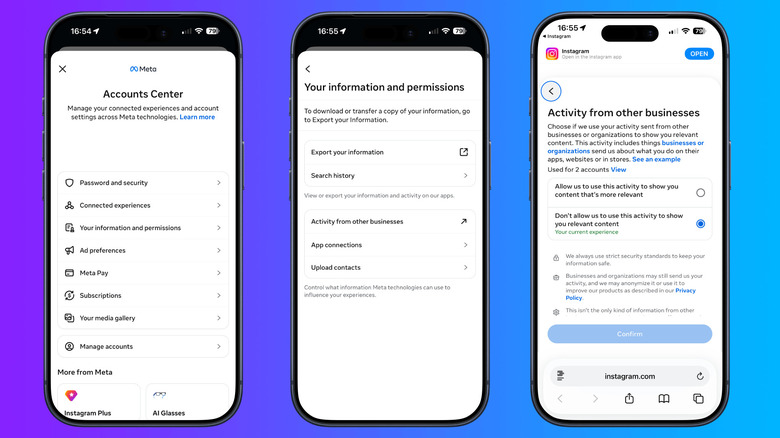
Meta began rolling out a broader Activity from other businesses control in July 2026. It’s replacing Your activity off Meta technologies and expanding an older ad setting called Activity information from ad partners. The new control decides whether businesses can use the information they already send to personalize ads, Feed content and AI responses.
To adjust this setting, open Instagram, go to your profile, tap the three-line menu and open Accounts Center. Look for Activity from other businesses. Because Meta is introducing the setting by country, some accounts may still show Ad preferences > Ad settings > Activity information from ad partners instead. Choose the option that prevents Meta from using this activity for personalization.
This won’t stop businesses from sending the data or Meta from using activity generated inside Instagram. Ads can still reflect the accounts you follow, posts or Reels you engage with, searches, ad clicks, profile details or customer lists uploaded by advertisers. The setting makes it so your activity off Meta’s platforms doesn’t inform your ad experience rather than shutting down all ad personalization.
In the European Region, Accounts Center also offers personalized or less-personalized ads under Ad preferences > Ad settings > Ad experience. The second option uses fewer signals, but Meta says it can still use details such as age, location, device information, ad interactions and content on screen during the current session.
Restrict Instagram’s access to your phone and accounts
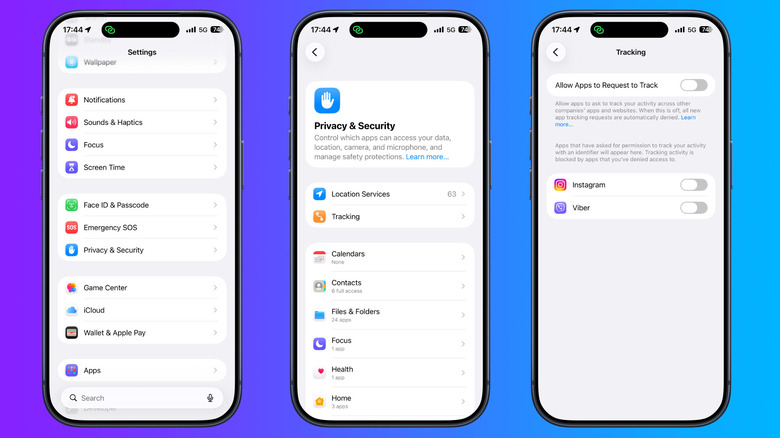
On an iPhone, open Settings > Privacy & Security > Tracking and turn off Instagram’s permission. Apple’s Ask App Not to Track control blocks tracking across other companies’ apps and websites for advertising or sharing information with data brokers. It doesn’t stop Instagram from recording activity inside its own app.
On Android, the path is usually Settings > Apps > Instagram > Permissions. Review access to location, contacts, photos and videos, camera and microphone, then deny anything you do not need. Turning off location removes one direct source, but Meta may still estimate where you are from an IP address, network information, device signals and account activity.
Contact syncing needs its own check. Go to Accounts Center > Your information and permissions > Upload contacts, select the Instagram account and turn off Connect contacts on every device. That stops future syncing but does not delete contacts already uploaded. To remove those, use Manage contacts in Accounts Center on Instagram.com. Meta says deletion can take up to 90 days.
Meta also uses information across accounts added to the same Accounts Center to personalize ads and suggest accounts to follow. Removing an account under Accounts Center > Accounts takes it out of that Accounts Center, but may disable shared logins and other connected features. It does not delete the account or its existing information.
Limit what Meta can learn from AI chats
Meta began using interactions with its AI features as signals for content and ad personalization on December 16, 2025, in most regions. A conversation about hiking, for example, could contribute to later recommendations for hiking posts or products. That said, Meta did not introduce a separate setting that lets users keep chatting with Meta AI while excluding those conversations from this use.
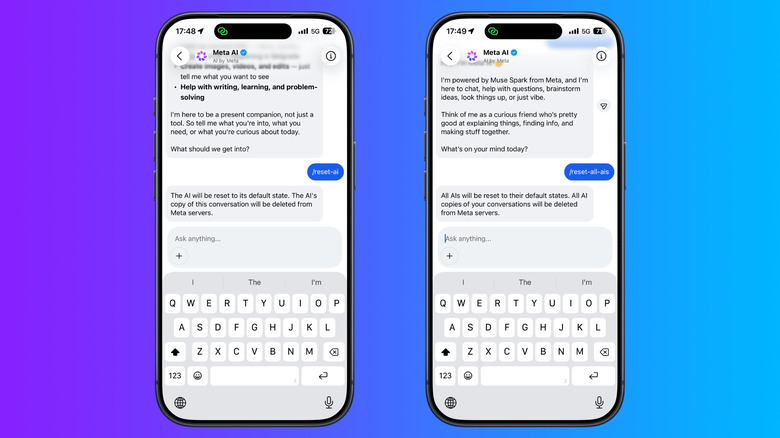
However, there are two cleanup commands in Instagram AI chats. Type /reset-ai to delete that AI’s copy of the conversation and the details it saved, or /reset-all-ais to reset every AI chat in the app. Your visible chat remains until you delete it separately. These commands clear saved context, and they don’t serve as opt-outs from advertising, ordinary data collection, or model training.
Model training is separate from personalization. Meta uses public posts and comments from adult accounts, along with interactions with its AI features, to improve generative AI models in regions where it relies on legitimate interests. Users in the EU and UK can object through Meta’s Privacy Center and that right isn’t a universal Instagram setting.
Do not put names, addresses, financial details, medical information or anything else you would not post publicly into a Meta AI chat. Use the reset commands after a conversation you don’t want the AI to remember, and use the objection form where it’s available.