dailynewsnblog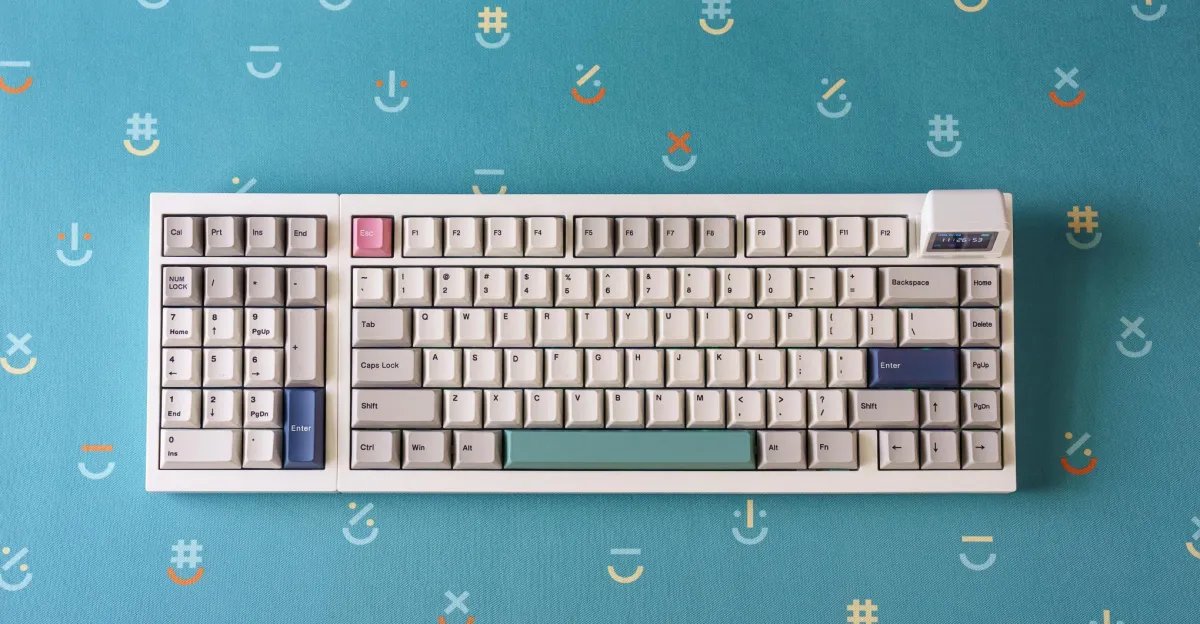
I know a vocal group of people who swear by the number pad on their keyboard. And yet, for years I haven’t cared about using one — until I put my hands on the Epomaker RT98. It’s a mechanical keyboard with a charming retro aesthetic, a fun CRT-like screen, VIA compatibility, a nice typing feel, and most importantly, a modular number pad that can be moved to either side. It’s a clever compromise in a budget friendly-ish board, allowing you to further customize your setup without losing the functionality of the coveted “tenkey.”
But like many mechanical keyboards out there, it’s got some unique quirks and tradeoffs.


$119
The Good
- Ambidextrous number pad
- Nice-feeling and -sounding silent switches
- Even nicer creamy switches
- Magnetic CRT-style screen is silly but fun
The Bad
- Plasticky build
- Moving the number pad is a slightly fiddly process
- Printed legends on the keycaps look low-quality and not sharp
- Around the starting price of nicer aluminum keyboards
The RT98 is Epomaker’s most recently crowdfunded mechanical keyboard, costing $119 for a prebuilt model configured with either the brand’s own Creamy Jade linear switches or Sea Salt Silent V2 linears. You can also choose to have your number pad on the right or the left when it ships to you, but being modular, this is something you can change on your own.
Southpaw keyboards with left-handed numpads aren’t new (Keychron has made them easily accessible for years), but this keyboard’s switch-hitter status is rare. There were a couple of old Asus ROG Claymores and the Mountain Everest Max with swappable / removable number pads, but they were costly and garish gaming keyboards. The Epomaker RT98 is much more understated and charming.


To fully test the RT98, I started off using it in right-handed mode with silent switches before moving the numpad to the left and swapping to the Creamy Jades. The typing experiences from both switches are solid. The RT98 is designed with the same hallmarks of most modern enthusiast keyboards: an internal gasket mounted design with layers of foam under the PCB to give the typing acoustics a fuller sound — even in a plastic chassis. It uses a solid PCB and polycarbonate switch plate without any flex cuts (cutouts allowing the whole board to flex under pressure). This makes the RT98 feel a touch sharper compared to other boards that have a pillowy bounce to their typing.
Whether you pick the RT98 with silent or creamy switches, you’re in for a fine typing experience that sounds nice. The Sea Salt Silent V2 linears have a smooth quietness to them, though that’s slightly betrayed by the louder plate-mounted stabilizers in the space bar, enter, shift, and backspace keys. It’s a fine setup for not bothering a desk neighbor or disrupting a video call with your on-the-down-low typing, but the Dry Studio ATM 98 I recently reviewed (while much pricier) is a better-sounding silent board with much nicer keycaps. Epomaker’s included PBT keycap set has nice beige nostalgia vibes, but their dye-sub printed legends look cheap and not very crisp.
The RT98 is an absolute treat when you use it with Epomaker’s Creamy Jade linears, delivering a crisp, marbley tone that’s always pleasant. When I hear “creamy” I think of the super popular F75 and similar boards from Aula, a brand that collaborates with Epomaker on some keyboards. The F-series has a bit of that sought-after raindrops-on-a-window tone. The RT98 and its Creamy Jades play in that ballpark but have a richer, darker tone than the F75 Max I’ve briefly used. I prefer the Epomaker.
The typing and acoustics are very good here, but the main draw of the RT98 is that modular number pad. I don’t work in data entry, so typing the occasional digits on the number row is fine by me. But I don’t mind the idea of having a numpad off to my left and out of the way of my mouse hand, which I can always do with a dedicated wireless pad. So I was excited to use the RT98 in a southpaw layout.
1/25
Changing the position involves removing the bottom screws, popping off the top cases from both the main section and numpad, swapping the internals, and reattaching everything. It’s not the most labor-intensive process, but you do have to temporarily unplug the cable for the detachable screen’s pogo pin connectors and reposition the numpad’s ribbon cable. I couldn’t find instructions in the box on doing this, but I found Epomaker’s step-by-step video tutorial and had it all done in about 30 minutes. I’m always slightly worried about messing up ribbon cables, but the process — while fiddly — was easy enough. But it did reveal an uncomfortable weakness: Prying this plastic thing open and pressing its clips back into place was nerve-wracking. I’d love to see this board made with metal.
I imagine most people will likely buy the RT98 in the numpad orientation they prefer and just leave it that way. Or, like me, change it only once. But there is something cool about not being locked into one form of 1800-layout board. Part of the fun of mechanical keyboards is how customizable they are, from the keycaps and switches to the stabilizers and down-the-rabbit-hole modifications you can make — especially if you’re an enthusiast who just mixes things up once in a while to feel alive.
1/20
The RT98’s silly little detachable screen is another way to have some customizable fun. It can show the date, time, and connection statuses or loop some built-in cat GIFs. Connecting the keyboard to Epomaker’s web-based driver allows you to sync its clock and customize the three GIFs. It was easy enough to load up some silly GIFs of my own and watch them endlessly loop. There’s not much other use for this CRT-like keyboard screen, but it’s fun. The magnetic nature of it would be more useful if Epomaker creates an ecosystem of attachable accessories, but company reps never replied to our questions asking if that might be in the cards.


1/2
The RT98 is a very good keyboard with a cool and unique hook. But it costs anywhere from $40 to $60 more than various Aula or other entry-level boards, and its build quality is only a tad nicer. For $119, you’re around the starting price of fancier keyboards with aluminum cases. It’s just $10 shy of something like the Wobkey Rainy75, which also includes much nicer keycaps. You have to really want the modular numpad and retro vibes of the RT98.
There are so many mechanical keyboards out there, and between various sizes, layouts, and optional number pads and macro pads, you can arrange your workspace in limitless ways. The Epomaker RT98 is just another cool option with yet one more way to customize how you use it. It’s a fun thing to tinker with and enjoy, even if you’re likely to just set it and forget it.
Photography by Antonio G. Di Benedetto / The Verge