dailynewsnblog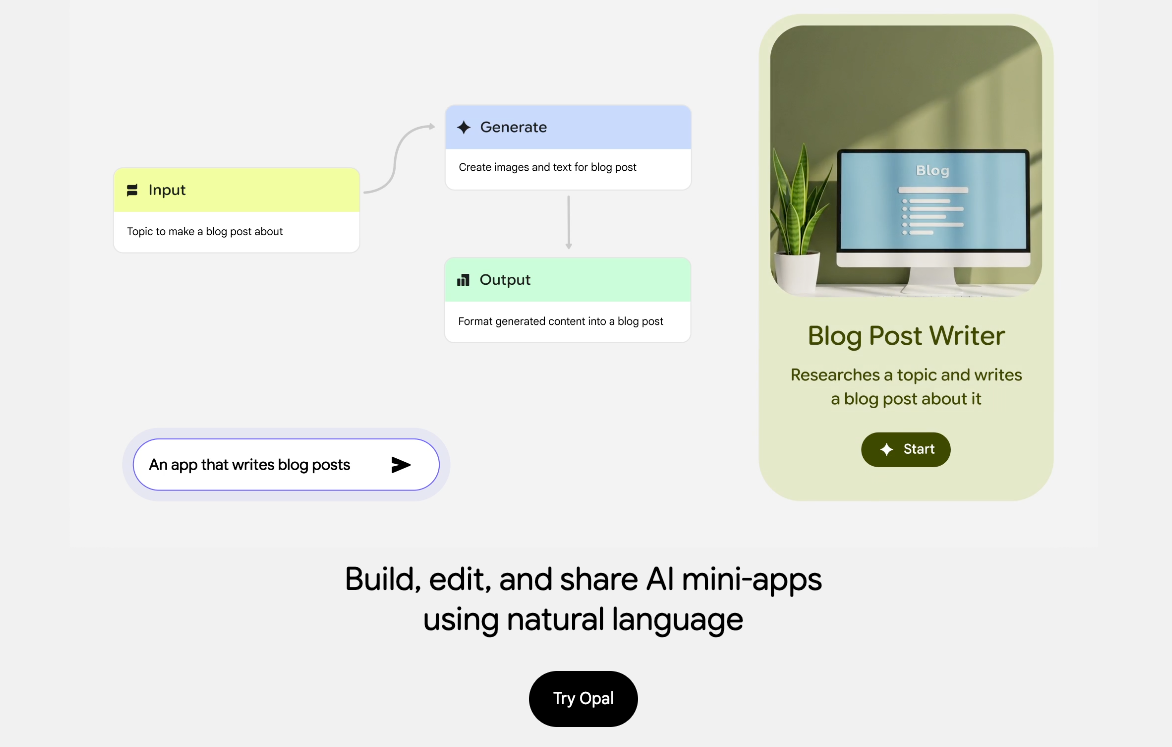
Almost any modern AI chatbot can allow you to vibe code these days. From event calendars to old school video game demakes, all you need to do is tell it what you want to build, and it will get to work. Google’s Gemini is pretty decent at doing this, but the tech giant also has a series of AI experiments that allow you to do an assortment of things when it comes to generating your ideas for the web.
Opal is one such experiment. It’s a no-code AI tool that allows you to create apps using natural language. It also comes with a visual editor that displays “nodes” for every step of the process for getting from A to B. It’s an interesting tool that can help meet the needs of some, but it’s very much an experiment at the moment and isn’t the easiest to pick up. Still, there’s a lot of potential here.
If you’re not feeling particularly inspired, you can choose from a gallery of pre-made apps to choose from and edit from there. This is what I did to get a grip on how it works, starting with a book recommendation app. Some of the pre-made options include an app that will turn a YouTube video into a quiz, a game concept builder with AI-generated visuals and an interior design app.
My time attempting to create an app with Opal was interesting, to say the least. While the tool essentially achieved what I set out to do, the way it went about it was not what I had in mind.

Opal requires your input during the flow, so your finished product will require you to manually type in an answer into a text field. This isn’t that big of a deal, but I immediately ran into an issue where I wanted to have a series of options generated for me that anyone could tap on to choose – something like Google Forms – but that’s seemingly not possible with Opal. Or, at least I couldn’t find a way to achieve this. When you consider that you can have Gemini itself vibe code an app that allows you to do this, Opal’s methodology might be somewhat of a blocker to some, depending on what you’re trying to achieve.
Gemini vs. Opal
Speaking of using Gemini to vibe code apps, the experience is different, despite having the core concept of creating apps by using natural language. (Gemini can do a lot more than that.) The comparison may be a bit unfair, given that I’d prompt Gemini to create single HTML files that could run in virtually any web browser. Often, the apps ran locally in the code and didn’t use AI to generate content. Opal lets you do that pretty easily without a lot of heavy lifting, so the benefit is obvious when you know how to use it properly.
My brief time with Opal
Once I got over that glaring detail of how you’re expected to interact with Opal apps, things got a bit better. While I still couldn’t get a handle on manually adding nodes and getting them to work properly, you really don’t need to. At the bottom of the Opal editor is a text box where you can add your own instructions. When attempting to add a node to generate a list of movies manually, I would receive an error. However, when I gave identical instructions to the chat box, it performed as it should have and added the node accordingly.
When building an app, you can choose what AI model you want to use for generating content, like Gemini 3.1 Pro, Nano Banana Pro, Veo and others. The default option was set to “Agent,” which can use any model when necessary.
The Opal editor is broken down into three sections: user input, generate and output, and they’re all pretty self-explanatory. User input is a node that you can add to prompt the user for questions, and the “generate” node creates the data based on the user input. The output field shows how the generated data is displayed, and it’s typically created in the form of a web app, but you can choose its output to be in the form of a Google Doc, Slide or Sheet as well.
Since Opal is an experiment, don’t expect it to work all the time. I received plenty of errors during my experience, and it can take a long time to process an edit. And sometimes, Opal would just hang and never integrate the edit at all, resulting in me having to refresh the web page completely and start the edit again, though this didn’t happen often.
Once you’re happy with your app, you can publish it and share it with anyone so they can use it themselves. If you know how to navigate the tool and know the ins and outs, the results can be powerful — but it’s not as easy to pick up as it seems in the beginning. Google provides some fairly detailed documentation for learning how to use the visual editor, and you’ll probably need it.
There’s something very cool about Opal, even if it feels unfinished. And although I didn’t use the visual editor or the nodes that much, it’s a neat way to build apps without knowing anything about coding.

See full bio