dailynewsnblog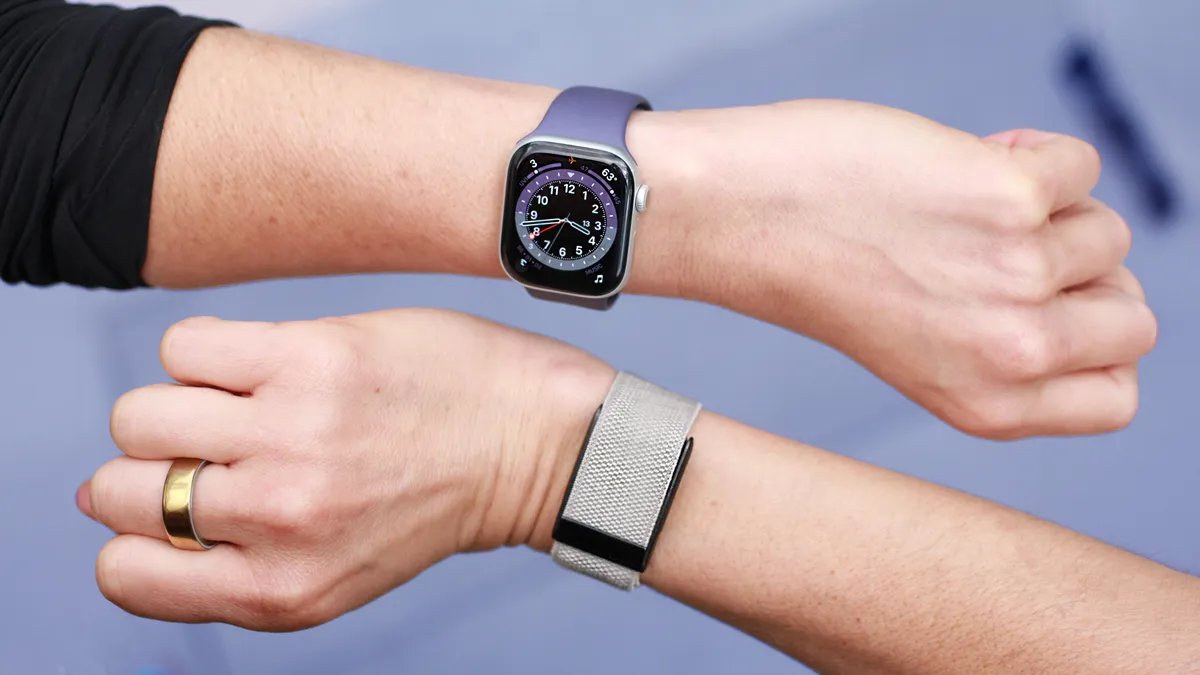
I’ll admit it: The Whoop band intimidated me. It came into my orbit about six years ago, and I kind of wanted it to disappear. The fitness-tracking screenless wearable is geared heavily toward serious athletes. I’ve always had imposter syndrome about my athletic ability, so I avoided the Whoop band — it had, and still has, a lot of metrics that felt intimidating to me as a mere mortal.
The Apple Watch, on the other hand, is like that approachable friend who speaks to you on your level — much more my speed six years ago.
But after seeing how many Whoop owners love the band, it was time to confront what intimidated me and see if it could beat my Apple Watch Series 11. Two months later, the Whoop has transformed the way I work out and surfaced insights about my own body that I had been missing. Don’t mistake this for a breakup story — I’m not ditching my Apple Watch, yet.
The wearable space is evolving rapidly, with AI opening up the possibility of finally turning years’ worth of raw health and fitness data into actual advice. The standout smartwatches and trackers are now built around AI health coaches, proactive longevity features and metrics that respond visibly when you make the right changes.
As wearable sensors become more capable and health information gets more complex, the stakes are higher. It’s more important than ever to understand what each device does and which one will give you the most relevant information. That’s why just comparing specs won’t cut it. To make this personal, I had to literally become a test subject and wear both the Whoop MG band and my Apple Watch Series 11 long enough to unlock every single feature.
Comparing the Whoop band to an Apple Watch is like comparing a motorcycle to a minivan. They’re two different beasts that just happen to drive on the same street (your wrist). Health tracking is the main event for the Whoop, and likely the reason you’re considering it, whereas on the Apple Watch, it’s just one of the items on the menu. In an ideal world, you’d get both, but for this comparison, I’ll focus on the health features.
The price to play
The Whoop has two immediate red flags for me. WTF is this name? I’ve never answered so many “the what?” questions when asked what’s on my wrist. But that’s a superficial me-problem.
On the surface, the Apple Watch Series 11 costs more: $400 for the 42mm Wi-Fi model. The Whoop MG is $360. But that’s not a one-time payment. The Whoop band itself is just a bonus; what you’re really paying for is a subscription model that ranges from $199-359 yearly. The plan’s price determines which band model you get and what metrics you unlock.
Whoop subscription plans
| Plan name | Band included | Price per year | Battery life | Key features |
|---|---|---|---|---|
| One | Whoop 4.0 | $199 | 5 days | Core metrics: vitals and training scores |
| Peak | Whoop 5.0 | $239 | 14 days | Adds aging insights (Healthspan) |
| Life | Whoop MG | $359 | 14 days | Adds ECG and AFib detection |
Not everyone’s willing to commit to yet another subscription, and if you’re in it for the long haul, you could end up spending more than the cost of the Apple Watch. But the bigger filter might be compatibility: The Whoop is the only device compatible with both iOS and Android. The Apple Watch is locked to the iPhone only.
First impressions and a Whoop THONG?!
The fact that I’d never worn a Whoop band before gives the Apple Watch an unfair advantage, especially since it has a screen; the Whoop doesn’t. I’m used to glancing down at my wrist for a time check, so seeing something occupy space on my wrist that didn’t tell time was genuinely infuriating.
Whereas the Whoop doesn’t present any data on the actual band, the Apple Watch shows you the time, weather forecast, tides, stock price and more. You control which notifications you receive, but it demands your attention throughout the day, from stand reminders to Slack alerts. You can also use it as a wallet or a camera remote, making it more like a mini version of your iPhone that just happens to be watching out for your health.
The Whoop MG with the proprietary band (left) and the third party alternative (right).
I can see the Whoop’s lack of screen as an asset for minimalists who don’t want the noise. While it was easy to forget I was wearing it, the band doesn’t exactly fade into the background like a smart ring does. The Whoop’s sensor alone is almost the size of the Apple Watch’s screen, but has a thicker profile, which makes it bulkier when wearing to bed.
You can also camouflage the device more easily since the band sits over the sensor. Whoop offers a range of clasp and band materials, and even a $20 third-party starlight gray band made it feel more subtle on my wrist than the original black. The Apple Watch also has a wide selection of bands, but the screen is always front and center.
You can’t make this up: Whoop is thong-compatible.
The Apple Watch is also mostly relegated to the wrist. The Whoop is more versatile in that it can take readings from different parts of your body, including your chest and lower back. That can be useful for athletes who can’t wear anything on their limbs or for amputees. Whoop even sells garments to hold the sensor in place, including a thong, though I still can’t wrap my mind around wearing any device below the belt; I’m clearly not the target audience. The only alternative I’d realistically use is the arm or bicep band for sleep.
Suffice to say, you won’t get that range of wear with the Apple Watch.
Similar metrics, different execution
The Whoop is built for long-term data analysis, so saying the band’s tracking strategy was a slow burn is an understatement. It takes at least a week to unlock most metrics, and two weeks of 24/7 wear to see the rest. The Apple Watch has real-time metrics that you can start using as soon as you strap it on.
Even once you unlock the data, the Whoop always uses your phone as the middleman to deliver it. But the app earns its keep by nudging you (via notifications) whenever a new metric is unlocked, or if something needs your attention. The Apple Watch also notifies you of trends in the iPhone’s Health app, but those nudges are less frequent, so I end up forgetting to look.
After two weeks of wear, the Whoop finally paid off
On the surface, the Apple Watch and Whoop measure similar biomarkers: heart rate, VO2 max, temperature, sleep and menstrual cycle. The difference is in what they do with that data. Apple gives you the numbers and some light guidance, but mostly leaves the interpretation up to you. Whoop collects the data and runs it through a single lens: How does this affect your training?
Sleep, heart rate and even your menstrual cycle phase get translated into a daily recovery score (how ready your body is to perform). Paired with a strain meter that tracks how hard you’ve pushed yourself, Whoop turns abstract data into a directive. On high-recovery, low-strain days, it pushes me to go harder. But the realities of parenting and work schedules don’t always align with my recovery score, and no amount of nudges can help me with that. There were times when a low recovery score convinced me I was too depleted for a hard workout (even though I could probably have pushed through). On other days, the score looked good, but my body was screaming the opposite.
The Apple Watch’s training load score measures workout effort, but it doesn’t tell you what to do with that info. It’s largely self-reported. Unlike the Whoop, which puts the strain score front and center in the app, Apple Watch training load trends are somewhat hidden in workout pages, so I don’t often remember to use it as guidance.
Whoop’s Healthspan tab turns your vitals into aging insights, including a calculated “Whoop Age.”
Both devices also track long-term trends such as VO2 max, or the measure of how efficient your body is at delivering oxygen to your muscles (a good indicator of cardiovascular health). Apple calls it Cardio Fitness score and surfaces it in the Health app. Whoop uses this metric (and other biomarkers) to calculate your “Whoop age,” how old your heart appears to be relative to your actual age, as well as your rate of aging. Not exactly a scientific term, but the effect is genius. Vanity and pride will get you invested in this number fast (at least it did for me).
Whoop’s health coach actually gets it
The shining star, though, is the Whoop AI coach. As a certified AI health coach skeptic, I never thought I’d be praising one, but here we are. The key is that it doesn’t require you to interact with it; Whoop AI just pops up on its own when it has something important to flag in the app or when you summon it. Two days before my period, it warned me that workouts might feel harder because of hormonal changes (spot on) and gave me concrete workout alternatives for those days when my recovery was low.
After an all-out 5K run, Whoop’s AI coach told me to take it easy for the next few days and not to push myself that hard more than once a week. In my black-and-white brain (before using the Whoop), every workout had to be all-out or it was simply not worth it. The coach pointed out that repeatedly spiking at peak heart rate might be working against my training. I did some non-AI-aided research myself and confirmed the AI coach was right. While raising your heart rate to peak occasionally can train your heart, sustained effort at this level increases your risk of injury.
The AI coach also adjusted my recommended bedtime based on strain, prior sleep debt (accumulation of sleep deprivation) and nightly patterns to optimize recovery. I don’t follow it most days, but the fact that it’s personalized and dynamic makes me less likely to ignore it than just the Apple Watch’s static bedtime reminder.
The closest Apple equivalent to Whoop’s AI coach is Workout Buddy, an in-ear trainer that motivates you in real time and contextualizes your effort against your data history. For runners like me, that kind of screen-free guidance is essential and it’s where the Apple Watch pulls ahead. I rely on heart rate zones, pace and distance cues in real time, and without a screen or in-ear guidance, there’s no way to do the same on the Whoop. I can surface live stats and strain in the Whoop app, but that still means staring at my phone when I should be watching the trail in front of me. Even Whoop’s workout summaries don’t include variables such as distance or pace.
Where Whoop holds its own is workout detection. Other screen-free wearables tend to miss lower-intensity sessions, but Whoop’s auto-detection has been spot on. The Apple Watch can detect some workouts automatically, but it’s less consistent and I usually end up starting them myself.
The CNET accuracy test
It’s one thing for these wearables to nail translating workouts into data, but now I had to make sure that data was accurate. I’ve run multiple accuracy tests on the Apple Watch, including a recent 30-mile cross-device testing blitz where it scored highest in heart rate tracking against five other smartwatches, outpacing even a Garmin watch.
I ran (literally) the same test on the Whoop using the Polar H10 chest strap for heart rate control.
The maximum and average heart rate from the Whoop was only two beats per minute off from the Polar chest strap during my test.
After three miles, the workout summary showed accurate results. It was only two beats below my peak heart rate (179 Whoop vs. 181 Polar), and two beats below my average HR. Workout summaries only tell part of the story, missing all the peaks and valleys that happen in between. That’s why I prefer to dig into the raw data. Polar makes it easy to export the second-by-second HR data into a spreadsheet, but getting that data off the Whoop app proved impossible. Even if there happens to be a workaround, it will likely require sleuth-level digging. For an athlete-focused wearable, that was extremely disappointing. Getting your heart rate data off the Apple Watch isn’t easy, but it is possible either by downloading your entire history or (as I’d recommend) downloading this third-party app.
Health and safety features
For all the fancy metrics and AI coaching, the Apple Watch still pulls ahead on raw health and safety features. Both devices have an ECG feature and AFib detection, though on the Whoop, you’re paying for the top-tier Life membership to get them. The Apple Watch has FDA-cleared hypertension alerts that flag signs of high blood pressure, sleep apnea detection and high and low heart-rate alerts. The Whoop can also give blood pressure estimates, but that first has to be calibrated with a traditional cuff and is intended only as a wellness feature (it’s not clinically validated).
The Apple Watch can send out a cry for help if it auto detects a crash or fall.
Where there’s no comparison at all is with emergency features. The Apple Watch has emergency SOS, fall detection, satellite connectivity (on 5G models) and crash detection that automatically contacts emergency services and your chosen contacts if something goes wrong.
It can also ping your phone, which may not seem like it’s health-related, but is certainly a mental health boon for me in the sense that it prevents me from losing my mind when I can’t find it.
Battery life is a no-brainer
Battery life isn’t even a competition. While the Apple Watch struggled to make it a day and a half on a charge, the Whoop powered through the two-week mark as promised without breaking a sweat. That means I’m far more likely to wear it around the clock. My patchwork charging strategy with the Apple Watch regularly leaves me with a dead battery before bed — or worse, before a workout. Does exercise even count if it wasn’t tracked?
The Whoop doesn’t even have to be taken off to juice back up, since the puck holds its own charge and snaps on for wireless top-ups. Unless you’re wearing it in your thong, of course, in which case I truly hope it’s coming off between washes.
The fact that it doesn’t have to come off my wrist means I’m more consistent at tracking my sleep. Since there are no gaps in my sleep data, all other data tied to it is more reliable, including menstrual tracking (which uses basal body temperature during sleep to detect ovulation). I’ve been tracking my cycle for 10 years and know it well enough to say the Whoop has been spot-on with its estimates. The Apple Watch also tracks my menstrual cycle, but calculates ovulation retroactively if you’ve been consistent with sleep tracking (which is when it measures temperature changes). That consistency has been harder for me on the Apple Watch, so my ovulation estimates aren’t as accurate on the Apple watch. If you want a tracker you can truly set and forget about on both the notification and charging front, Whoop is your pick.
The Whoop (left) is great for training-focused metrics, while the Apple Watch is more of a generalist.
Apple Watch vs. Whoop: Bottom line
Despite being a longtime Apple Watch wearer, I’m not itching to take the Whoop off my wrist. It’s one of the few wearables I’ve worn for 14 consecutive days that hasn’t irritated my skin. I’d consider keeping both if it weren’t for Whoop’s subscription cost and my fear of financial commitment. Currently, you can get the One membership for $149 ($50 off).
The Whoop band has given me valuable insights about my training habits and flagged trends about my own body I hadn’t even put together myself — hey there, hormonal fatigue. The AI coach gets sharper the longer it knows you, which means I’m actually invested in sticking with it and following its advice.
But realistically, I’m still in the thick of raising young kids while holding down a demanding job, and fitness has to take a back seat. Sticking with the Whoop would be like paying for a fancy gym membership and only using it twice a month. For anyone in a different stage of life looking to level up their fitness and optimize for peak performance (without real-time guidance), the Whoop is likely a worthy investment. I’ll join your ranks soon enough.
Maybe the fact that I’m paying for it would hold me accountable, and I’d find a way to prioritize the guidance more often? Or maybe our timing’s just off? For now, I’ll stick with the dependable friend, the Apple Watch, who doesn’t drop knowledge at every turn, but speaks my language and shows up when I need it — whether it’s pointing out I’m running late, or letting me dictate a text while wrangling a toddler.