dailynewsnblog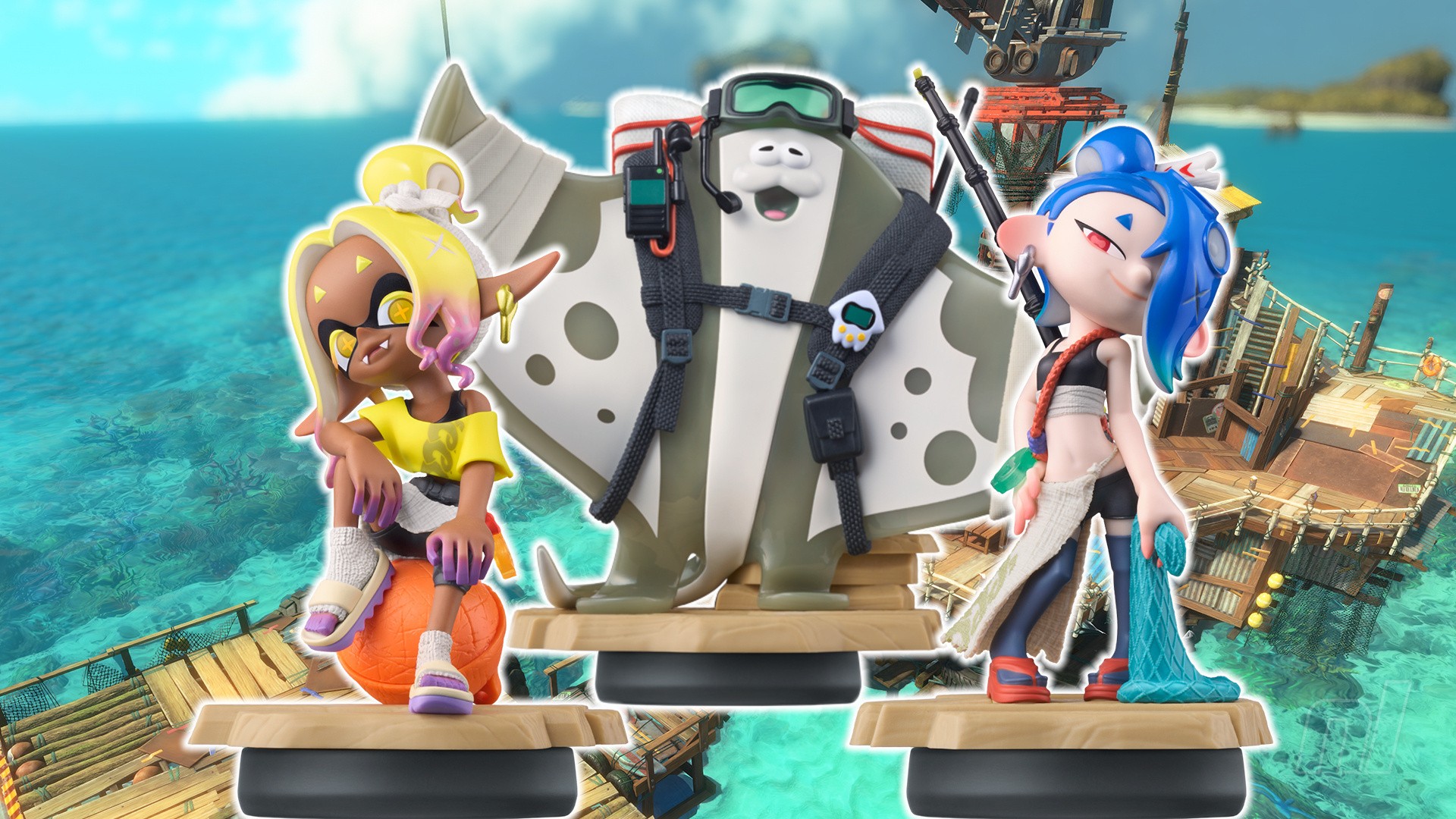

Nintendo has shown no sign of letting up on amiibo just yet, and Splatoon Raiders keeps the unlockables coming with a range of outfits available to all those who scan ’em.
In this guide, we’ll run through what every amiibo unlocks in Splatoon Raiders, including the new tie-in Deep Cut figures.
Splatoon Raiders: All amiibo Unlocks
Shiver (Splatoon Raiders amiibo)

Scanning the Shiver Splatoon Raiders amiibo will unlock an exclusive in-game outfit inspired by the shark master of Deep Cut. There’s no way to get these blue overalls through gameplay alone, so scanning is the only way to complete the collection.
Much like the other outfits in Splatoon Raiders, this unlockable look does not come with any passive ability buffs.
Frye (Splatoon Raiders amiibo)

Scanning the Splatoon Raiders Frye amiibo will unlock a different exclusive outfit, this one modelled on Frye’s yellow colour palette. As with Shiver, you can’t unlock this outfit any other way.
Fortunately, the overalls don’t come with any ability buffs or bonus skills, so you’re not missing out on any upgrades if you can’t grab the amiibo.
Big Man (Splatoon Raiders amiibo)

The final amiibo in the Splatoon Raiders set, scanning Big Man unlocks another exclusive outfit, this time in the manta ray’s greys and greens. And yes, you guessed it, there’s no other way to get your hands on this look through gameplay alone.
Once again, the outfit doesn’t come with any buffs of its own.
Splatoon Series amiibo

Scanning any other amiibo in the Splatoon series (excluding any of the above Raiders models) unlocks the Bite Waders outfit. There’s no other way to get these orange waders in the game, so you’ll have to scan a relevant amiibo if you want in.
All Other amiibo

There are no unlocks for scanning any other amiibo. Trying to scan one outside of those outlined above brings up the following message:
Please tap an amiibo that is compatible with Splatoon Raiders.
Sorry!
How To Scan amiibo In Splatoon Raiders

To scan an amiibo in Splatoon Raiders, follow these steps:
- From the Hideout ship, press ‘+‘ to open your gear menu
- Head to ‘Style‘ and hit ‘R’ three times to open the amiibo option
- Press ‘Scan‘ and touch a Splatoon series amiibo to the NFC point (the right Joy-Con 2 stick, or the middle of your Pro Controller)
That’s it! Any unlocked outfits will be automatically sent to your in-game wardrobe, which you can find by heading to ‘Outfit’ in the Style menu.
What are you still doing here? Get scanning! You’ll find more tips and tricks in our full Splatoon Raiders guide, as well as our lists of amiibo unlocks, gadgets, and Tank upgrades.