dailynewsnblog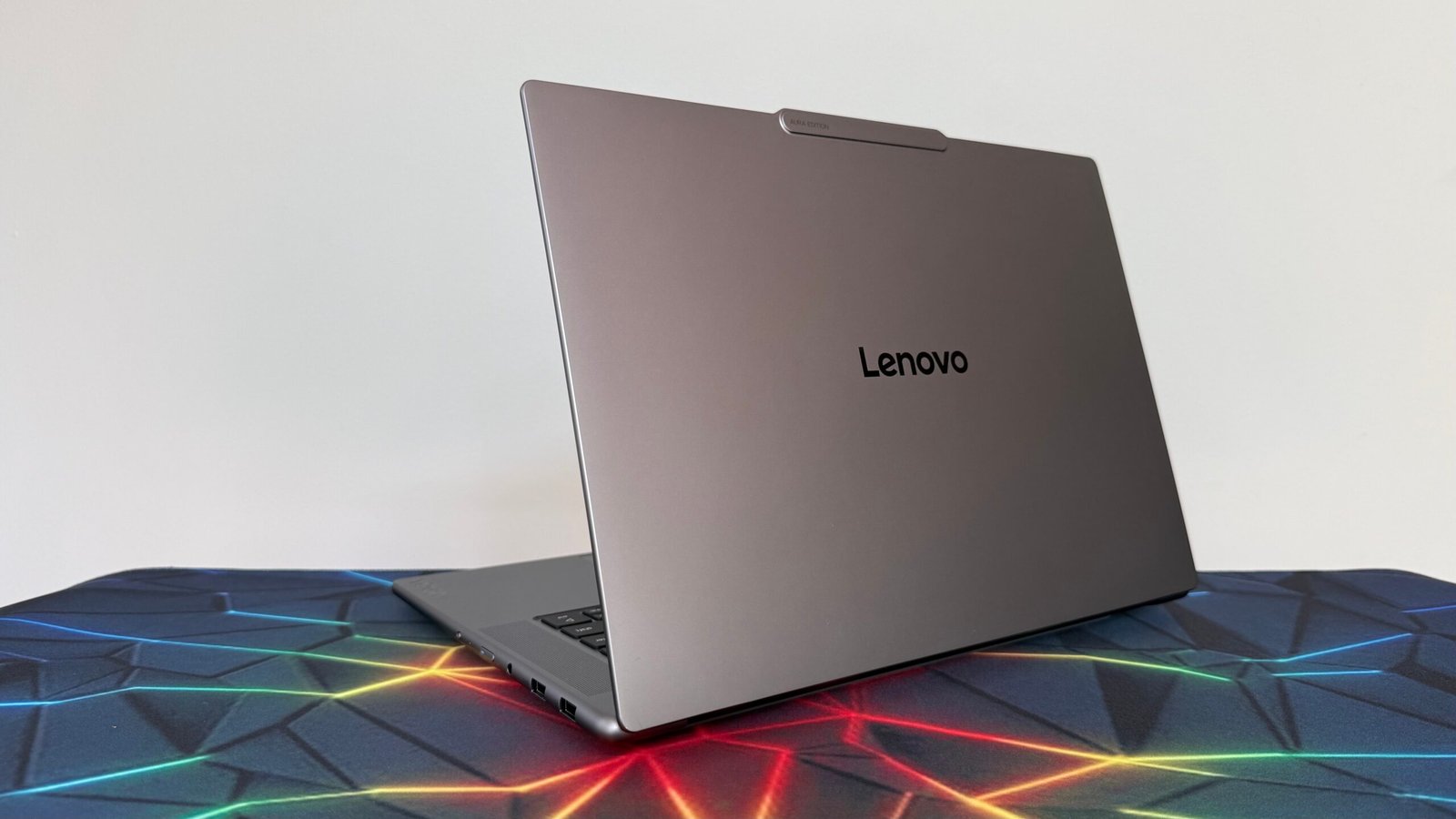
Lenovo Yoga Pro 7i Aura Edition Gen 11
Pros & Cons
-
Solid processor performance across the board -
Well-built, sturdy chassis -
Excellent array of ports
-
Could benefit from a higher resolution display -
3.7-pound weight makes it a bit hefty to tote around -
So-so battery life compared to other clamshells
The Lenovo Yoga Pro 7i Aura Edition Gen 11 is one of the beefiest clamshells in the company’s Yoga lineup – and it ought to be when you consider it commands a starting price of $2,600. That money is going straight to the Intel silicon and an Nvidia RTX GPU. The laptop’s 2.5K OLED screen is also nothing to scoff at.
This 15-inch laptop has a considerable amount of heft to it, which might make it a pain to tote around to work or school every day. But the chassis is solid and sturdy, refusing to flex much around the top cover or hinge. The fundamentals – including the keyboard and touchpad – are done well, and the wealth of ports is convenient.
The Yoga Pro 7i is a budding creative’s “jack of all trades.” Few laptops offer such robust processing performance alongside 15 hours of battery life, and even fewer are compact 15-inch models. But is this “master of none” worth a price closing in on the $3,000 mark?
Lenovo Yoga Pro 7i Aura Edition Gen 11
| Price as reviewed | $2,900 |
| Display size/resolution | 15.3-inch, 2,560×1,600-pixel OLED |
| CPU | Intel Core Ultra 9 386H |
| Memory | 32GB LPDDR5-8533 |
| Graphics | Nvidia GTX 5060 |
| Storage | 1TB SSD |
| Ports | Thunderbolt 4 USB-C (x2), USB-A (x2), HDMI (x1), audio combo jack (x1), SD card reader (x1) |
| Networking | Wi-Fi 7 and Bluetooth 5.4 |
| Operating system | Windows 11 Home 64 |
| Weight | 3.7 pounds |

Lenovo Yoga Pro 7i Aura Edition Gen 11 specifications
There are two configurations available for the Yoga Pro 7i, giving you some leeway in how much processing power you want to splurge on. The processor and GPU are bundled together in the distinct configs, which might make your choice easier but reduces the overall customizability of the device.
The model I tested was the more expensive configuration, which contains an Intel Core Ultra 9 386H processor, an Nvidia RTX 5060 graphics chip, 32GB of LPDDR5 memory and a 1TB SSD. The 15-inch OLED touchscreen has a 2.5K (2,560×1,600-pixel) resolution. This configuration costs $2,900 on the Lenovo store.
If you’re looking to save a little bit of cash, the base configuration is available for $2,600 on Lenovo’s web store. This configuration is available at Best Buy for $2,700, but the retailer offers frequent deals, and the base Yoga Pro 7i has been available for less than $2,000 in the past. This model has the same amount of RAM and system storage, but is outfitted with Intel Core Ultra 7 356H silicon and an Nvidia RTX 5050 GPU instead.
As per usual, Lenovo also lets you bundle a bunch of software with this laptop — if you’re interested in any of those, it might raise the final price by up to several hundred dollars. The laptop can be packaged with the Windows 11 Pro operating system, Microsoft 365 services and a whole host of Microsoft Office subscriptions.
If you’re vexed and confused by the computer’s “Aura Edition” label, don’t worry about it too much. That’s just a bit of marketing jargon indicating that this particular computer is powered by Intel silicon, and has no real bearing on the price or performance of this machine.

Middle-of-the-pack performance, but the graphics card is a boon
The Yoga Pro 7i is built with creatives in mind, and the combination of high-end Intel silicon and a discrete Nvidia 50-series GPU ensures this clamshell is packed with plenty of processing power. This is a premium-level product, which means it’s expected to deliver appreciable results running resource-intensive programs like Blender (and it should absolutely be able to spin up some AAA games of yesteryear).
Despite putting up respectable benchmark numbers against other non-gaming laptops with Intel Panther Lake and Arrow Lake architecture, like the Geekbook X14 Pro, it’s worth noting that the Yoga Pro 7i still gets absolutely mollywhopped by clamshells like the Alienware 18 Area-51 and Razer Blade 18 in single- and multi-core processing performance tests. But those dedicated gaming laptops cost thousands of dollars more and are tougher to tote around, which makes a big difference at checkout.
If you’re an Apple aficionado, it’s also worth noting that the M5 chip still routinely outperformed the Yoga Pro 7i’s processor performance in Geekbench 6 and Cinebench 2024 single-core tests. Despite that, this Yoga Pro config’s Intel Core Ultra 9 386H silicon still beat out the competition in the multi-core tests.
Basically, don’t expect to eke out much more than 60fps on a contemporary game like Assassin’s Creed Shadows. The Yoga Pro 7i can handle slightly older games (it can run Guardians of the Galaxy on high graphical settings at nearly 160fps), but it’s not optimized for that task. This will be a creative’s computer choice first and foremost.
Where the Yoga Pro 7i really outshines its competition is on the 3DMark Steel Nomad benchmark test, which measures GPU performance. The Nvidia RTX 5060 graphics card ensures the Yoga Pro 7i places leagues above other creative laptops, like the Dell XPS 16 and M5 MacBook Air. The stronger and larger Yoga Pro 9i 16 only slightly beats out the Yoga Pro 7i. This laptop is even capable of going toe-to-toe with some budget gaming laptops in more demanding graphical tests, trouncing computers like the Acer Predator Helios Neo 16 and MSI Cyborg 15 during our 3DMark Fire Strike Ultra benchmark.
It’s worth noting that even though 15 hours of battery life isn’t exceptional by today’s standards, the Yoga Pro 7i beats out most clamshells with similarly taxing CPU and GPU combinations. Dell’s XPS 16 barely ekes out 14 hours of battery life during our testing, while the more expensive Yoga Pro 9i 16 only manages 11 hours of battery life. Four or five hours of extra battery life makes a huge difference, especially when you’re working with numbers like these – this is a solid value add for the Yoga Pro 7i that shouldn’t be underestimated.

The Yoga Pro 7i is bulky, but sturdy
Unlike some of the other laptops in Lenovo’s Yoga lineup, the Yoga Pro 7i is quite a hefty device. Weighing in at 3.7 pounds, this 15-inch computer is just as heavy as some 16-inch models, like the HP Omnibook 3 16. By no means is this the most cumbersome clamshell on the market, but it’s noticeably dense and can be a pain to lug around in a backpack all day.
For what it’s worth, all of that bulk seems to serve a purpose here. The Yoga Pro 7i’s build quality is quite good – even when applying a good deal of pressure, the top cover doesn’t warp or bend. I also noticed very little flexing around the hinge. This clamshell is satisfactorily sturdy.
I dinged the ultraportable Yoga Slim 7i Ultra for its lacking selection of ports, but I’m happy to report that likely isn’t a problem you’ll have with the Yoga Pro 7i. Lenovo took advantage of the laptop’s larger chassis to include a wealth of connectivity options. There are two Thunderbolt 4 USB-C ports, two USB-A ports, an HDMI 2.1 port, an audio combo jack and an SD card reader, which should be enough for most people to avoid having to shell out for an adapter.

A 2.5K OLED screen is a slightly underwhelming display for such an expensive laptop, especially since other, less expensive Yoga models feature higher-resolution panels. Maybe this is a necessary compromise to tamp down the final price, though it’s a bitter pill to swallow considering this laptop is meant for the more creative clientele. The display still features solid color contrast and adequately vibrant picture quality, especially at max brightness – but I feel like this was the wrong compromise to make for this machine.
Many of the other design fundamentals have been cleanly executed. The keyboard is well-designed with firm keycaps. They yield to focused pressure but aren’t likely to be accidentally pressed. The backlight is also always appreciated, making it easy to work in low-light environments while burning the midnight oil.
By contrast, the mechanical touchpad is decent but not perfect. It’s large, which makes it easy to browse without lifting a finger – but there’s too much resistance toward the top of its surface area and no dedicated mouse buttons, which makes it a tad annoying to click around at the top of a web page. Little design compromises like this are what you’d expect to see in a less expensive laptop, but might become genuine dealbreakers as a clamshell’s price approaches $3,000.

Is the Lenovo Yoga Pro 7i Aura Edition Gen 11 worth buying?
Any laptop commanding a starting price of $2,600 is worth scrutinizing, even as RAMageddon pushes hardware prices into higher four-figure ranges. Lenovo’s latest Yoga Pro 7i model has solid specs to justify that price: The Intel silicon and Nvidia graphics card, along with an ample 32GB of RAM and generous 1TB SSD, are all pricey tech.
This workhorse clamshell provides solid single- and multi-core processor performance and can even run a few big-name games. Sure, it routinely tests into second place compared with its older brother, the Yoga Pro 9i 16, but that laptop starts at nearly $3,000 when it’s in stock and only gets more expensive from there. That’s not to mention the fact that the Yoga Pro 7i ekes out a couple extra hours of battery life, which is one of the tangible edges you’ll appreciate day-to-day.
Perhaps a better direct comparison could be made with the Dell XPS 16 – despite starting at similar prices, the XPS 16’s combination of an Intel Core Ultra X7 358H processor and Intel Arc B390 graphics lags behind the Yoga Pro 7i’s performance by nearly every metric. For its price, this Yoga laptop packs some solid silicon and a suitably high-end GPU. The Yoga Pro 7i might not be the most eye-catching clamshell, and it’s a bit unwieldy compared with other 15-inch laptops – but in a world where tech prices have gone mad, the Yoga Pro 7i starts to look like a more appealing deal.
How we test computers
The review process for laptops, desktops, tablets and other computer-like devices consists of two parts: performance testing under controlled conditions in the CNET Labs and extensive hands-on use by our expert reviewers. This includes evaluating a device’s aesthetics, ergonomics and features. A final review verdict is a combination of both objective and subjective judgments. The list of benchmarking software we use changes over time as the devices we test evolve. The most important core tests we’re currently running on every compatible computer include Primate Labs Geekbench 6, Cinebench 2024, PCMark 10 and 3DMark Fire Strike Ultra. A more detailed description of each benchmark and how we use it can be found on our How We Test Computers page.

See full bio