dailynewsnblog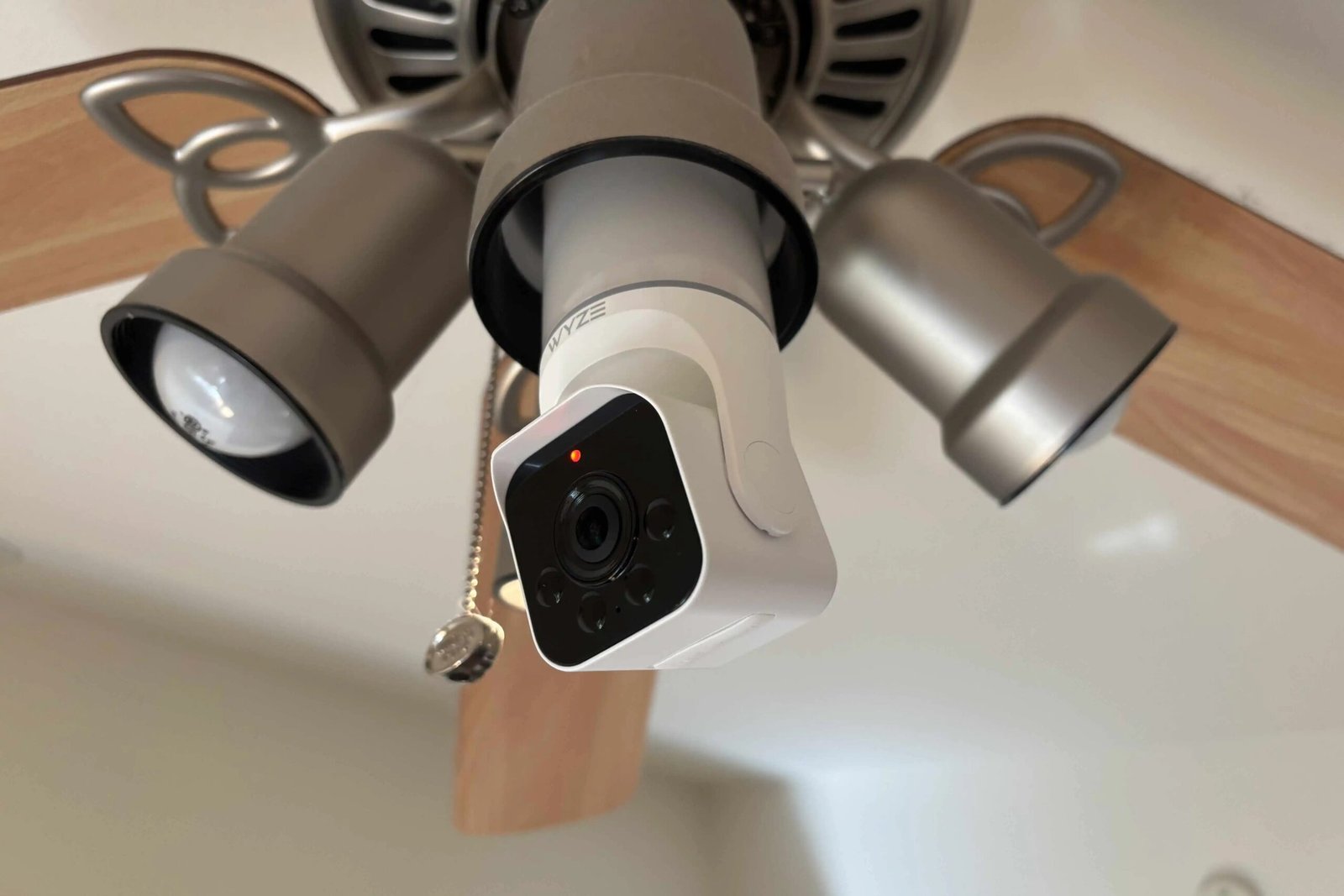
Light bulb security cameras provide an interesting alternative to the classic wireless and plug-in cams. These models screw directly into an existing home or building light socket, such as those found on porches or entryways. They don’t need wiring, nearby outlets or batteries to recharge. Many also come with pan/tilt features to cover lots of ground and LED lights of their own. Did I mention they’re affordable, too?
Our Picks

Bottom Line
Wyze has packed an impressive amount of features into its bulb cam. The camera itself is a 2K resolution, pan/tilt option that doesn’t move au…
Pros & Cons
-
2K resolution -
Built-in 800-lumen LED light with brightness control and ambient modes -
Pan/tilt features let you adjust viewing angle easily -
Local video storage supported -
Free AI detection features -
Two-way audio and siren
-
Pan/tilt features only work manually, so you can’t move the camera remotely or use auto-tracking

Bottom Line
It was a close call between Wyze and Lorex for the top bulb cam. I ultimately went with Wyze because its camera is a little more affordable an…
Pros & Cons
-
2K resolution -
Tracking pan/tilt features -
Two-way audio -
Free person and vehicle detection -
800-lumen light with the ability to change brightness and color temperature -
Cloud or local storage options
-
Unlike some cameras, Lorex doesn’t include a free microSD card with this model -
No dedicated siren option

Bottom Line
If you’re looking to save as much as you can on a security camera, this Luna model is under $30 and still provides important features, includi…
Pros & Cons
-
Under $30 -
2K resolution with pan/tilt functionality and zooming -
LED light built in -
Professional monitoring is available, which is unusual in a light bulb camera -
Comes with extender for larger outdoor sockets
-
AI detection and other features require a subscription

Bottom Line
This Symynelec light bulb camera is a well-rounded option if you’d prefer a 2K camera with an 8x zoom feature to focus on objects, something m…
Pros & Cons
-
2K resolution with zoom -
Human detection and tracking -
Google and Alexa compatibility -
Long-range night vision
-
No built-in light, which means you have to give up a light socket to use it
If you have a light socket in the right spot, these cameras could be an option for you, too. I’ve been testing the latest 2026 models, and have a few winners for you to check out.
What’s the best light bulb security camera?

After my tests, I’m choosing the Wyze Bulb Cam ($49) as the best all-rounder for light bulb cameras. It comes with free local storage and object recognition, plus a 2K resolution and ambient light mode so you can get the best of both worlds. See my full list below.
Best overall light bulb security camera
Wyze Bulb Cam
-
2K resolution -
Built-in 800-lumen LED light with brightness control and ambient modes -
Pan/tilt features let you adjust viewing angle easily -
Local video storage supported -
Free AI detection features -
Two-way audio and siren
-
Pan/tilt features only work manually, so you can’t move the camera remotely or use auto-tracking
Wyze has packed an impressive amount of features into its bulb cam. The camera itself is a 2K resolution, pan/tilt option that doesn’t move automatically, but rather allows you to angle or extend the camera to exactly the place you want (a little awkward, but also better for privacy). It has color night vision and, notably, options for both cloud video storage and local storage with a not-included microSD card. That means you can go subscription-free easily with this model, and the useful detection features for people, animals, vehicles and so on are also free.
That’s just the camera — I also like the attached 800-lumen bulb. Wyze lets you adjust its brightness and offers an ambient-light mode that adapts throughout the day based on surrounding light. The bulb can also pulse, a feature no other bulb camera I tested offers. Add two-way audio, a siren and Google and Alexa compatibility, and this camera is an ideal choice for anyone who wants a model that can do a little bit of everything.
- Resolution
- 2K
- Motion tracking
- No, only manual pan/tilt changes
- Audio
- Two-way audio
- Alarm/siren
- Yes, plus free AI detection features
Lorex’s bulb camera offers no-subscription video storage and more. / Tyler Lacoma/CNET
Best light bulb security camera without subscriptions
Lorex Connect Smart Lightbulb Camera
-
2K resolution -
Tracking pan/tilt features -
Two-way audio -
Free person and vehicle detection -
800-lumen light with the ability to change brightness and color temperature -
Cloud or local storage options
-
Unlike some cameras, Lorex doesn’t include a free microSD card with this model -
No dedicated siren option
It was a close call between Wyze and Lorex for the top bulb cam. I ultimately went with Wyze because its camera is a little more affordable and has extra features, but Lorex’s model is also formidable. Like Wyze, it offers a 2K resolution and free local video storage, as long as you put in your own microSD card. The camera also offers basic person and vehicle detection for free. And, unlike Wyze, it provides motion tracking and digital controls for its pan/tilt camera.
Other important features include two-way audio, night video and a privacy mode you can turn on when you don’t want the camera watching. The LED light, rated at 800 lumens, allows you to adjust brightness and color temperature, which makes it a good indoor choice as well as a potential outdoor model.
- Resolution
- 2K
- Motion tracking
- Yes, with pan/tilt auto tracking
- Audio
- Two-way audio
- Alarm/siren
- N/A
Luna’s light is available for under $30. / Luna
Best budget light bulb security camera
Luna Light Bulb Security Camera V3
-
Under $30 -
2K resolution with pan/tilt functionality and zooming -
LED light built in -
Professional monitoring is available, which is unusual in a light bulb camera -
Comes with extender for larger outdoor sockets
-
AI detection and other features require a subscription
If you’re looking to save as much as you can on a security camera, this Luna model is under $30 and still provides important features, including a 2K resolution, pan/tilt features, color night vision and a built-in LED light. There’s also two-way audio, but no compatibility with Google or Alexa. You can add many more features to this bulb with a subscription, including professional monitoring, AI detection and 24/7 recording. But since I chose this model as a way to save money, I think you can get plenty of use out of this cam without any monthly fees.
- Resolution
- 2K
- Motion tracking
- Yes, but no person detection
- Audio
- Two-way audio
- Alarm/siren
- Yes, plus option for professional monitoring
Symynelec has one of the few light bulb cameras that works with Google. / Symynelec
Best light bulb security camera with zooming
Symynelec Light Bulb Security Camera
-
2K resolution with zoom -
Human detection and tracking -
Google and Alexa compatibility -
Long-range night vision
-
No built-in light, which means you have to give up a light socket to use it
This Symynelec light bulb camera is a well-rounded option if you’d prefer a 2K camera with an 8x zoom feature to focus on objects, something my other picks don’t have. It also has rotation and tilting, two-way audio, night vision and auto-tracking, which means it can recognize and follow humans when they come into view. It also has an IP65 weather-resistance rating, so you don’t need to worry as much about placement.
On the downside, this camera doesn’t add a light feature, so you’re basically giving up a light to get all these features, which may not work in every location.
- Resolution
- 2.5K (capture) 1440p (effective)
- Motion tracking
- Detection and tracking
- Audio
- Two-way audio
- Alarm/Siren
- Yes
Light bulb security cameras compared
| Best light bulb security cameras | Wyze Bulb Cam | Lorex Connect Smart Lightbulb Camera | Luna Light Bulb Security Camera | Symynelec |
| Price | $49 | $65 | $27 | $50 |
| Resolution | 2K | 2K | 2K | 2.5K with zoom |
| Field of view | Manual pan/tilt 360-degrees | 360-degree pan/tilt | 360-degree pan/tilt | 360-degree pan/tilt |
| Motion detection | Motion and AI object Detection | Motion, tracking and object recognition | Motion tracking with motion zones, AI detection with subscription | Motion detection and tracking |
| Night vision | Color night vision | Color night vision | Color night vision | Color night vision |
| Audio | Two-way audio | Two-way audio | Two-way audio | Two-way audio |
| Voice assistant | Amazon Alexa, Google Home | Amazon Alexa, Google Home | N/A | Amazon Alexa, Google Home |
| Review score | N/A | N/A | N/A | N/A |
What advantages does a light bulb camera have over a security camera?
Light bulb security cameras are incredibly easy to install. You simply find the right socket in your home and screw them in. (They come with mounts as well.) They also tend to be a bit more affordable than standard security cameras, although you can still find many cheap cams that are comparable. But you do have to give up higher-end features and the app quality of trusted brands, so be aware there’s a tradeoff.
Some may say that light bulb cameras are better hidden than traditional security cams. That may be true until the cam’s motion detection and tracking turns on, and then they’re quite noticeable, especially if anyone is watching for security cameras.
Factors when choosing a light bulb security camera

LaView’s bulb, like other bulb cameras, is designed to fit into standard sockets.
LaView
Bulb fit
Light bulb cams use a standard E26 base, so compatibility shouldn’t be a problem. But room and positioning can be. You’ll want the right socket in the right spot, and the cam needs enough room along with a clear field of view. It can’t be blocked by overhangs or walls. Security bulb cameras also tend to stick out a lot more than light bulbs, around seven inches or so, so you’ll need clearance beneath as well. Before you buy one, take a close look at your light sockets.
Some bulbs do come with extenders and similar features to fit in more unusual socket designs.
Also, not all bulb cams will have connected lights, although I tried to favor cameras that came with their own LED lights. Keep in mind that some socket designs may hide most of the LED light.
Resolution
Resolution is important for a camera like this, which will typically sit up high and take in a wide angle. Our picks all have 2K or more capture resolution to help with this, which works out to around a 1080p or higher effective video resolution. Higher is generally better.
Motion detection
A good light bulb security camera should have motion detection and tracking to keep an eye on nearby movement. I favored models that come with free object recognition to detect things including humans and vehicles and send you alerts about what the camera has recognized.
Video storage
Video storage is a complicated topic for light bulb security cams. Most models come with local storage supported by a microSD card, which you’ll have to buy separately. We suggest sticking with this non-subscription local option. While light bulb cameras do often offer cloud storage, they don’t really have the track records and trust that come with bigger brands such as Nest or Arlo (which are themselves not immune to trouble), so we advise staying clear.
Light features
Look for higher lumens and brightness controls for the included lights. One reason Wyze is my top pick is because it offers extra light features such as an automated ambient mode, although these aren’t necessary.
Night vision
A quality light bulb camera should have night vision options that go beyond just turning the light on.
What are the latest updates in the light bulb security camera field?
This year, I’ve seen major security companies enter with all-new, powerful light bulb cam models, including Wyze and Lorex. That makes this particular corner of the home security world far more robust than it was before — and a good time to look for an upgrade.
FAQs
Are light bulb security cameras safe to use?
Light bulb security cameras are generally safe to use, although some off-market apps do give me pause. That’s why I recommend sticking to local storage instead of using cloud storage, and if you need to create an account, make sure your password is robust. My top picks are from better-known brands with more reliable track records.
Will light bulb security cameras work with my smart home?
Most of my picks offer compatibility with Alexa and Google Home. I haven’t seen any so far that work with Apple Home or Siri.
Do any light bulb security cameras have cloud storage?
Many light bulb security cameras do offer cloud storage, but we don’t recommend it if you can avoid it. At the best of times, cloud storage can be a privacy concern and could make access to your video footage easier for unfriendly folk. And many light bulb camera companies are opaque when it comes to how they offer cloud storage and how that data is managed. Stick with local storage when possible.

See full bio