dailynewsnblog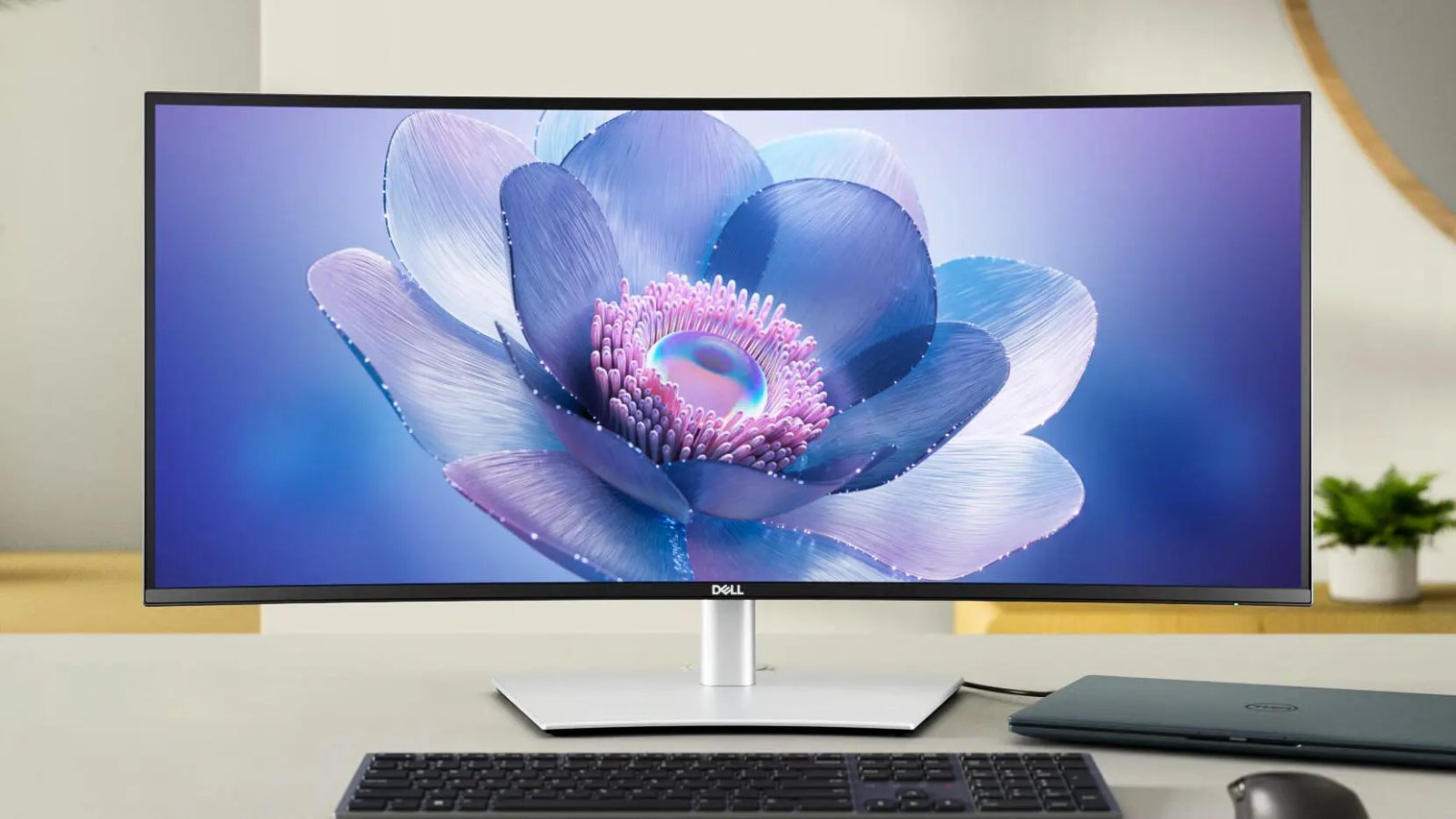

Pros & Cons
-
Excellent connection options -
Loud speakers
-
Monitor is good but underperforms for the price. -
Color accuracy is only average
The Dell UltraSharp U3425WE is a sizable ultrawide monitor, offering a 34-inch, 21:9 screen with 3,440×1,440-pixel resolution. This provides plenty of real estate for multitasking. The 120Hz refresh rate keeps everything looking smooth. The display itself isn’t much to look at, pun intended, for a $1,050 monitor (it’s significantly less from other retailers). While it has decent color gamut and contrast, it’s rather limited in brightness and color/contrast performance, falling well short of what recent OLED and QD-OLED monitors can muster.
What helps set the UltraSharp U3425WE apart is its plethora of ports. Display aside, the Dell UltraSharp U3425WE is a proper Thunderbolt 4 hub that’s capable of offering high-bandwidth pass-through to connected devices, display daisy-chaining, 95-watt power delivery charging and downstream connections to three USB-C ports and five USB-A ports, none with less than 10Gbps of bandwidth. The monitor even offers potent speakers.
With all that, the U3425WE is built to serve as a proper center point for a host of devices and peripherals to an extent most monitors fall short. If you’re after a clutter-free setup that makes for an elegant desk, the Dell UltraSharp U3425WE will do the job. Just be aware you won’t be getting the best display for your money.
Dell UltraSharp U3425WE
| Price | $1,050 |
| Size (diagonal) | 34 inch (86.4 cm) (34.14 inch actual) |
| Panel and backlight | IPS black |
| Flat or curved | 1,900R curve |
| Resolution and pixel density | 3,440×1,440, 110 ppi |
| Aspect ratio | 21:9 |
| Maximum gamut | 95% DCI-P3 |
| Brightness (nits, peak/typical) | 300/300 |
| HDR | n/a |
| Adaptive sync | No |
| Max vertical refresh rate | 120Hz |
| Gray-to-gray response time | 5ms |
| Connections | 1x HDMI 2.1, 1x DP1.4, 1x Thunderbolt 4 (90W PD) Upstream, 1x Thunderbolt 4 Downstream (for daisy chaining), 1x USB-C 3.2 Gen 2 Upstream, 2x USB-C 3.2 Gen 2 Downstream (15W PD), 5x USB-A 3.2 Gen 2, 1x RJ45 2.5GbE |
| Audio | Headphone jack, 2x5W speakers |
| VESA mountable | Yes, 100×100 mm |
| Panel warranty | 3-year advanced exchange service and premium panel exchange |
The Dell UltraSharp U3425WE is an elegant monitor with a gently curving display. The screen has an effective antiglare finish that makes it easy to see, even in ambient light. It can also use a light sensor to automatically adjust its brightness depending on ambient conditions. Add in a smooth 120Hz refresh rate and you’ve got a monitor that’s easy on the eyes.
The U3425WE is perhaps a USB hub as much as it’s a monitor. Dell packed this thing to the gills with ports. The main selection includes one full-size HDMI 2.1 and a DisplayPort 1.4 connection, plus a pair of Thunderbolt 4 ports with one intended for daisy-chaining to a second monitor and the other serving as a high-speed uplink to a host device. That upstream port can also provide 95 watts of power for charging devices. This area includes another USB-C port capable of 10Gbps as well as four USB 3.2 Gen 2 ports. These ports are all tucked back and hard to access, lending them toward more permanent connections, such as a printer or external storage.
For on-the-fly connectivity, the U3425WE includes three more USB 3.2 Gen 2 ports (two Type-C, one Type-A) closer to the front of the monitor along its bottom edge. I’ve had dedicated USB hubs with far worse connectivity. Dell goes still further with a 2.5Gb Ethernet jack. Considering a decent Thunderbolt dock can easily cost $200 to $300, the Dell UltraSharp U3425WE adds major value with its hub capabilities.

The U3425WE has a pair of 5-watt speakers that frankly put a lot of other monitors to shame. They’re shockingly loud and have a decent tone with reasonable low end. At max volume, they can sound a little boxed in and grating, but they’re still plenty loud even with the levels slightly dialed back to avoid that harsher quality.
Naturally, the UltraSharp U3425WE has a similar design to Dell’s many other black-and-silver monitors, plus a sturdy, adjustable stand with convenient cable routing. While Dell usually has quite adjustable stands, the dimensions of this monitor rule out rotating it into portrait mode, so the stand doesn’t allow for this rotation outside a few degrees of wiggle room.
Dell UltraSharp U3425WE color measurements
| Profile | Gamut (% coverage) | White point | Gamma | Typical brightness (nits) | Contrast | Accuracy (DE1976 average/max) |
| Standard (Default 75% brightness) | 100% (sRGB); 94% (P3) | 6700K | 2.1 | 158.3 | 2180:1 | 1.91/4.07 |
| Standard (100% brightness) | 100% (sRGB); 95% (P3) | 6700K | 2.1 | 309.8 | 2160:1 | 1.93/4.02 |
| Movie | 100% (sRGB); 94% (P3) | 10300K | 2.1 | 241.1 | 1430:1 | 2.18/4 |
| Game | 100% (sRGB); 94% (P3) | 6700K | 2.1 | 313.4 | 1850:1 | 2.87/5.58 |
| Display P3 | 100% (sRGB); 93% (P3) | 7200K | 2.2 | 304.3 | 1800:1 | 1.04/2.71 |
| sRGB | 99% (sRGB); 74% (P3) | 6800K | 2.2 | 318 | 1880:1 | 1.13/5.25 |
The UltraSharp U3425WE is a great-looking display, but when compared to some of its rivals at the price, it’s rather unremarkable. It offers a handful of picture mode presets as well as a few options for color space; I included the Display P3 and sRGB options in testing, particularly to see if the former could get the monitor to its advertised 97% DCI-P3 gamut.

The various profiles largely offered a strong color gamut, with almost all achieving 100% coverage of the sRGB color space except, ironically, the sRGB profile itself. Most settings also achieved 93 to 95% of the much wider DCI-P3 color space. This is good performance, but shy of what Dell advertises on the box and not quite a match for some of the OLED monitors on the market, such as Dell’s own Alienware AW3423DW, which itself has already been largely surpassed by newer and even cheaper options.
For an IPS monitor, the UltraSharp U3425WE has impressive contrast. At its best, it achieves an over 2,000:1 contrast ratio. That can really help content pop. Unfortunately, there’s not much else to enhance content, as the display only hits a peak brightness of 318 nits and has no HDR support. Again, the U3425WE falls well behind its competitors with that kind of performance. The 120Hz refresh rate also doesn’t hide the modest ghosting that trails fast-moving visuals.

Unfortunately, even with its wide color gamut, it doesn’t quite offer dependable color accuracy. In most profiles, it averages a decent Delta E 1976 below 3, but it has a max Delta E 1976 over 4 in all modes I tested except the Display P3. The display could likely be tweaked for better accuracy, but that entails added expense for customers. However, the results are fine for most office work and, unless you’re a designer, creative or working with photos and video regularly where color accuracy is a must, this shouldn’t be a deal breaker.
As a combo device, the Dell Ultrasharp U3425WE is great and offers impressive convenience, but judged strictly as a monitor, it comes up a bit short for the price.
How we test monitors
Measurements for the Dell UltraSharp U3425WE were taken with a Spyder X2 Ultra colorimeter using DataColor’s Spyder X2 software for SDR. Color accuracy measurements results are reported in Delta E 1976 using Datacolor’s 48-color patch test.
On the most basic models, we may only test brightness, contrast and color gamut. With more capable displays, we may also run tests of user-selectable modes for gaming or color-critical usage, uniformity and so on. We may also run tests to verify how white point accuracy varies with brightness. We also use Blur Busters’ motion tests to judge motion artifacts (such as ghosting) or refresh rate-related problems that can affect gaming.
Keep in mind that individual results can, and often do, vary from a manufacturer’s reported results for a variety of reasons.