dailynewsnblog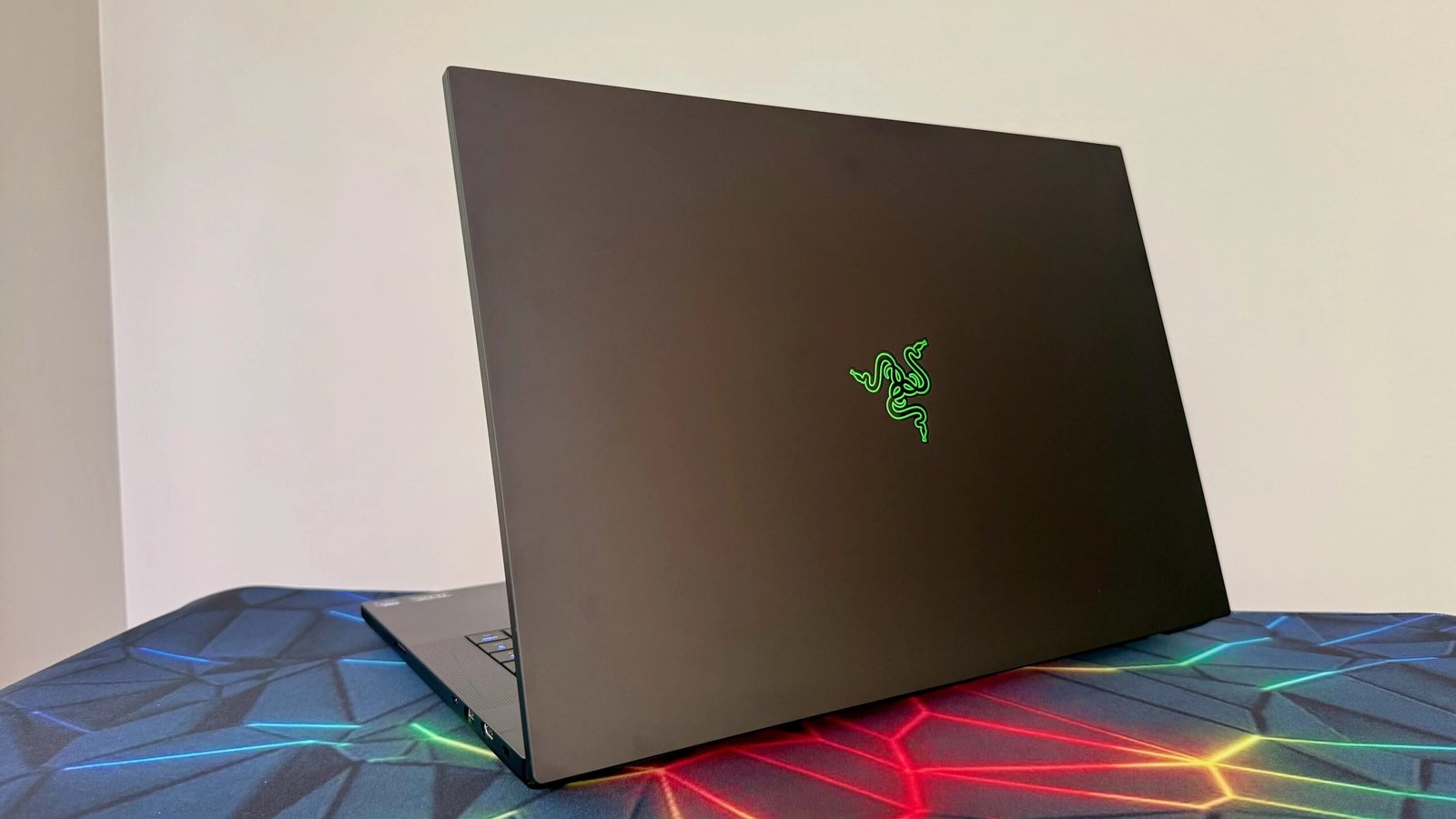

Pros & Cons
-
Blazing 3D performance from RTX 5090 -
18-inch dual-mode display offers a best-of-both-worlds experience -
Unadorned design offers clean look -
Compact and light for its size -
RAM and storage are user replaceable/expandable -
Loads of ports, including Thunderbolt 5
-
RTX 5090 comes at exorbitant cost -
Matte finish prone to smudges -
No option for mechanical keyboard -
Despite its two modes, display is still only an IPS panel -
Switching between display modes is a bit clunky -
Unlabeled ports are a bit of a mystery
Is it possible to get a thin-and-light gaming laptop with a massive, 18-inch display? It’s not, but the Razer Blade 18 comes the closest to achieving this impossible feat. Although its sheer size makes it unwieldy and ill-suited for travel, you might still be able to squeeze the Blade 18 into your laptop bag for a short trip now and again.
Weighing a reasonable 7 pounds, the Blade 18 is more than 2 pounds lighter than Dell’s Alienware 18 Area-51 and almost a pound lighter than the Lenovo Legion 9i Gen 10. This relative portability makes it easier to justify the high price of an 18-inch gaming laptop than going the desktop route and getting more performance and upgradability for your money.
While it doesn’t offer the expansion of a gaming desktop, the Blade 18 provides some room inside to grow. On the exterior, the highlights are Razer’s unibody design and dual-mode display. I love the simple, slab-like look of the Blade 18, and while I wish I were getting an OLED display at this price, the display provides unique utility in its ability to act as two IPS panels in one. It lets you switch between an ultrasharp 4K picture at 240Hz and drop down to a 1200p resolution at an ultrafast 440Hz refresh rate.
The Blade 18 might be more svelte than the 18-inch models from Dell and Lenovo, but it’s every bit as powerful. It’s based on an Intel Core Ultra 9 290HX Plus CPU and offers up to RTX 5090 graphics to deliver blistering performance. With a design superior to that of competing 18-inch models and performance to match, the Blade 18 is what I would choose if I had $5,000 or so to spend on the biggest, baddest gaming laptop around.
Razer Blade 18 specifications
| Price as reviewed | $5,400 |
| Display size/resolution | 18-inch dual-mode IPS display 3,840×2,400 @ 240Hz / 1,920×1,200 @ 440Hz |
| CPU | Intel Core Ultra 9 290HX Plus |
| Memory | 32GB DDR5-6400 SO-DIMM |
| Graphics | Nvidia GeForce RTX 5090 |
| Storage | 2TB SSD |
| Ports | USB-C Thunderbolt 5, USB-C Thunderbolt 4, 3x USB-A, HDMI 2.1, Ethernet, SD card slot, combo audio |
| Networking | Wi-Fi 7 and Bluetooth 5.4 |
| Operating system | Windows 11 Home 25H2 |
| Weight | 7 pounds (3.2 kilograms) |
The entry point for the Blade 18 is $3,500. For that sum, you get a system with an Intel Core Ultra 9 275HX CPU, RTX 5070 Ti graphics, 32GB of RAM and a 1TB SSD. For $4,000, you can get that same config but with a Core Ultra 9 290HX Plus. Spend $4,500, and you can swap out the GPU for an RTX 5080. Razer sent me the $5,400 config that maxes out the GPU to an RTX 5090 while doubling the storage to 2TB.
Have even more to spend? For $6,000, you can get my test system, but with 64GB of RAM. If you want to max out the RAM in this era of RAMageddon, then you can get the Blade 18 with 128GB of RAM for a whopping $7,000.
Every model features the 18-inch, dual-mode display: 4K for up to 2400p gameplay at a speedy 240Hz that you can nearly double to 440Hz at 1,920×1,200 for esports or any scenario where every extra frame per second gives you an edge.
The Blade 18 starts at £3,700 in the UK. Only the smaller Blade 16 is sold in Australia, starting at AU$6,000.

Razer Blade 18 performance
The key number for my Blade 18 test system is 24. It has a 24-core Core Ultra 9 275HX CPU and Nvidia’s flagship RTX 5090 mobile GPU with 24GB of VRAM (and it runs at its full 175 watts). Together, this CPU/GPU duo propelled the Blade 18 to some of the best benchmark results we’ve ever seen from a laptop. Then again, the only other laptop we’ve tested with an RTX 5090 is the Alienware 18 Area-51. This pair took turns topping the performance charts, which you can see at the end of this review.
The Blade 18 shot out of the gates with dominating multi- and single-core scores on both our Geekbench 6 and Cinebench 2024 tests. The Lenovo Legion 9i Gen 10, which features the same Core Ultra 9 CPU, but steps you down to an RTX 5080, was competitive on these tests next to the two RTX 5090 systems, even taking top honors on the single-core Geekbench 6 test.
On our 3D gaming tests, the Blade 18 produced incredible 1080p frame rates, edging the Alienware 18 Area-51 on Shadow of the Tomb Raider, Guardians of the Galaxy and The Riftbreaker. On our two newer tests, the Blade 18 was a few frames per second slower than the Alienware on Assassin’s Creed Shadows, with an average of 93 fps, but was the fastest on F1 24 at 193fps. The Blade 18 also produced smooth frame rates at higher resolutions, averaging 75fps at 1440p and 58 fps at 4K on Assassin’s Creed Shadows with quality settings at High and without the aid of frame generation. The racing action in F1 24 remained buttery smooth at 1440p where the Blade 18 averaged 157fps.
Battery life is never the strong suit for a huge, high-powered gaming laptop, and frankly, it’s not that important because such a system will likely be used plugged in most of the time. The Blade 18 lasted 4.5 hours on our YouTube streaming battery drain test: A fraction of what the longest-lasting laptops can do, but not too bad for a gaming laptop. It ran for about an hour longer than the Alienware 18 Area-51 and a half an hour longer than the Lenovo Legion 9i Gen 10.
Matte black beauty
Call me crazy, but I want my laptop to feel like a laptop, no matter how big its screen or how powerful its components. And with 18-inch gaming monsters, they can feel more like a foldable all-in-one desktop than a laptop. At more than 9 pounds, the Alienware 18 Area-51 stretches the definition of the term “laptop.” Its extreme size and weight make it awkward to even pick up and move to another room. At 7.8 pounds, the Lenovo Legion 9i is closer to the Blade 18’s 7-pound weight, but still an appreciably heftier laptop.
All three of these 18-inch models are a little over an inch in thickness, but the Blade 18 is more compact than the other two, measuring 15.7 inches wide by 10.8 inches deep. The Legion 9i is 15.9 by 11.7 inches, and the Alienware 18 Area-51 is the roomiest at 16.1 by 12.6 inches.

The Blade 18’s trim dimensions, relatively speaking, are a result of Razer designing the laptop without a large thermal shelf that protrudes out behind the hinge. Instead, the Blade 18 has a slight bump-out on the bottom panel that allows the space needed to house its cooling fans. It’s as effective as a thermal shelf in that the Blade 18 doesn’t run any hotter or louder than its Alienware and Lenovo competitors while allowing for greater portability.
I couldn’t squeeze the Blade 18 into my compact laptop backpack — it holds a 16-inch model at most — but it fit comfortably in my messenger bag and wasn’t too much of a chore to tote around. I certainly don’t recommend taking it on a daily commute (unless it’s just going into your car’s backseat), but it’s much easier to fold up and move around than the larger, heavier Alienware 18 Area-51.
I’m sure there are fans of Alienware’s gently curved edges, RGB lighting extravaganza and window on the bottom panel that offers a glimpse of its interior workings. And I don’t doubt there are those who like the unique look of the carbon-fiber-infused lid of the Legion 9i. But to my eyes, the Blade 18 is the best looking of the bunch. The plain, matte-black chassis is an understated beauty. The only RGB lighting to be found is the keys themselves — the keyboard offers per-key RGB lighting. My only complaint about the design is that the matte finish shows smudges pretty quickly; keep a lint-free cloth handy to maintain its sleek, clean look.

There is one other spot of lighting, and it’s a bit hidden. You can’t get to it from the included Razer Synapse app, but you will find it on the companion Razer Chroma app, where you can enable lighting behind the painted green Razer logo in the center of the lid. You can’t change the color, but you can turn on backlighting – either static or with a breathing effect – to make it a brighter, bolder green for the three-headed snake logo.
The keyboard itself is solid, but it can’t match the luxe feel of the Cherry MX switches you get with the optional mechanical keyboard on the Alienware 18 Area-51. The keys offer 1.5 millimeters of travel for a more plush feel than the typical membrane laptop keyboard, and the large expanse of this 18-inch behemoth means the number pad doesn’t feel cramped.
The touchpad is larger than your average touchpad – again, the absolutely enormous keyboard deck lends lots of space – but it’s otherwise a run-of-the-mill mechanical touchpad. Given that many will opt for a mouse most of the time with a huge gaming laptop, I can see why Razer opted against adding more to the already sky-high price and skipped a haptic touchpad.
 Matt Elliott/CNET
The biggest addition to the latest Blade 18 is the dual-mode display, which offers two native resolutions. Out of the box, it was set to 4K (3,840×2,400) with a 240Hz refresh rate. This is the setting for general use and any creative work you might want to do on the Blade 18, plus most gaming scenarios. When you need to eke out every frame per second possible for esports and twitchy shooters, you can drop the resolution to 1,920×1,200 and up the refresh rate to an astounding 440Hz.
Switching between the two modes is done in the Razer Synapse app and requires a reboot. And you’ll need to go into Windows settings each time you make the switch because the resolution changes without a corresponding change to Windows scaling. It’s set to 200%, which is perfect for 4K but way too much for 1,920x,1200. I dialed it back to 125% for the lower resolution. Being able to toggle between two native resolutions without any fuzziness in either setting is fantastic, but I wish the transition between them were smoother. I don’t mind the restart, but I wish the change in scale were automatic.

No matter the resolution and refresh rate, the display produces a bright image with wide color coverage. It hit a peak of 682 nits in my testing with a Spyder X Elite colorimeter and covered 100% of sRGB and 99% of the P3 gamuts, dropping to 87% coverage of the larger AdobeRGB color space. Photos and graphics in games looked natural and vibrant, but details were lost in darker scenes more quickly than they would be on an OLED panel with effective zero-nit black levels.
The Blade 18 uses its size to its advantage and offers a six-speaker array. They pump out better-than-average laptop sound, but you’ll still want headphones for deeper bass when listening to music and more lifelike, powerful effects when gaming. Among the plentiful ports is a headphone jack. You also get a pair of USB-C and three USB-A ports, HDMI out and an Ethernet jack as well as an SD card slot.

It’s a bit of a mystery as to which Thunderbolt port is which because none of the ports are marked. I like Razer’s minimalist aesthetic, but unlabeled ports are taking it a step too far. For the curious, the Thunderbolt 5 port is on the left, and the Thunderbolt 4 port is on the right.
Inside, there is room to expand. There are two DIMM slots, each occupied by a 16GB stick of Samsung 6,400MHz DDR5 RAM. My test system’s 2TB SSD occupies one of the two M.2 slots, leaving one free for an easy storage expansion. Given the painfully high prices of memory and storage at the moment, it’s nice to have an upgrade path.

Is the Razer Blade 18 a good gaming laptop?
An 18-inch gaming laptop isn’t the best pick for everyone, and an RTX 5090 GPU is probably overkill for most gamers. I mean, if you’re after the best gaming performance, then a full-tower PC with a desktop-class GPU is the way to go. But if you’re willing to trade some performance for the portability of a laptop while still getting the biggest laptop display you can, then the Blade 18 is my pick. Its overall design and dual-mode display give it an edge over the Alienware 18 Area-51, even if it means missing out on Alienware’s excellent mechanical keyboard.
For my money, the sweet spot in the Blade 18 series is the $4,500 config with an RTX 5080 and 1TB SSD. If you’re stepping down from desktop-class 3D graphics performance, then I think it makes more sense to aim for the mobile RTX 5080 GPU that provides nearly the same muscle as the mobile RTX 5090 graphics at a much lower price. Think of all the games that extra $900 could buy.
How we test computers
The review process for laptops, desktops, tablets and other computer-like devices consists of two parts: performance testing under controlled conditions in the CNET Labs and extensive hands-on use by our expert reviewers. This includes evaluating a device’s aesthetics, ergonomics and features. A final review verdict is a combination of both objective and subjective judgments. The list of benchmarking software we use changes over time as the devices we test evolve. The most important core tests we’re currently running on every compatible computer include Primate Labs Geekbench 6, Cinebench R23, PCMark 10 and 3DMark Fire Strike Ultra. A more detailed description of each benchmark and how we use it can be found on our How We Test Computers page.
System configurations
| Razer Blade 18 | Windows 11 Home; Intel Core Ultra 9 275HX; 64GB DDR5 RAM; Nvidia GeForce RTX 5090; 2TB SSD |
| Alienware 18 Area-51 | Windows 11 Home; Intel Core Ultra 9 275HX; 64GB DDR5 RAM; Nvidia GeForce RTX 5090; 2TB SSD |
| Lenovo Legion 9i Gen 10 | Windows 11 Home; Intel Core Ultra 9 275HX; 64GB DDR5-4800 RAM; Nvidia GeForce RTX 5080; 2TB SSD |
| HP Omen 16 Max | Windows 11 Home; Intel Core Ultra 9 275HX; 32GB DDR5 RAM; Nvidia GeForce RTX 5080; 1TB SSD |
| Asus ProArt P16 | Windows 11 Home; AMD Ryzen AI 9 HX 370; 32GB DDR5 RAM; Nvidia GeForce RTX 5070; 2TB SSD |
| Acer Predator Helios Neo 16S AI | Windows 11 Home; Intel Core 9 Ultra 275HX; 32GB DDR RAM; 8GB Nvidia GeForce RTX 5070; 1TB SSD |

See full bio