dailynewsnblog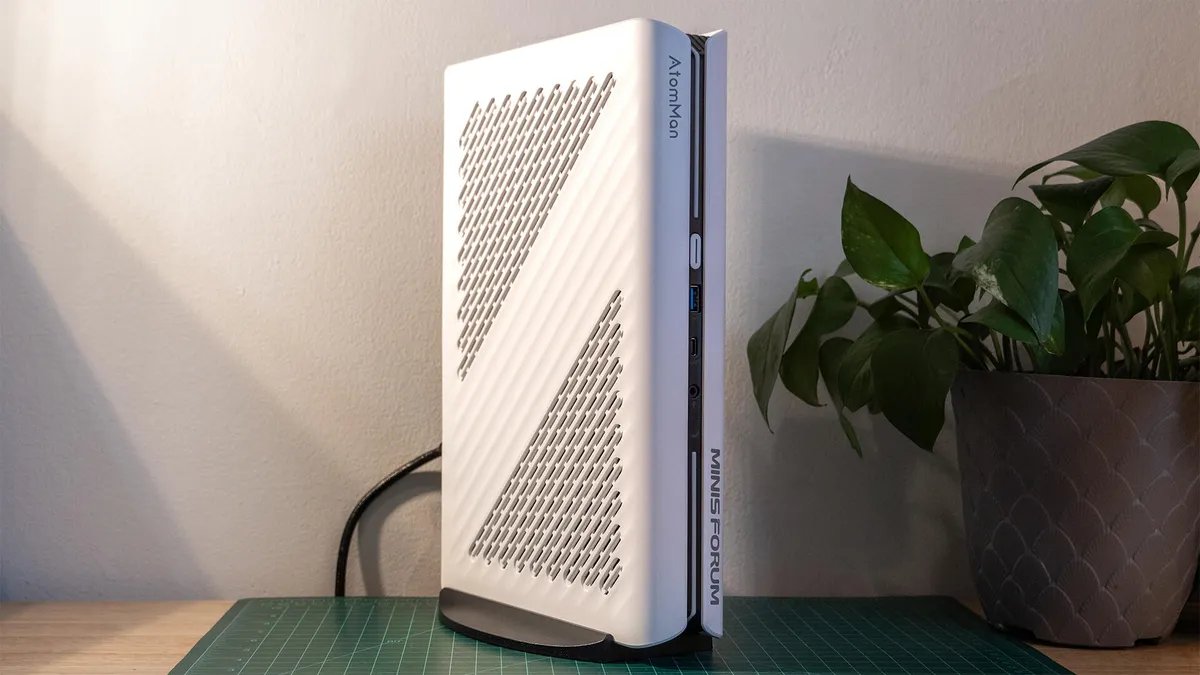

Pros
- Quite compact for a desktop
- Great 1080p gaming performance
- Some upgradeability
- Fast networking
- Integrated power supply
Cons
- Somewhat large for a mini PC
- Defaults leave lots of performance on the table
- Will gather dust
- Limited port selection
The Minisforum AtomMan G1 Pro is an exciting PC. At least on paper. It’s extraordinarily compact for a desktop gaming PC, though still much larger than some of Minisforum’s other offerings. It uses that extra size to its advantage, offering a larger CPU cooler, integrated power supply and a desktop-sized graphics card (kinda, since it’s a tiny one that likely will be near-impossible to find if upgrading in the future). This all helps it deliver ample performance for everyday computing and strong, triple-digit performance for 1080p gaming.
It’s not quite a surefire pick, though. Plenty of laptops, like the Lenovo Legion 5i Gen 10, can keep pace even with their laptop-class GPUs. They’ll also be more versatile since they’re properly portable. Normal desktops don’t come with the mini PC price premium either, so you’ll be able to find more powerful, better-equipped options like the Lenovo Legion Tower 5 Gen 10 at competitive prices compared to the AtomMan G1 Pro. Those bigger desktops will also be much easier to upgrade down the line. This puts the G1 Pro into a niche, where it might work for those who need a computer that conforms to a small space but don’t want to go for a laptop.
Minisforum AtomMan G1 Pro
| Price as reviewed | $1,799 |
|---|---|
| Size | 3.85 liter (8.5×2.2×12.4 in/215x57x315 mm) |
| Motherboard | Minisforum custom |
| CPU | 2,500MHz AMD Ryzen 9 8945HX |
| Memory | 32GB DDR5-5200 |
| Graphics | Nvidia GeForce RTX 5060 |
| Storage | 1TB NVMe M.2 PCIe Gen 4 SSD (boot) Kingston OM8TAP31024K1-A00) |
| Networking | 5GbE, MediaTek Wi-Fi 7 MT7925 802.11be, Bluetooth 5.4 |
| Connections | USB 3.2 Gen 2 Type-C (x1 front, x1 rear), USB 3.2 Gen 2 Type-A (x1 front, x2 rear), 3.5mm audio connector (x1 front), 5Gb Ethernet, HDMI 2.1 (x1 on motherboard, x1 on GPU), DisplayPort 2.1b (x2 on GPU), DisplayPort 1.4a (x1 on GPU) |
| Operating system | Windows 11 Pro |
The Minisforum AtomMan G1 Pro comes in two configurations. The first is a barebones option with no installed memory, storage or operating system for $1,299. It does include an AMD Ryzen 9 8945HX CPU, RTX 5060 graphics card and other hardware components. The second configuration is a fully prepared build with 32 gigabytes of DDR5-5200 memory on SO-DIMMs, a 1-terabyte PCIe Gen 4×4 solid-state drive for storage and Windows 11 Pro installed for $1,799.
Not quite using its size to its advantage
The AtomMan G1 Pro brings plenty of performance to the table. It may not be leading the market since it’s running a laptop-class processor and a lower-end GPU, but it still manages some surprises.
Having a ton of CPU cores certainly helps out the G1 Pro. With 16 cores that all support multithreading, the Minisforum AtomMan G1 Pro manages to outpace even a desktop-class AMD Ryzen 7 7800X3D as tested in the Lenovo Legion Tower 5 Gen 10 in the Cinebench R24 benchmark. However, it still falls behind competing systems running Intel processors, even dating back to the Intel Core i7-14700HX as tested in the Lenovo Legion 5i Gen 10.
There are a few connection options in the front.
Even without raw CPU horsepower, the G1 Pro is a competent machine for general computing. It managed a staggering 9,066 points in the holistic PCMark 10 benchmark, a lofty height usually reserved for top-tier gaming PCs. This indicates that the Minisforum AtomMan G1 Pro will more than make do for most work. But how about play?
While the AtomMan G1 Pro may be running a laptop-class CPU, it has a desktop GPU. So one might expect a step up in performance compared to gaming laptops running similar hardware. That just doesn’t happen, at least not without some tweaks. The Minisforum AtomMan G1 Pro consistently performs in line with some of its RTX 5060-powered laptop contemporaries like the HP Omen 16 and Lenovo LOQ 15. It lags behind more beastly models like the Lenovo Legion 5i Gen 10 by a sizable margin. Even next to its generation-old sibling, the Minisforum AtomMan G7 Ti, with a mobile RTX 4070, which has a much thinner design, the G1 Pro falls well behind (and that likely gets worse next to the refreshed RTX 5070 version). That said, Minisforum’s own Gaming Mode performance plan appears largely to blame.
After changing to the PC’s Beast Mode for some extra testing, I saw the G1 Pro leap in performance by almost 20% in 3DMark’s Time Spy, by 38% in 3DMark’s Steel Nomad and 26% in Shadow of the Tomb Raider. These bumps were enough to bring it back in line or even ahead of the AtomMan G7 Ti and Legion 5i Gen 10. Oddly, it’s not as though the Beast Mode has major compromises. It’s not much louder than Gaming Mode fan-wise, and sustained its speed well, passing 3DMark’s Steel Nomad stress test.
There’s just enough I/O options in the rear.
Keeping up with laptops and thinner mini PCs isn’t necessarily a grand achievement. Also, the AtomMan G1 Pro isn’t just competing with similarly equipped laptops and mini PCs. Going compact comes at a premium, and when looking at price, the G1 Pro falls in the range of some larger systems that bring even more to the table. The $2,380 Dell Tower Plus EBT2250 (27.5 liters) and $2,100 Lenovo Legion Tower 5 Gen 10 (42.7 liters), for example, both offer desktop RTX 5070 graphics, which gives them a massive advantage in graphical performance well beyond the increased price. From a pure performance-per-dollar standpoint, that holds the Minisforum AtomMan G1 Pro back.
A software oddity
We test systems in their default settings, and the G1 Pro defaulted to Gaming Mode in my testing. One might think would provide the best gaming performance but, looking at the results, that clearly wasn’t the case. The system’s Beast Mode was a click away and brought meaningful gains without questionable overclocking. But these kinds of software fixes rely on you knowing they exist in the first place. They also have to be reliable, which brings us to the issue at hand.
The G1 Pro has a stand to use it vertically.
A few days after benchmarking the system, while using the computer normally, Windows Defender had a flag. It alerted me to a dangerous file on the computer called Winring0. As PCWorld explains it, this is a vulnerable driver integrated into a lot of hardware monitoring and customizing software (fan speeds, RGB lights and the like). In this case, it appears to have been in Minisforum’s software, as the driver lived in a Minisforum folder on the PC. Since the driver is vulnerable to attacks, Windows Defender automatically locked down the file.
What all this did to Minisforum’s software is unclear. It can still monitor fan speeds and adjust system lighting. Performance profiles seemed affected, however. After the removal of the questionable file, all performance profiles appeared to run at full speed, performing at Beast Mode levels regardless of which mode was selected.
All this to say, while it’s alarming to see an unpatched vulnerability like this in Minisforum’s software, it at least doesn’t appear linked to any degradation of performance.
A little bit desktop, a little bit mini PC
Minisforum is no stranger to small PCs, but next to the AI X1 Pro and AtomMan G7 Ti I tested last year, the G1 Pro is a different animal. It’s much larger than those, though it still sits at a tame 3.85 liters with a chassis that’s just 12.4 by 8.5 by 2.2 inches. This is closer in form to game consoles, though even then it’s a little smaller.
The white plastic frame wrapping around a black core gives off PlayStation 5 vibes, even in the way the frame curves down around the front. The geometry is a lot more tame than the PS5, but a pair of RGB light bars on the front add some flair. The G1 Pro includes a small stand for holding it vertically, and that seems to be the intended orientation. Setting it on its side, at least in a way that would leave its vents unobstructed, orients its logos upside down.
Space is tight on the inside, but there’s more room than other Minisforum PCs.
The inside of the system benefits from the extra space compared to smaller Minisforum PCs. Even though the G1 Pro has a laptop CPU, it gets a thick cooler. The system doesn’t rely on an external power brick, instead integrating its power supply. It also gets a desktop graphics card in a PCIe 4.0 x16 slot. That said, this desktop graphics card (a three-fan Gigabyte model) is probably not what you’re picturing. Rather, it’s a diminutive version that takes up a fraction of the space of even your typical one-fan card. With that in mind, options to upgrade to a new graphics card down the line will be severely limited by this size restriction.
There are some more feasible upgrade options, however. There are two M.2 slots, though they’re buried beneath power supply cabling. The memory isn’t soldered on, so it can be expanded after purchase, but accessing the memory slots requires removing the CPU cooler.
The system has two large intake grilles on the left side to pull air into the CPU cooler, power supply and graphics card. The grille isn’t filtered in any meaningful way, though, so expect dust to build up quickly and plan on regular cleanings. The air exhausts out of extensive venting on the top and back of the chassis, which leaves little room for the kind of port quantity you might expect from a desktop.
Cooling is sufficient and reasonably quiet.
Even with the fans running hard, the system is quiet. It’s not dead silent, but its fans are hushed. The power supply fan adds a bit of racket with a dull clicky sound at a higher frequency than the whir of the fans and flow of air, sounding a bit like a cricket. Even that is quiet enough to drown out with speakers or headphones. The kit also includes a power cable, an HDMI cable and a heat shield for use with any extra M.2 drives you might put into the system.
The connectivity of the system is mixed. The front includes a conveniently placed headset jack. For networking, it’s strong enough with both Wi-Fi 7 and 5GbE, so fast internet speeds are possible. It doesn’t impress with its USB connections, however. The front includes one USB-A and one USB-C port, while the rear has two USB-A and one more USB-C port. Disappointingly, all of them top out at 10Gbps — no 20Gbps or USB4 ports and no video output over USB-C. With such modest USB connectivity, the display connections feel like overkill. The motherboard has one HDMI 2.1 out while the graphics card offers a second alongside three DisplayPort connections (two 2.1b and one 1.4a).
So, overall, the AtomMan G1 Pro performs decently well for the size, but that compact size increases the price and decreases the upgradability.
Geekbench 6 (multicore)
Framework Desktop 17,389Minisforum AtomMan G7 Ti 16,959Asus NOC 16 Pro 16,730Minisforum AI X1 Pro 15,358Apple Mac Mini M4 (2025) 14,908Minisforum Atomman G1 Pro 11,461
Cinebench 2024 CPU (multicore)
Framework Desktop 1,829Minisforum AtomMan G7 Ti 1,413Minisforum Atomman G1 Pro 1,357Minisforum AI X1 Pro 1,225Asus NUC 16 Pro 1,222Apple Mac Mini M4 (2025) 958
Cinebench 2026 Single Thread
Minisforum Atomman G1 Pro (SC) 584Asus NUC 16 Pro 514Minisforum Atomman G1 Pro 455
3DMark Steel Nomad
Minisforum Atomman G1 Pro 2260Framework Desktop 2053Asus NUC 16 Pro 1647Minisforum AI X1 Pro 529
Shadow of the Tomb Raider (Highest, 1080p)
Minisforum Atomman G1 Pro 141Framework Desktop 111Asus NUC 15 Pro 73Minisforum AI X1 Pro 37
PCMark 10 Pro
Asus NUC 16 Pro 9375Minisforum Atomman G1 Pro 9066Framework Desktop 8715Minisforum AI X1 Pro 7569
Configurations
| Apple Mac Mini M4 | Apple MacOS Sequoia 15.1, M4 chip 10‑core CPU with 10-core GPU; 16GB LPDDR5 unified memory; 512GB SSD |
|---|---|
| Asus NUC 16 Pro | Microsoft Windows 11 Pro; 1.9GHz Intel Core Ultra X7 358H; 64GB LPDDR5x-8533; Intel Arc B390 integrated graphics; 1 terabyte NVMe M.2 |
| Framework Desktop | Windows 11 Home; 3GHz AMD Ryzen AI MAX+ 395; Radeon 8060S GPU (integrated); 64GB LPDDR5x-8000 RAM (shared); 1TB NVMe M.2 PCIe Gen 4 SSD |
| Minisforum AI X1 Pro | Microsoft Windows 11 Pro; 2GHz AMD Ryzen AI 9HX 370; 64GB DDR5 5,600MHz RAM; 2GB AMD Radeon 890M integrated graphics; 1TB SSD |
| Minisforum AtomMan G1 Pro | Microsoft Windows 11 Pro; 2.5GHz AMD Ryzen 9 8945HX; 32GB DDR5-5200; 8GB Nvidia RTX 5060 graphics; 1 terabyte NVMe M.2 |
| Minisforum AtomMan G7 Ti | Microsoft Windows 11 Home; 2.2GHz Intel Core i9-14900HX; 32GB DDR5 5,600MHz RAM; 8GB Nvidia RTX 4070 graphics; 1TB SSD |