dailynewsnblog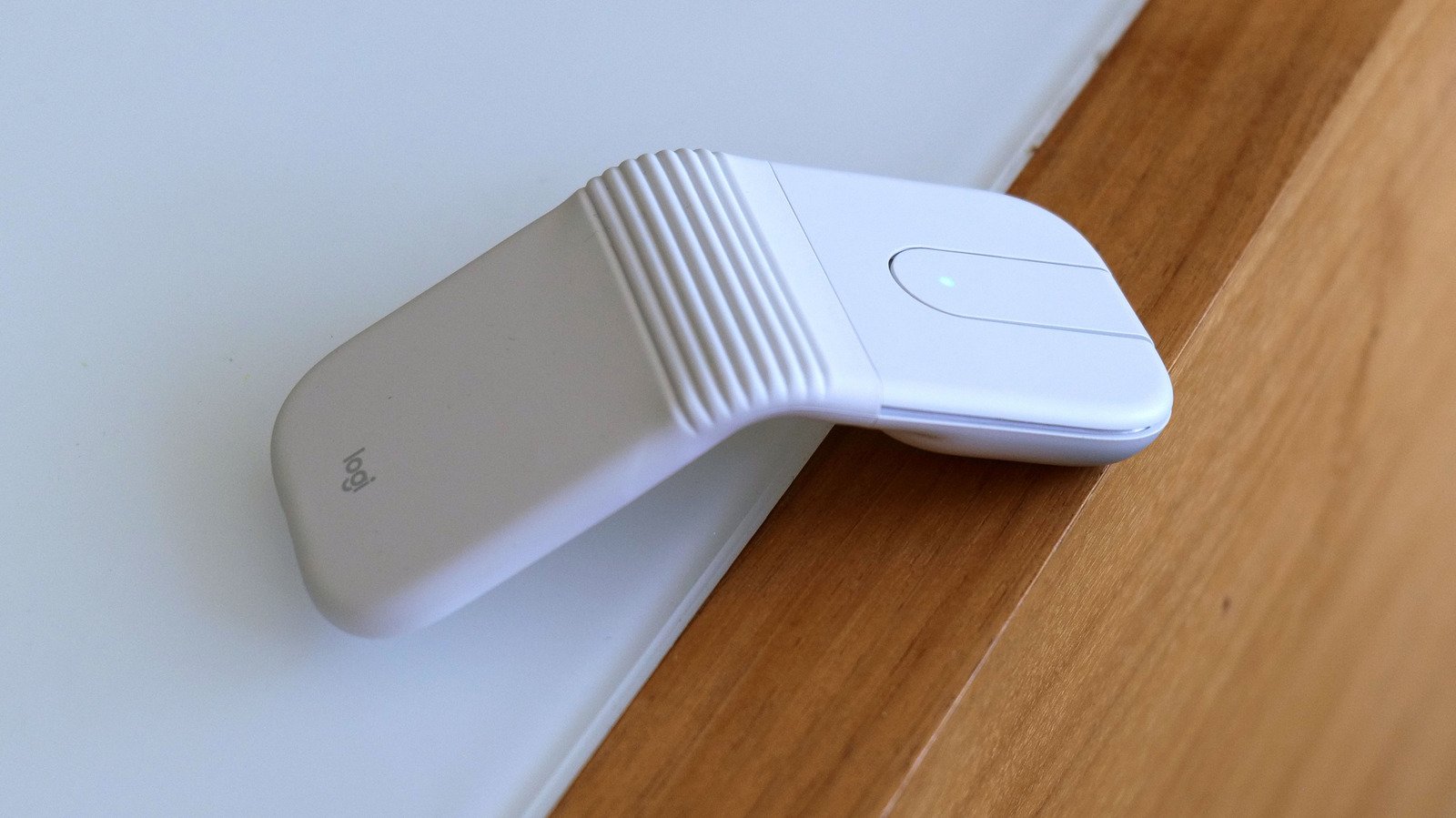
It’s like Microsoft’s Arc Mouse, but even smaller.
RATING : 8.4 / 10
- Super compact
- Great battery life
- Automatically turns off when folded
- Supports three simultaneous Bluetooth connections
- A bit pricey
- Not very ergonomic
- USB receiver only comes with the business model
Logitech makes some of the best productivity mice on the market. However, when it comes to super portable but still premium travel-friendly options, its selection is a lot more limited. You’re basically looking at just the MX Anywhere 3S. But with its latest mouse — the Mobi Fold — Logitech has created something even lighter and more compact for the kind of people who need an accessory that goes beyond your typical laptop touchpad.
Design
Fans of old Microsoft peripherals might notice a lot of similarities between Mobi Fold and the Arc mouse line, as Logitech’s latest cursor looks like a modernized spiritual successor to a family of gadgets that were arguably ahead of their time. For traveling, the Mobi Fold bends in half to become a small 2.2 x 2.5 inch rectangle that’s less than an inch thick and weighs barely more than two ounces. It’s so small it practically disappears into a bag and can easily be slipped into a pocket, even if you’re limited by the comically small pockets you often find on women’s pants.
When you want to get some work done, you can simply unfold the mouse, set it on a table and get right back to clicking, highlighting and pointing. The Mobi Fold features physical left and right mouse buttons that are dampened so pressing them won’t distract nearby colleagues. In the middle, there’s a small touchpad that serves as your mousewheel, allowing you to quickly and accurately scroll through long docs and websites. You can even press down on the touchpad to get a middle mouse click (or scroll wheel click depending on what you call it). And if you want to customize what any of these buttons do, you can always change their behavior inside Logitech’s free Options+ companion app.
On the bottom, there’s a button for pairing the Mobi Fold over Bluetooth with up to three different devices at the same time, along with handy indicator lights to let you know which one is currently selected. There’s also a cutout for the mouse’s sensor, a USB-C port for charging around back and some built-in feet to ensure the Mobi Fold glides smoothly over all sorts of surfaces.
In-use
Using the Mobi Fold really couldn’t be simpler. Once you’ve paired it to a laptop, opening and closing it automatically turns it on and off, so you never suffer from accidental clicks while in transit. And while it might look a little strange for people used to more traditional pucks, everything behaves just as you would expect.
That said, if I’m really nitpicking, the Mobi Fold’s geometric design isn’t the most comfortable thing in the world. I actually like the little bit of bounce you get when you press down on its hinge. However, because there’s a big gap in the middle, there isn’t really anywhere to rest your thumb or ring/pinky fingers. Then again, because the Mobi Fold is essentially a tent-shaped rectangle, it’s perfectly ambidextrous, which is nice for lefties.
Finally, while you can adjust the sensitivity of the Mobi Fold’s touchpad, I noticed that scrolling just isn’t as smooth as it is with a proper physical wheel. But that’s sort of the price you pay for a super compact design. And make no mistake, it’s still just as good if not better than the vast majority of laptop touchpads out there.
Battery life
Logitech says the Mobi Fold provides up to 30 days of battery life on a single charge. I haven’t used my review unit for that long, but that claim is believable. After two and a half weeks of intermittent use, the mouse still has over 70 percent left in the tank. That said, if you do run low and need to perform a quick top up, the company also says plugging it in for one minute can add 22 hours of additional runtime, which is more than enough to get you through multiple workdays. And when I tested out its charging speed myself, the Mobi Fold went from 70 percent battery to 80 in just sixty seconds. You’ll just need to borrow a cable and a power adapter from your phone or laptop, because you don’t get either of those in the box.
Wrap-up
I will admit that the Mobi Fold is meant for a rather specific type of laptop user who is never fully satisfied with their PC’s built-in touchpad and wants a super compact and lightweight alternative for traveling. But as someone who grew up in a world before trackpads became standard equipment, I totally get it. I’m faster and more productive when using a physical mouse and I’m more than willing to carry one with me, just as long as it doesn’t weigh things down too much. And with the Mobi Fold, Logitech has created one of the most travel-friendly pointers on the market.
The main knocks against it are its price, which at $80, may put it out of reach for some people. It also isn’t the most ergonomic thing to use, as its design is focused more on portability than pleasure. Meanwhile, if you want the convenience of using a dedicated wireless dongle instead of relying solely on Bluetooth, you need to pay an extra $10 for the business model. But perhaps the biggest issue is that the MX Anywhere 3S still exists. Sure, it costs $90 instead of $80. But it has longer battery life, three extra buttons, a truly excellent physical scroll wheel with Logitech’s Magspeed tech and it’s more comfortable to use. Plus, it’s not that much larger either. If you place a big premium on maximum portability though, the Mobi Fold could be the ultra compact companion for you.