dailynewsnblog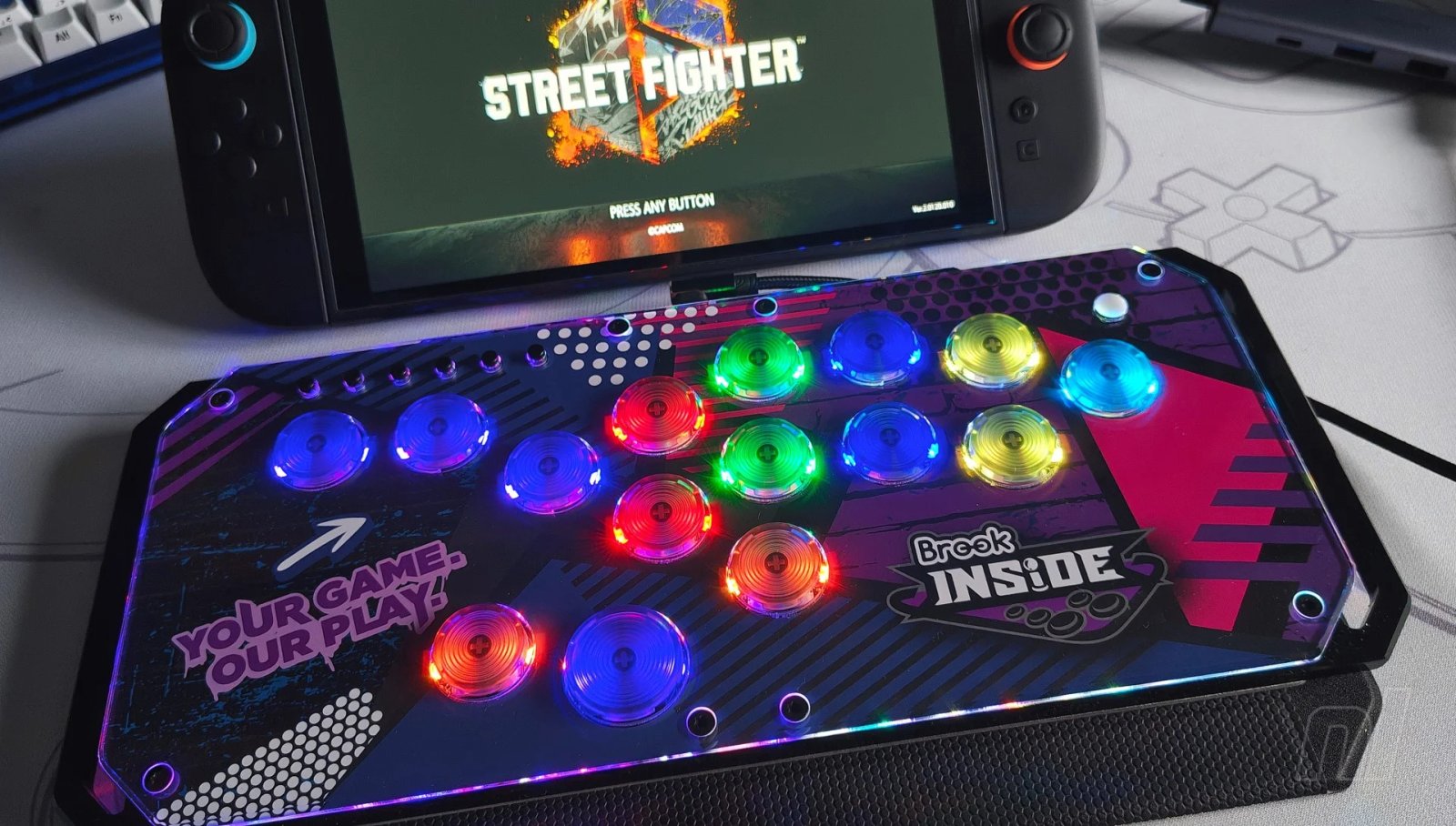
A lot of arcade controllers tend to lean more towards function over form, sacrificing attractive aesthetics for something that simply works as intended. But what if you could have both?
That’s exactly what accessory manufacturer Brook has attempted to do with its Fighter Starburst, a leverless controller that’s as nice to look at as it is to use. It’s got a pretty hefty price tag to boot, but if you’re after something that looks and feels premium, then this is the controller for you.
Brook is pretty well known in the fighting game community at this point. Its Wingman adapters have been instrumental in allowing unlicensed arcade controllers to work with the likes of the PS5. In fact, it’s this exact same technology that allows other controllers, like the Hitbox Ultra and Junkfood SWORL, to work instantly with multiple platforms thanks to the internal Brook circuit boards.
So it seemed inevitable that the company would launch an arcade controller of its very own, and the Starburst can proudly stand toe-to-toe with its competitors. Priced at $179.99, it works on not only Switch 1 and 2, but also PS4/5, Xbox Series X|S, and PC. Hold down a specific button (consult the instructions to see which one) while plugging the controller in to enable specific console layouts.
The Starburst only works via a wired connection with the included USB-A to USB-C cable, so no wireless compatibility here. This is pretty much the standard given the focus on low-latency competitive gaming, and the 8BitDo Arcade Controller is the only example I’ve seen that offers wireless play. The cable itself is braided and feels super tough, though I’d say it’s a little too short for those who want to game in the living room. You can just swap it out for a different one if need be.
The controller itself is one of the dinkiest on the market. At 5.12 x 0.98 x 11.93 inches, it’s not quite as small as the Snackbox Micro from Junkfood Arcades, but it’s not far off. But what really stands out is the actual design.
To put it simply, this is the only arcade controller (as far as I can tell) with its own built-in cover. It works kind of like your average tablet cover in that half of it is attached to the back of the controller, allowing you to fold the rest of it over and protect the vinyl and buttons while out and about.
Unlike a tablet cover, however, you can’t remove it entirely. You can also adjust the angle slightly so that it’s either facing away from you or towards you while in use. I wouldn’t recommend the latter since you’d be angling your wrists back to use the buttons, but it’s always nice to have options.
Meanwhile, the vinyl cover is incredibly premium in design, with the corners sliced off to give it an edgier look. When the controller is turned on, the light from the buttons cascades across the clear vinyl and it looks really lovely, especially in darker environments. Across both sides, you’ll also see black accents, and you can use these to attach a strap for easy transportation; something else that Brook has wisely included as standard.
In short, this is a controller that you’ll want to show off. The included strap not only makes it a doddle to carry with you at tournaments and whatnot, but the flashy design and elegant cover makes it an instant conversation starter, a fact made even more true when you turn it on and see the buttons light up.
The Starburst uses Kailh Choc V2 Red switches, but these are hot swappable if you’d like to try something else. As it is, the buttons feel responsive with a decent amount of travel, and the slightly concave design makes for a nice change from the predominantly convex inputs seen on other controllers. Each button houses its own LED lights, and although you can’t change the colour, you can alter everything from brightness and patterns directly on the controller itself by holding down the small white button on the right side.
Along with the standard directional and attack buttons, there are three additional inputs. Over on the far right is the Start button, while two inputs sitting to the left and right of the larger ‘Up’ button at the bottom function as L3 and R3. If you’re in the market for a Starburst, chances are you’re probably going to be using it for fighting games like Virtua Fighter 5 R.E.V.O. and Street Fighter 6, so you won’t necessarily need quick access to L3 and R3, but it’s nevertheless good that they’re included.
What’s interesting about the buttons is that they’re probably the smallest I’ve seen on an arcade controller so far, with wider spacing in between each input. It’s not a massive decrease from the likes of the Hitbox Ultra and Snackbox Micro, so you’re looking at a difference of around 2 or 3mm in diameter. Even so, if you’re used to bigger buttons that are perhaps spaced a little closer together, you might find the Starburst presents a brief learning curve thanks to the wider spacing.
Up on the top left are the function buttons, and I should note that neither these nor the main inputs come with labelling. Personally, I prefer this, since a lot of arcade controllers have PS5 or Xbox labelling, so it doesn’t match with the actual inputs when set to Switch mode.
This also means, however, that when you’re first starting out with the Starburst, you might find yourself tapping the wrong function button until you’re used to what they actually do. It doesn’t take long to figure out the order, but it’s something to keep in mind. For simplicity, from left to right, you’ve got Home, Capture, Select, Start, R3, and L3.
Fighting enthusiasts will be keen to know that the Starburst also comes packing four different SOCD modes that you can alter by holding down a directional input while plugging the controller in – definitely handy for keeping it all ‘tournament legal’ when necessary. You can also change the directional inputs to mimic the D-pad, left analogue stick, and right analogue stick. This means that, yes, you can use the Starburst on Super Smash Bros. Ultimate, if you wish.
Finally, if you want to change up the design of the controller, you can swap out the default artwork by unscrewing the vinyl on top with the included custom screwdriver. A blank template file can be downloaded from Brook’s website, or there are plenty of services online if you’re not keen on designing and printing your own artwork.
Conclusion
At $179.99, the Starburst isn’t cheap, but alongside the Hitbox Ultra, it’s also one of the only options available that’s compatible with every major console on the market straight out of the box. So if you’re someone who likes to jump between platforms, keep in mind that buying a more budget-friendly controller necessitates an additional authentication device, which ramps the price up. Not here, though.
This, coupled with the compact, stylish design, solid magnetic cover, and optional carrying strap, makes the Starburst an easy recommendation for those who just want to buy an arcade controller and have the peace of mind that it’ll serve your needs easily while being extremely portable. Just maybe invest in a longer power cable.
The sample used in this review was provided by Brook Gaming.
Please note that some external links on this page are affiliate links, which means if you click them and make a purchase we may receive a small percentage of the sale. Please read our FTC Disclosure for more information.