dailynewsnblog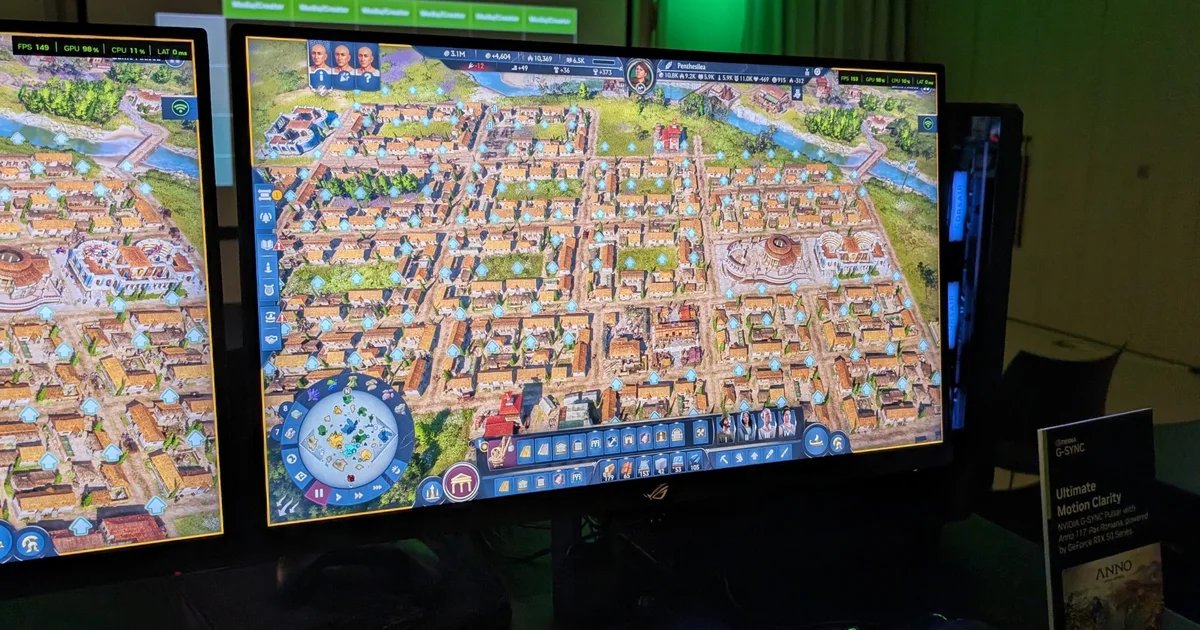
Nvidia’s relationship with PC gaming doesn’t always feel like a loving one. Sometimes they’re gifting us a useful new version of DLSS, sometimes they’re helping drive RAM prices up to £300 a stick. Even so, it’s hard not to look at G-Sync Pulsar – a new bit of monitor cleverness that seeks to remove unwanted motion blur from its LCD panels – and see some goodness still inside that big, green eye. After trying it out at a demo event this week, I’m hopeful that Pulsar can clean up how games look in motion as well as anything since the original G-Sync.
In short, Pulsar-equipped monitors make moving objects – whether they’re shifting within a certain perspective, or being whipped over by the game’s camera – appear clearer and more defined, without the need of any sharpening filters or frame generation-style AI bodging. Or, even, a higher, properly rendered framerate. I zoomed around Anno 117: Pax Romana on two identical PC-and-monitor setups, only one with Pulsar enabled, and that screen showed visibly higher clarity than the other – despite both rigs producing the same level of pure frame performance.
While modern LCD/IPS panels are hardy unplayable, Pulsar is aiming to solve an actual problem, and it’s one that’s bothered flatscreen LCDs since inception – even if it isn’t entirely their fault. See, even displays with high refresh rates suffer the effects of ‘sample and hold’ blur, a combination of hard technological limitations and the betrayal of our own lying eyes. On every refresh, the monitor puts an image onscreen and holds it there, stationary, for the full duration of that refresh. Obviously these images are moved through fast enough to give the impression of motion, but our pernickety brains can still pick up that we’re technically only seeing a series of still images, with no natural transition between them. Subsequently, we add our own perceived blur effect, tricking ourselves into seeing genuine motion at the cost of clarity.
Overcoming sample and hold blur is therefore a fight against biological impulse as much as hardware shortcomings, and it’s a battle that several previous attempts have never won without casualties. OLED monitors, for instance, can very briefly shut off individual pixels (which in OLED’s case, are self-illuminating with no backlight) to reduce how long an image is visible per refresh. That breaks up pixel persistence, and short-circuits the brain’s tendency to add its own motion blur. Some LCD screens use a technique called backlight strobing to achieve basically the same effect: the whole panel’s backlight is switched off and on between refreshes, so there’s no instant jump from one frame to another that our eyes smooth out with blur.

However, in service of this one, specific facet of Making Games Look Pretty, both technologies end up compromising others. They both risk visible flickering, and strobe backlighting enforces a lower overall screen brightness. They also both require a fixed refresh rate, so you can’t simultaneously employ a variable refresh rate (VRR) system, like Nvidia G-Sync or AMD FreeSync, to eliminate screen tearing. No wonder most of us are happy with our imaginary Vaseline.
G-Sync Pulsar is, in very simple terms, another backlight strobing technique, but has figured out how to produce the same effect with almost none of the tradeoffs. To deal with flickering, for one, it never disables and enables full-screen backlighting at once. Instead, it splits the panel up into ten horizontal zones, which are reset one at a time in a top-to-bottom flow – not terribly unlike how CRT monitors, those all-time champions of motion clarity, refresh themselves. It still avoids the persistent pixel problem that induces us to conjure up blur effects, but as I saw in the demo, there’s no perceptible on-off flickering at all.
There’s no need for dimming either, so you can keep brightness cranked as high up as the backlight can go. And, while my ability to explain the hows and whys are exhausted at this point, Pulsar is also fully compatible with G-Sync as a VRR tool, so the connected PC’s frame rates can still be synced to the monitor’s refresh rate (for yet more clarity and stability) without interfering with Pulsar’s ability to tidy up motion.
That’s the theory, now here’s the practice: it looks good. Better, to be sure, than on the adjacent monitor with Pulsar switched off. As I dragged my God’s eye view of a nascent Roman town – sometimes faster than I ever would playing normally, just to be intentionally difficult – details like tree outlines and building textures blurred out of clear view on the non-Pulsar screen, almost popping back into existence once the camera stopped. With Pulsar, those details were much more consistently pronounced. That such a difference was conspicuous even with Anno 117 running around 150fps, what any reasonable person would already call a smooth framerate, was all the more convincing.

Again, nothing is being faked or interpolated here. It’s the game as it is, just with hardware flaws (of both monitors and human bodies) being compensated for. Pulsar’s timing, too, seems close to perfect: as rising refresh rates produce diminishing quality returns, and graphics cards get more expensive without proportionate improvements to performance, meatier clarity gains were always going to need to come from elsewhere. Pulsar could well be that answer.
You can actually go out and buy a Pulsar monitor right now, if you wish, though this does bring us to some of the tech’s potential catches. GPU compatibility stretches back to the Maxwell-era GeForce GTX 900 series, but you will need to stump for a brand new screen, and pricing – as it so often is – might be painful. The Asus ROG Strix XG27AQNGV I demoed is a cool £629, some serious cheddar for a 27in/1440p gaming screen (even if it does refresh up to 360Hz). The AOC Agon Pro AG276QSG2 offers largely identical key specs at lower cost, though is still £559. That’s 4K OLED money.
Speaking of OLED, it’s also worth remembering that Pulsar is currently LCD-only, so if you can’t live without the richer colours and inky, infinite contrast blacks that the former provides, you’ll have to learn to live without Pulsar. Serious HDR converts may also find the top peak brightness of Pulsar’s launch lineup, 500 nits, on the low side – even if it’s more than adequate for non-HDR games.
I’m still itching to get one of these screens in for longer-term testing, mind. The clarity advantage that Pulsar delivered in that demo is something that I don’t think even hundreds of additional frames-per-second could achieve on a traditional monitor. And as much as I enjoy a good OLED, these can often only feel like upgrades on LCD if you know, in the picture quality, what to look for. Pulsar feels like an upgrade even if you don’t.