dailynewsnblog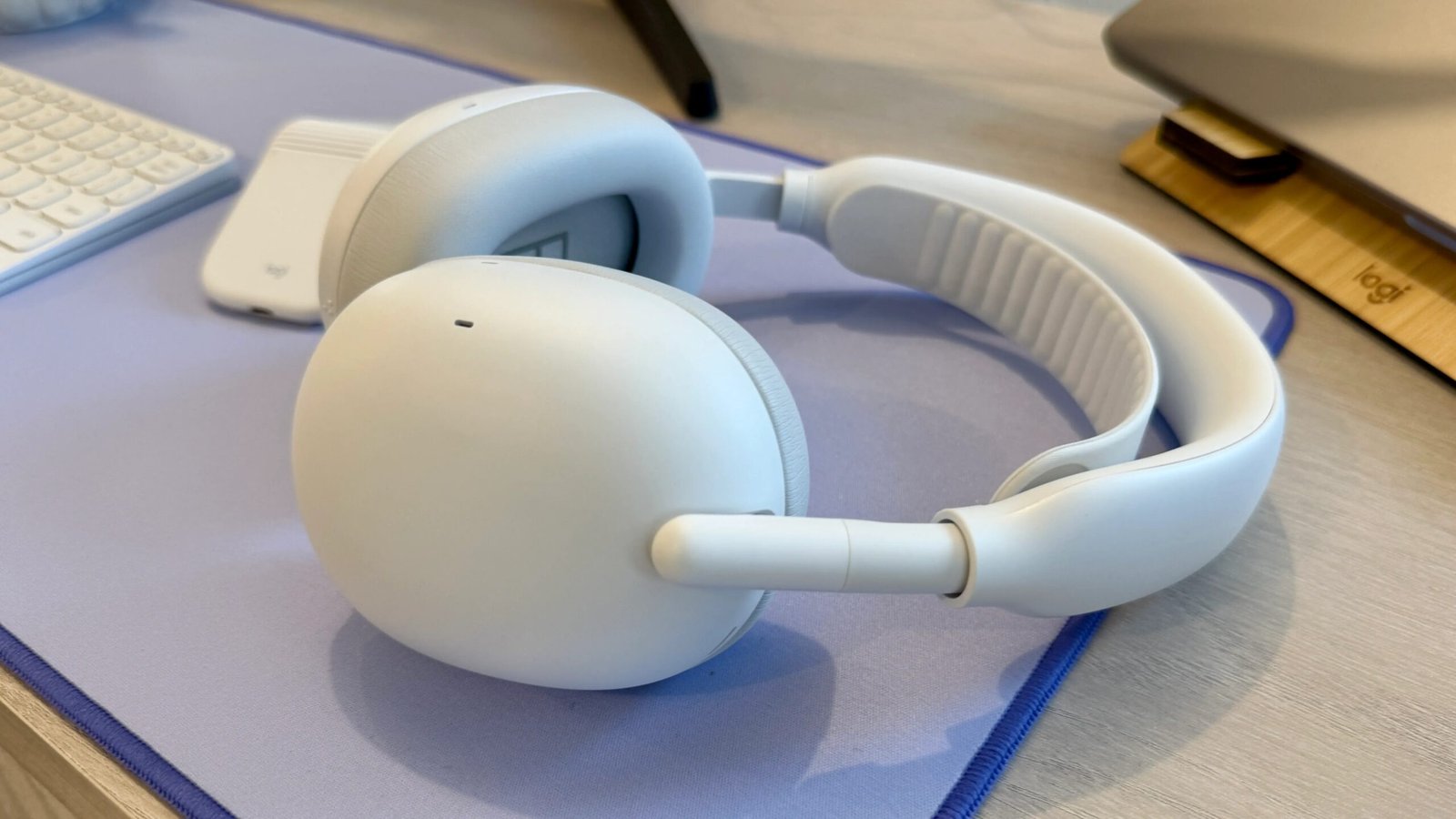
Pros & Cons
-
Lightweight design with no boom microphone -
Comfortable fit with plush ear cushions and headband strap to relieve pressure -
Excellent microphone performance with top-notch background noise reduction -
Decent noise canceling -
Good sound for music listening -
Earpads and headband strap are replaceable -
USB-C audio
-
Earpads can steam up your ears if you’re in a warm environment -
No wear-detection sensors that pause your audio when you take the headset off -
Zone USB-C Receiver for seamless wireless PC connectivity is only included with Zone Vibe Pro for Business model
Earlier this year, I reviewed Jabra’s Evolve3 85 and Evolve3 75 headsets, which leave off the flexible boom microphone to make them look like your typical premium over-ear and on-ear headphones so you can use them as everyday cans when you’re not using them for work calls. Logitech’s answer to Jabra’s hybrid headphones/headsets is its new boomless Zone Vibe Pro.
While the Logitech headset, available in graphite, black, lilac and white, doesn’t have the slim design (or quite the build quality) that I found so appealing about the Evolve3 series, the Vibe Pro is significantly less expensive at $260 and delivers similar performance, with excellent noise reduction during calls, solid noise canceling and respectable sound quality for music listening. Despite some small drawbacks, it earns a CNET Editors’ Choice award in the headset category.

Logitech Zone Vibe Pro design
Logitech makes a variety of gaming headsets, and there’s a hint of that in the Vibe Pro’s design, which reminds me of Sony’s Inzone H9 II headset ($248) that I tested. That Sony model, like most gaming headsets, has a boom mic, whereas this model doesn’t. The Vibe Pro’s headband and arms also shared some similarities with Sony’s WH-1000XM6 headphones, though the headband and arms are wider on the Vibe Pro, and the Sony XM6 has a dual-hinge design; this model has only a single hinge (the headset folds flat but doesn’t fold up).
Weighing 10.2 ounces or 290 grams, the Vibe Pro is pretty lightweight, though Sony’s WH-1000XM6 and Bose’s QuietComfort Ultra Headphones (2nd Gen) are a little lighter, with the Sony at 254 grams and the Bose at 262 grams. Meanwhile, the Jabra Evolve3 85 is even lighter at 220 grams.
The faux leather earpads feature plush memory foam for a comfortable fit. They’ll also get a good seal that passively blocks out a lot of ambient noise, which improves overall noise-canceling performance when it’s activated. I have medium-size ears, and the well of the earcups was deep enough for them. For those with extra-large ears, I can’t guarantee they won’t rub against the drivers.

The headband is well-designed to conform to the shape of your head without the arms sticking out too far, and the removable, replaceable headband strap helps relieve pressure on the crown of your head. The only issue I had was that the Vibe Pro steamed up my ears a bit more in warmer environments than some over-ear headphones I’ve tested.
The Vibe Pro is equipped with physical control buttons, and I had no issues with them. There’s a rocker button for volume control on the left earcup (I like that the earcups are clearly labeled “L” and “R”), along with a call answer/end button, power/Bluetooth slider switch and microphone mute button. The right earcup has a button to toggle between noise-canceling modes and transparency, as well as a multifunction button that lets you access Microsoft Teams when it’s running or the Logi Tune Desktop app when it isn’t.
A simple neoprene travel pouch is included for storing and protecting the Vibe Pro. It’s a bit cheap, but it takes up less space in your bag than a hard case. It also has a separate little pocket inside for storing Logitech’s Zone USB-C Receiver (for more seamless PC connectivity), which comes with the Zone Vibe Pro for Business ($280) but not with the native Bluetooth model I tested. The Zone USB-C Receiver is sold separately for $50.

Logitech Zone Vibe Pro noise-canceling and voice-calling performance
The two most important qualities in a work headset are comfort and voice-calling performance (video conferencing performance goes hand in hand with voice-calling performance). Many headsets, including plenty of gaming headsets, have good sound for music, but headset makers seem less inclined to tout overall sound quality and noise-canceling performance in favor of comfort and microphone quality.
Logitech says the Zone Vibe Pro, like the Jabra Evolve3 85, has six omnidirectional MEMS microphones for both ANC and calls. By comparison, the Sony WH-1000XM6 has 12 microphones. More mics don’t automatically translate into better performance, but it can help, depending on the microphones’ quality, along with the quality of the software powering the audio filtering.

The advantage of a flexible boom microphone is that it brings the mic closer to your mouth, so people can hear you better without needing to speak loudly. But more and more everyday headphones are now equipped with advanced beam-forming microphones and noise-reduction algorithms that are able to isolate your voice while eliminating background noise (Logitech calls it AI-powered voice isolation), so it’s not surprising that companies like Logitech and Jabra are ditching the boom mics for designs that can do double-duty as your daily-driver headphones.
I tested the Zone Vibe Pro in the noisy streets of New York, and callers said they couldn’t hear any background noise, even when I was near a construction site where workers were drilling into bedrock. Sometimes when I spoke, there was a touch of static or a whooshing noise (it’s a little hard to describe noise, but it was faint), and occasionally my voice warbled slightly, but for the most part, callers said I sounded pretty clear in these harsh conditions that also included some wind noise.
You can adjust the level of sidetone in the Logi Tune app, which lets you hear your voice in the headphones as you talk, so you don’t have to shout unnecessarily. I set it at about 50% because if you turn it up higher, you also hear some ambient sound, so it becomes a little harder to hear callers if you’re in a noisy environment like a cafe. Overall, I give the Zone Vibe Pro an A for voice-calling performance.
Noise canceling is more in the B-plus to A-minus range (as is the transparency mode that lets ambient sound into the headphones and comes across as pretty natural-sounding, though not as natural as Apple’s transparency mode). You can set the noise canceling to low, high, adaptive or off, and Logitech sees people using the Zone Vibe Pro in an open office or a cafe, where you’d want to muffle chattering voices and more sounds in the mid-to-high frequencies, which are harder to muffle than lower frequencies (like the engine noise on a plane).
The Zone Vibe Pro’s noise canceling does a decent job across the frequency spectrum, but it’s not quite as effective as the top-tier noise canceling you get from headphones like the Sony WH-1000XM6, Apple AirPods Max 2 or Bose Quiet Comfort Ultra Headphones. For instance, that same drilling from the construction site near my apartment I can hear in my home office 13 floors up from the street. The Zone Vibe Pro muffled most of the sound, but I could hear it ever so faintly. Those other headphones completely eliminated it.
Zone Vibe Pro sound quality
The Zone Vibe Pro is equipped with 40mm drivers and delivers very respectable sound quality, with punchy bass, good clarity and a reasonable amount of openness (a fairly wide soundstage). Compared with the significantly more expensive Sony WH-1000XM6, the headset doesn’t sound quite as refined or accurate. Premium headphones like the Sonys just sound a little cleaner and have more depth to their sound with better separation between instruments and placement in the soundstage (along with a little more sparkle in the treble). That said, after testing Logitech’s less expensive Zone Wireless 2 ES ($160) on-ear headset, I was pleasantly surprised by the Zone Vibe Pro’s sound quality. Not that the Zone Wireless 2 ES sounds bad for music listening; you just probably wouldn’t want it to be your headphone for both work and entertainment.
As you’d expect from a headset, the Vibe Pro is strong in the midrange (where voices live), with singers’ voices sounding clear and natural. At the default sound setting, the sound profile for music listening seems fairly typical, with a touch of bass and treble push (U-shaped curve) to give a little excitement to the sound. But the sound was warm enough — and the treble performance was good enough — to keep me from experiencing listening fatigue over a longer listening session.
There’s a five-band equalizer that allows you to dial in a custom EQ setting along with a few different presets, including bass boost and a podcast setting that accentuates the midrange.

While the Jabra Evolve3 85 has the edge design-wise and at least matches the Zone Vibe Pro’s call quality, the Zone Vibe Pro sounds a little better overall, with fuller sound. Both the Jabra and Logitech models lack support for “hi-res wireless audio” codecs such as LDAC and AptX Lossless (AAC and SBC audio codecs are supported). The Zone Vibe Pro is equipped with Bluetooth 6.0, while the Jabra Evolve3 85 uses Bluetooth 5.3.
The Evolve3 85 has an Enhanced Spatial Sound mode that, while not true spatial audio with head-tracking, shifts where voices are in the soundstage, making them sound like they’re coming from your screen in front of you. The Zone Vibe Pro is also missing that feature, and it doesn’t have wear-detection sensors that pause your audio when you take the headphones off and resume playback once you put them back on (a feature you’ll typically find in this price range). On the upside, to help save battery life, you can set the headphones to turn off after a set period of time in case they accidentally get left on. I set them to turn off after 30 minutes, for example.
As for battery life, it’s rated at 30 hours with noise canceling on and 66 hours with it off at moderate volume levels. Talk time is rated at 18 hours with ANC on and 20 hours with it off. Those numbers are solid, no complaints there, and I should note that if you plug the headset into your computer with a USB-C cord, you can listen to audio while charging the headset. You have to turn the headset off for the USB-C audio to work, and from my tests, I didn’t think the wired sound quality was noticeably better compared with streaming over Bluetooth. Also, the volume seemed a tad lower when connected via USB-C.
I did appreciate that Logitech also included a USB-C-to-3.5mm cable so you can use these headphones with an in-flight entertainment system. Interestingly, you have to turn the headphones on to use them with that cable. Again, I didn’t think the wired listening this way was any better than wireless listening.
Logitech Zone Vibe Pro final thoughts
The voice-calling performance of consumer headphones continues to improve, and you can find a very small number of options like Anker’s Soundcore Space 2 Pro ($200) that deliver equally good (if not a tad superior) voice-calling performance for less money than this Logitech model. But the Zone Vibe Pro largely lives up to its promise as an excellent headset that’s comfortable to wear and a proficient noise-canceling headphone for everyday use. While its noise canceling and sound quality don’t quite measure up to top headphones like the Sony WH-1000XM6, its performance in those areas is respectable, and its voice-calling performance is top-tier.
As I said, I liked how slim and lightweight the Jabra Evolve3 85 headset is, and its build quality seems a little more premium. But the Zone Vibe Pro costs almost half the price and is far more affordable for average consumers (the Jabra Evolve3 series is sold direct to consumers, but its pricing seems more enterprise-focused).
I do wish the base “native-Bluetooth” Zone Vibe Pro came with Logitech’s Zone USB-C Receiver for more seamless PC connectivity to help differentiate it from other consumer headphones. But, as I said, you can plug the standard Zone Vibe Pro into your computer via USB-C, and if you do want the Zone USB-C Receiver that’s certified for Microsoft Teams as well as for Zoom and Google Meet, I’d suggest buying the Zone Vibe Pro for Business.

See full bio