dailynewsnblog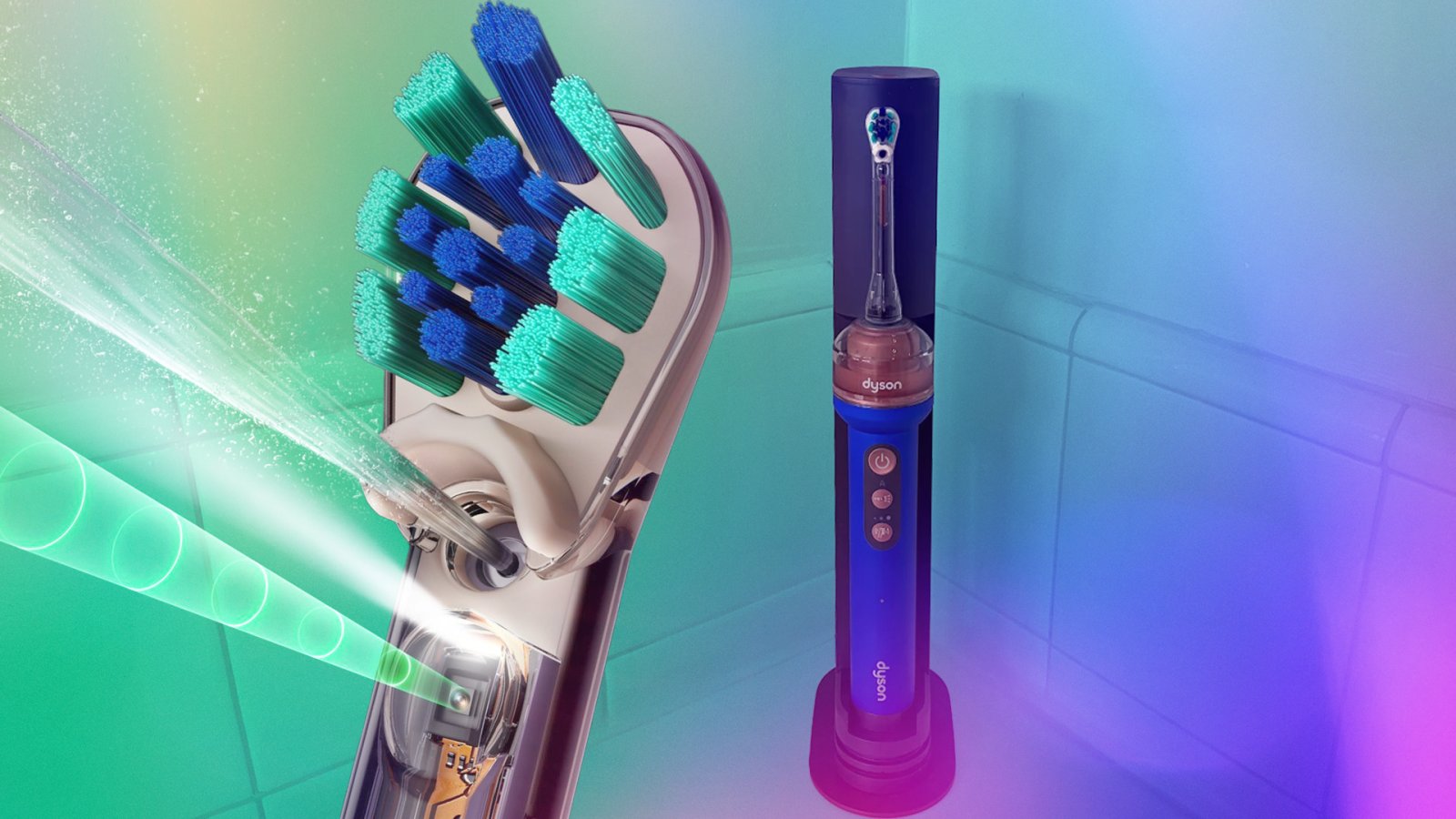
On Sept. 1, Dyson revealed what it called “an entirely new way to clean your teeth.” This is the CameraJet toothbrush, which the company also dubbed the only toothbrush that includes both a camera and a jet. The cost? $500.
The following week, I received a CameraJet electric toothbrush for testing. I turned on the brush to ensure it worked. It did. But right after, I ran into a problem that was a sign of things to come.
My first CameraJet died a quick death
You’re meant to use low-foaming toothpaste and mouthrinse with the CameraJet, but unsure whether my mouthwash is low-foaming, I decided to use water. I filled the docking station with water and pressed the button to send it into the toothbrush’s anti-gravity tank. Then … water leaked everywhere from the tank’s refill nozzles.
I tried several times to make it work without luck, so I decided to fill the tank manually instead. Still, during the leaks, water pooled around the dock and the brush’s charging pins. I tried my best to dry them ASAP, but things weren’t looking good.
After letting the toothbrush charge for a bit, I put what I hoped would be a low-foaming toothpaste on the bristles, went to brush and the toothbrush stopped working within 30 seconds. I tried to reset it, but it wouldn’t turn on again. A red light appeared on the lowest brush intensity, but the manual didn’t explain what that meant.
I put the brush back on the docking station and called it quits, but in the middle of the night, the CameraJet turned on of its own accord and started vibrating. I unplugged it and couldn’t get it to turn on again.

I wasn’t alone
A quick online search led me to another reviewer reporting that their CameraJet also stopped working within 30 seconds. A Reddit thread detailed similar issues reported by multiple users, with one saying they found water inside the battery chamber. The name “ScameraJet” started getting thrown around.
Later, following the instructions in the CameraJet manual, I removed my own brush’s battery — it was indeed covered in water.

When the pricey toothbrush started vanishing from Dyson’s online and physical stores, head of beauty communications Liv Thomas told Wired in September that it wasn’t recalled but was experiencing strong demand and was in short supply while production scaled up.
However, on Oct. 7, a Dyson spokesperson told me via email, “Unfortunately, one production batch of jet tubes had experienced a process issue, creating the potential for water seepage, which affected the performance of a small number of products early on. We made what we believe was the right decision to isolate impacted products, which resulted in a temporary out-of-stock position. We are sorry that we have let down our loyal customers and we will do all we can to support them.”
They added that Dyson is now in full production for the CameraJet and is shipping the product, though it’s currently out of stock on the Dyson US website.
A second attempt: Better, but not perfect
I received my second CameraJet for testing on Oct. 1 and had no leaking problems. The brush also worked, and no water ended up in the battery compartment, so I’ve spent the last week putting it to the test. Here’s what I’ve discovered.

A learning curve
Dyson instructs you to split your teeth into three sections (left, right and center) on both the lower and upper jaw. Then, brush each section for 20 seconds. This differs from other electric toothbrushes I’ve used and the American Dental Association’s guidance, which says to split your mouth into four quadrants and brush each for 30 seconds.
Not a huge deal, but there’s a learning curve.
The CameraJet has a pacer that vibrates to signal when to move on to the next section, and there’s a guided cleaning tutorial in the Dyson app, both of which are helpful. However, I’m still getting used to the differences between the tones and vibrations that indicate the pacer, over-pressure and scrub detection alerts.
There’s also a long list of LED indicators that are difficult to remember without the manual beside you.

The jet works
I’m not sure why, but the jet takes a few seconds to start working. Yet, once it does, it’s cool to feel it targeting each gap between your teeth in a row. It does feel different from a water flosser, though, because the CameraJet uses a quick, conical burst of water, whereas a water flosser uses a continuous stream.
To find out whether the jet actually works, I always use string floss after brushing with the CameraJet, and it does a great job of getting between my teeth, leaving only a tiny amount of plaque on the floss. My teeth also feel clean, even on the lowest of three brushing intensities.

It’s messy and tough to keep the camera clean
The CameraJet can get messy, especially if you’re trying to brush in a way that keeps its camera from getting covered with toothpaste. By the end of my brushing sessions, my bathroom mirror is covered in spray from the jet and I have at least one spot of toothpaste on my shirt. Sometimes, I pause my brushing to rinse and dry the toothbrush because it’s also covered in toothpaste.
It’s difficult to keep the toothpaste on your teeth
When using the CameraJet, I struggle to keep the toothpaste in my mouth, which is important because you want the toothpaste on your teeth while you’re brushing for it to be effective. I’ve used both fluoride and nano-hydroxyapatite toothpaste with the brush and found that the fluoride toothpaste foamed too much to use with the CameraJet.
When the CameraJet was announced, Dyson said it would release its own non-foaming toothpaste and a low-foaming mouthrinse specifically designed for the CameraJet. Both are currently available on the Dyson UK website, but not in the US.
Live-viewing doesn’t seem necessary
In the Dyson app, you can also use your CameraJet’s camera to see a live view of your teeth as you brush. I’ve used this feature a few times, but it doesn’t offer much insight while you’re brushing, as your teeth are covered in toothpaste. You can also use it when you’re not brushing for a closer look at your teeth.
While Dyson states that no images are recorded or stored on the product or in the cloud, it still feels strange having a camera in my bathroom.

Dyson app insights are helpful and necessary
The Dyson app also offers several helpful tutorials for the CameraJet, and it only took a few minutes for my brush to connect. It shows you battery life, the brushing intensity level and which mode your brush is on, which is handy when you don’t want to pull out the manual to decipher what the LED indicators mean.
My favorite features, however, are the brush head status that shows you when to replace your brush head and the “clean sessions” tab, which records your individual brushing sessions, brushing duration and coverage, auto-jet coverage and overscrubbing duration. You can also see your weekly averages for each.
When you click on an individual session, you can learn more about the areas of your mouth that need extra attention.

The dock and travel case take up space
The dock measures 12.4 by 4.13 by 1.97 inches, and it takes up much more space than any other electric toothbrush I’ve tested. The travel case, a plastic cover that goes over the dock, is just as large and would also take up a lot of space in any suitcase.

Is the Dyson CameraJet worth $500?
I don’t think the Dyson CameraJet is worth $500. In fact, it’d be hard to justify paying that much for any toothbrush. While using the CameraJet, I often found myself wanting to swap it for my trusty $50 Oral-B Pro 1000, which is simple and gets the job done.

While the CameraJet has some useful features, it overcomplicates brushing to the point that I don’t want to use it. And it makes a mess in the process.
After all, brushing your teeth shouldn’t be complicated, and electric toothbrushes should make the entire process less of a chore.

See full bio