dailynewsnblog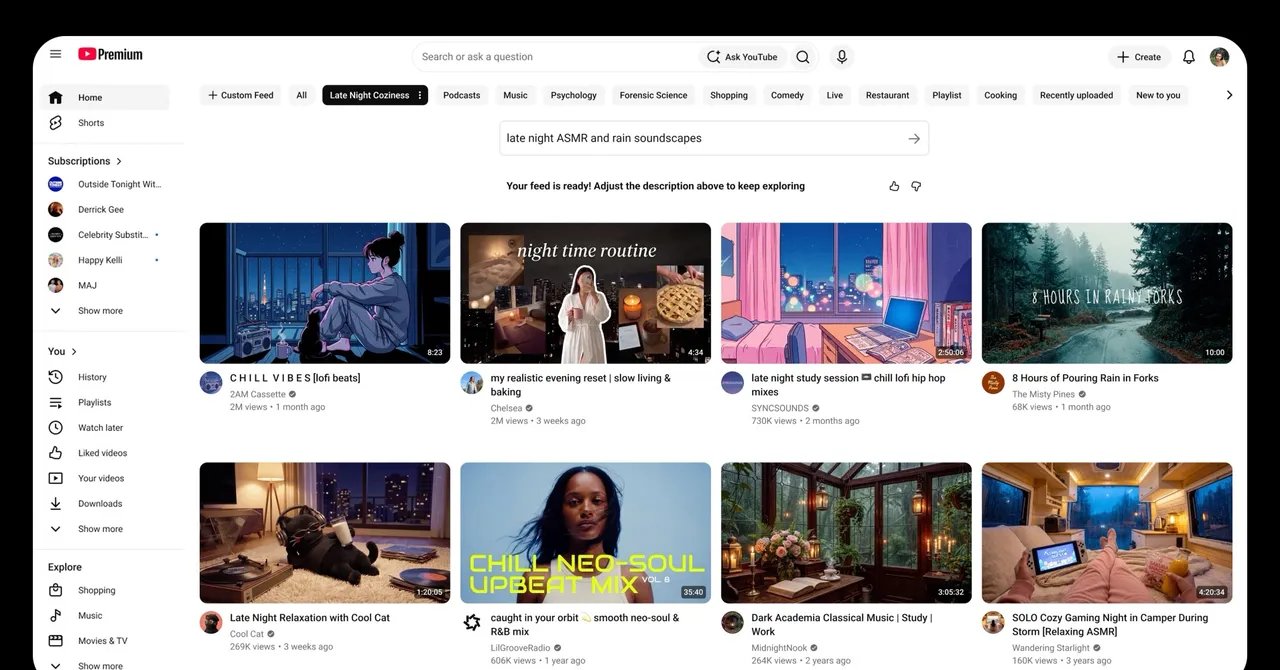
My YouTube algorithm is sacred, with years of data about my preferences and viewing history fermenting into whatever videos it picks for my home screen. YouTube’s algorithm, while not perfect, sure knows what I want to see. The current top three videos on my front page are an Apple Watch analysis, a Big Brother season 28 update, and something called “I Lost to the Muppets” from comedian Chris Fleming. Click. Click. Click.
As part of its Made on YouTube event Wednesday, Google released several new features, including a Custom Feeds button for adjusting what videos pop up on your front page. It’s a rare chance for users to directly tweak their algorithmic feed on YouTube, in ways that go beyond just pressing thumbs up on a video or blocking a creator.
To try it out, users can click the Your custom feeds button below the search bar and type a request for the feed they’d like to see. YouTube uses large language models to process your request and whip up a freshly personalized homepage. “I want a rainy Shanghai vibe: café jazz, street food, and vlogs,” read one of my suggested prompts.

Courtesy of YouTube
YouTube tested Custom Feeds as an experimental feature earlier this year, before deciding that it was a good fit. The company plans to roll it out soon as an option for all US users, whether viewing on mobile, desktop, or TV.
“Users are always telling us that they want more control,” says Emily Moxley, YouTube’s vice president of product management. “They want more ability to steer their algorithm. With custom feeds, we’re giving them a natural-language way that they can do that. They can tell us exactly what they want.”
So, I told YouTube exactly what I wanted to see: “Gooey macaroni and cheese recipe videos, Caleb Hearon clip compilations, and crystal singing bowl videos under 15 minutes.” And the feed it generated was exactly that. My perfect zen blend for rotting on the couch after a long day. YouTube suggested potential additions to expand my prompt, like “uploaded this month” and “without talking or commentary.” Not bad.
The Custom Feeds button sits next to other topic tabs below the search bar, like “Music” and “Podcasts.” Experimenting with this tool doesn’t replace your standard homepage, which you can access anytime by clicking the “All” button. Users can save multiple custom feeds.