dailynewsnblog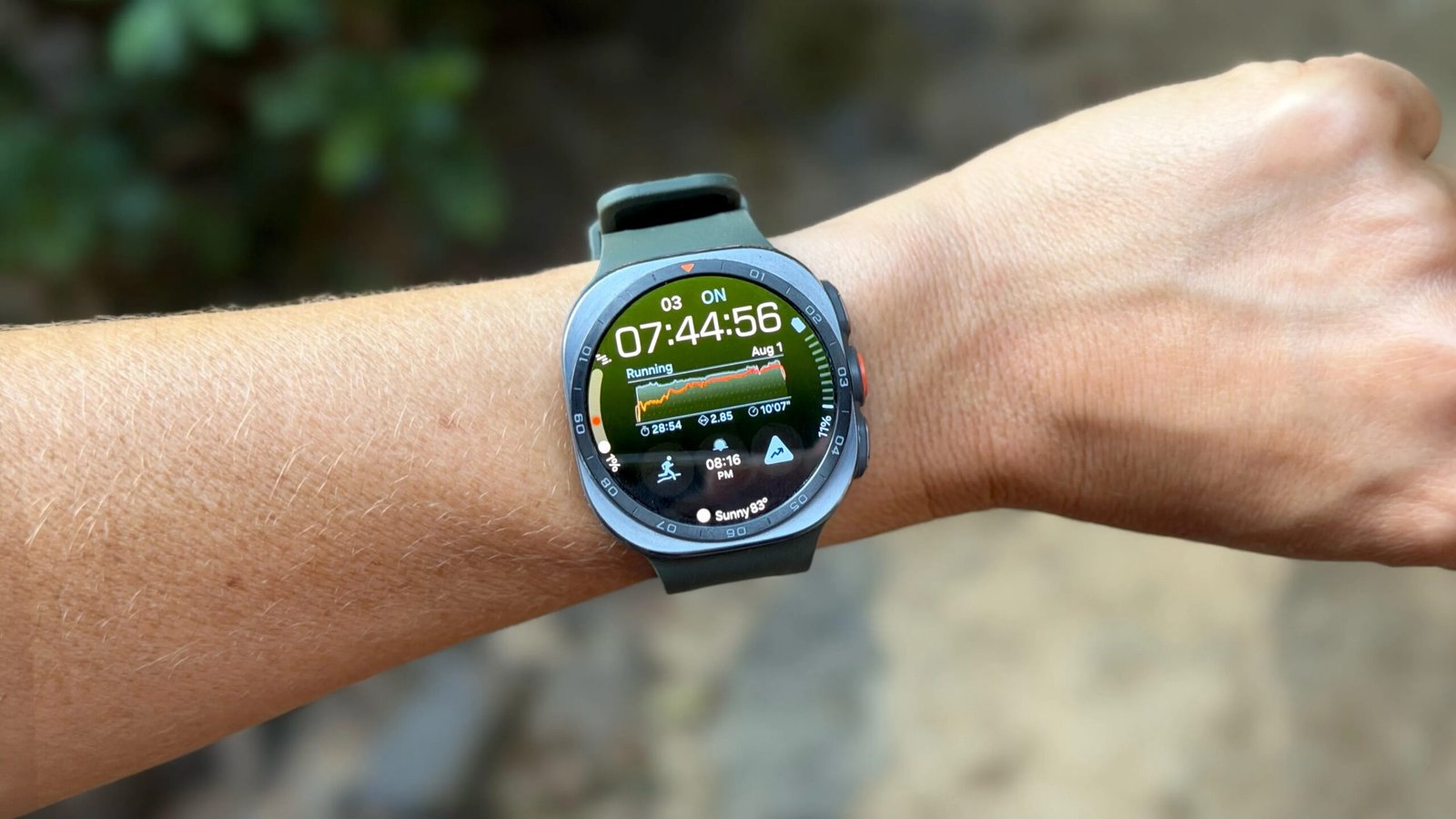

The Galaxy Watch Ultra 2 can withstand the elements. / Vanessa Hand Orellana/CNET
Galaxy Watch Ultra 2
Best Galaxy Watch
Pros & Cons
-
50-hour battery life (always-on) -
Durable titanium design -
Fast Snapdragon Wear Elite processor -
Hands-free Gemini (raise-to-talk)
-
Expensive at $700 ($50 more than previous gen) -
Trail map search isn’t working yet -
Dive mode unavailable at launch -
Feels bulky for sleep tracking
I’ll admit the Galaxy Watch Ultra 2 isn’t my usual type of wearable. It’s bigger and bulkier than what I normally wear on my wrist, and pricier than I’d normally spend on a smartwatch. But after three weeks of testing, it’s grown on me.
The $700 Ultra 2 is the best Galaxy Watch money can buy. It’s a luxury smartwatch with enough battery life, durability and outdoor features to hold its own both at the office and on the trails.
Whether it’s worth the premium depends on what you want from a watch. If all you need is a great everyday smartwatch, you can get much of the same experience for less with the Galaxy Watch 9. If you’re after a dedicated sports watch with weeklong battery life and every running metric imaginable, there are better options, like the Garmin Forerunner. But if you want a Wear OS smartwatch that can also handle the off-roading of a weekend adventure, the Galaxy Watch Ultra 2 is it.
More power, longer battery life
There are two big reasons to consider upgrading to the Ultra 2: battery life and processing power. Samsung increased the battery to 800 mAh, up from the 590-mAh capacity in the first Galaxy Watch Ultra and the largest in any Galaxy Watch so far, and swapped its Exynos chip for Qualcomm’s Snapdragon Wear Elite processor. Together, they make power-hungry AI features like raise-to-talk Gemini feel seamless and hands-free interactions much more practical.
I still haven’t unlocked Gemini’s full potential, but it’s already become one of my favorite features. I’ve used it to pull up recipes and check whether food in my fridge has expired, all without getting meat juice on my phone. Gesture controls (pinch and flick, which aren’t new to this model) complement that hands-free experience nicely.
The bigger battery is just as welcome. After three weeks of testing, I’ve topped out at around 50 hours (roughly two full days and nights) with the always-on display enabled. That’s still short of Samsung’s 60-hour claim, but I’ve consistently seen battery life improve as the watch learns my habits, so I wouldn’t be surprised if it gets even better over time.
Though that still doesn’t come close to dedicated sports watches like Garmin’s Fenix line that can last a week or more on a charge — it’s nearly double what you’d expect from Samsung’s standard Galaxy Watch lineup. It’s helped with overnight sleep tracking and longer trail runs that would normally eat up half my battery. Switching from the always-on display to raise-to-wake should stretch it even further, though I haven’t tested exactly how much.

Design: Buttoned-up mountain man
As a woman with a 6.5-inch wrist, this wouldn’t be my first choice in terms of style or size, but it’s more comfortable and elegant than some of the other mountain-man-inspired sports watches I’ve tested. It’s a slight step-up from its predecessor, though you have to look closely to catch the differences.
It’s made of the same titanium case as the previous Galaxy Watch Ultra (compared with the aluminum used on the standard Galaxy Watch), paired with a scratch-resistant sapphire crystal display, but it’s now thinner and lighter. Samsung even managed to squeeze in a little more screen real estate into that smaller body (1.5 to 1.52 inches). At 47mm, it has the largest and brightest screen in the line-up. It also takes the crown as one of the most durable Wear OS watches you can buy, with a water and dust resistance rating of IP68 and 10ATM.
The bands have also been slimmed down and designed for better breathability. They keep the same proprietary mechanism as the original Ultra, but they allow the watch to sit flatter against the wrist, which Samsung says improves sensor contact and might explain some of the accuracy gains I saw in my testing (more on that in the next section).
The Galaxy Watch 2’s display brightness maximum of 5,000 nits sounded like just another bragging point until I found myself mid-run trying to read directions off my wrist with the mid-morning sun beating down my back. I never had to shield the screen from the direct sunlight, and it adjusted seamlessly as I weaved between canopy cover and exposed trail.
You can also program the additional side button that sits between the home and power button as a flashlight. At full brightness, it’s powerful enough to light up my daughter’s nursery during my midnight check-ins.
Sleeping in it, on the other hand, hasn’t been my favorite. I’ve managed to keep it on throughout the night, but realistically, it’s not something I’d choose to wear to bed past the review period. My tolerance threshold for wearing a device while I sleep is low, and the sheer size of this watch means it doesn’t meet it. Just keeping it real — some of you may have more relaxed preferences for keeping wearables on overnight.

Trail running is solid, but health features involve homework
The Ultra 2 tracks everything you’d expect from a high-end smartwatch: heart rate, sleep, blood oxygen levels, ECG sleep apnea alert and even blood pressure (calibrated first with a blood pressure cuff). It also includes newer additions like antioxidant levels, body composition and AI-powered coaching.
It sounds impressive on paper, but after the initial wow factor of taking a body fat scan from my wrist or checking antioxidant levels from my fingertip, I struggled to turn those metrics into something actionable. And because most metrics don’t surface as part of my daily routine, I mostly forgot they were there.
I have scenic hiking trails right outside my front door, so the feature I was most excited to try was Trail Running. Exclusive to the Ultra 2, it shows real-time elevation data during your climbs and lets you download trail maps for offline access, so you can get turn-by-turn navigation either through the watch’s speaker or a connected Bluetooth headset.
 Vanessa Hand Orellana/CNET
During my 5-mile trail run, the watch alerted me whenever I drifted off course and gave me a bird’s-eye view of my progress. The catch is getting new trails onto the watch. The built-in trail search wasn’t functional during my testing, so the only way to load a route was by importing an existing GPX file. Luckily, I already had one saved from a previous run. If I hadn’t, I’m not sure I would’ve bothered.
Samsung says it’s working on a fix, and I’ll update this review once it’s available, but it’s a little alarming that a headline feature trumpeted at the phone’s launch isn’t working as intended so close to when the watch starts shipping to customers on Friday.

During the trail run, the watch also estimates sweat loss using a combination of environmental factors and biometric data, providing you with hydration reminders along the way. [Read more about my trail run here.]
The Ultra 2 has another signature perk talked up during the Unpacked launch event — a dedicated feature for recreational diving. Samsung is partnering with dive company Mares for an app exclusive, but it won’t be ready until later in the year.
Measuring long-term trends
The new Vitals feature tracks your baseline metrics across heart rate, respiratory rate, blood oxygen and skin temperature and can flag when one or two are out of range (a sign you may be getting sick). It needs at least seven nights of data to unlock, but once it does, you can miss a day or two, and it’ll still pick up where you left off.
One of the more practical additions for me is that it now surfaces temperature variation within the cycle-tracking widget, so you can see how it correlates with ovulation and menstrual trends.
There’s also a new Cardio Load metric that gauges the intensity of your workouts to help determine whether you’re pushing too hard, not hard enough or recovering appropriately before your next training session. After my 5-mile trail run, it showed I was 98% over target, which indicated I needed to take it easy the next day (I did).
Heart Health hub can interpret data from sleep, exercise, BMI and blood pressure to grade your heart health, giving you a tangible goal to beat or improve on. It requires consistent wear and overnight tracking to unlock, but despite wearing it for over three weeks, it still hasn’t surfaced my results. (I’ll update this review once it does.)
The most interesting addition to the Health app, for me, was Fitness Index. It starts with a body composition assessment that estimates metrics like muscle mass and body fat, then combines those results with your workout data, including strength, cardio, flexibility, endurance, exercise heart rate and walking speed, to establish your baseline fitness and build a personalized training plan.
The watch uses the same electrodes as its ECG feature, built into the two side buttons, to estimate body composition. To take the measurement, you rest your middle and ring finger on the buttons (don’t press them) for about a minute while the watch sends tiny electrical impulses through your body, similar to what a smart scale does.
Once you’ve completed the assessment and logged a few workouts, the app builds a training plan based on your goals, whether that’s improving your overall fitness or focusing on specific areas. Mine prescribed two and a half hours of exercise each week, split across strength, cardio, flexibility and endurance, and recommended workout videos to help me get there, though some require a $10-per-month iFit subscription.
Because my score was relatively high across the board, I had no real motivation to overhaul my routine, so I just went back to my usual combination of running and Pilates and called it a day. The bigger challenge for me is finding time to learn a new routine and change habits, and even the smartest watch can’t solve that.
One thing I do appreciate is that Samsung isn’t locking these core health metrics behind a subscription the way that other companies like Whopp and Oura do. It’s worth noting, though, that many of these features have not received FDA clearance, so they’re best treated as conversation starters with your doctor, not diagnoses.
It’s also difficult to independently verify the accuracy of many of these health metrics without access to clinical-grade equipment.
Accuracy: More than just a beat better
I may have to take Samsung’s word on things like body composition and antioxidant levels, but I did put the Ultra 2 through my usual accuracy testing: Running around a track while wearing a Polar chest strap as a heart rate control, measuring distance over a known mile and comparing the watch’s step count against a manual clicker.
Step count
| Clicker | Galaxy Watch Ultra 2 | Error | % Error | |
| Step Count | 3,000 | 2,989 | 11 | 0.4% |
Distance
| Track | Galaxy Watch Ultra 2 | Error | % Error | |
| Lap 1 | 0.25 | 0.24 | 0.01 | 4% |
| Lap 2 | 0.50 | 0.49 | 0.01 | 4% |
| Lap 3 | 0.75 | 0.74 | 0.01 | 4% |
| Lap 4 | 1 mile | 1 mile | 0 | 0% |
Heart rate
| Avg. Heart-Rate Error (BPM) | Avg. Heart-Rate Error (%) | |
| Samsung Galaxy Watch 8 Ultra 2 | 1.49 | 1.21% |
| Samsung Galaxy Watch 8 | 10.51 | 6.66% |

You can dig into the numbers in the charts above, but here’s the headline: The Galaxy Watch Ultra 2 performed exceptionally well across all three tests, with the biggest improvement showing up in heart rate tracking.
On average, the Ultra 2 measured within two beats per minute of the Polar chest strap, translating to less than a 2% error rate. That’s roughly a 5% improvement over the Galaxy Watch 8 I tested earlier this year, and puts it in the same league as last year’s category leader, the Apple Watch Series 11.
Samsung says the Ultra 2 uses the same BioActive sensor as its predecessor, so it’s hard to pinpoint exactly where the improvement comes from. It’s likely a combination of the redesigned bands providing better sensor contact, refinements to Samsung’s algorithms and the new Snapdragon processor processing that data in real time.
Software and smarts
One of the biggest advantages of the Ultra 2, especially if you have a Samsung phone, is how familiar everything feels. That’s not exclusive to the Ultra 2, but it is what separates it from a dedicated sports watch. There’s no learning a new platform or ecosystem, and it picks up where you left off on your phone, making the handoff between the two feel seamless.
The redesigned Samsung Health app also makes it much easier to find information. Plus, the Wear OS app selection is still leagues ahead of what you’ll find on most sports watches, with full WhatsApp support, Google Maps and Gemini among my favorites. The Ultra 2 also ships with Wear OS 7, and Samsung is promising five years of major Wear OS updates and security patches.
Should you buy it?
If you’re looking for a step up in your Galaxy Watch experience and are willing to pay a premium for battery life and durability, this won’t disappoint. It’s a premium smartwatch that can also pull double duty as an outdoor companion, as long as you don’t expect it to go as far or last as long as a dedicated sports watch.
But if your budget isn’t quite there — $700 on a smartwatch is a lot, after all — and you don’t need LTE or two-day battery life, the 44mm Galaxy Watch 9, or even older Galaxy Watch models, will still give you a lot of the same health features and my favorite flex: Gemini on the wrist.

See full bio