dailynewsnblog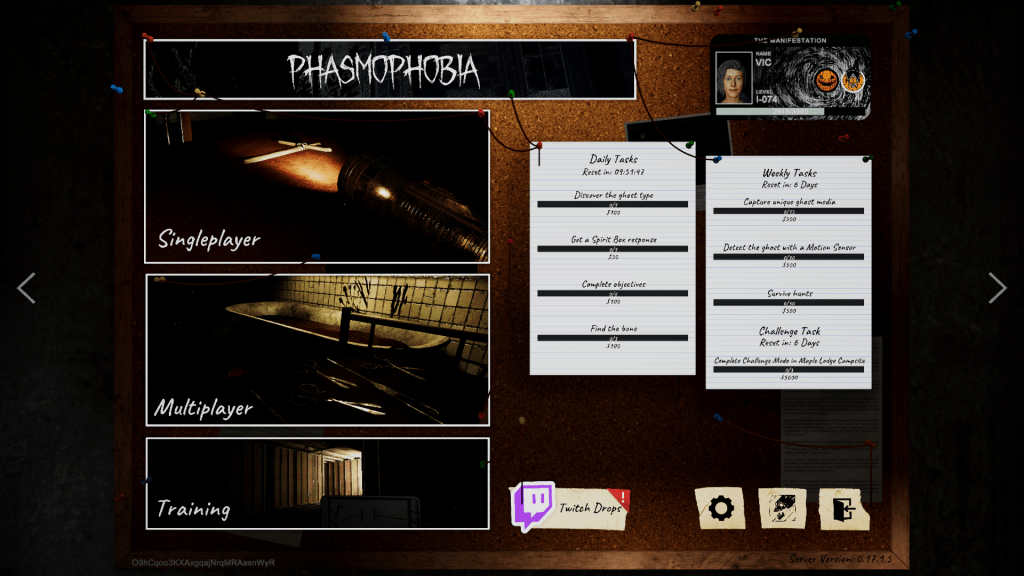
In Phasmophobia, successfully identifying the ghost, capturing media, collecting the bone, and completing specific objectives during a contract can earn you XP (AKA experience). Players level up their character by meeting the required XP threshold, with that number increasing as you progress to higher levels, and each new level unlocking rewards such as cash bonuses, new equipment and maps, and more challenging difficulty levels. But when you reach level 100, you have a choice: continue enjoying the perks of your hard-earned cash and equipment, or Prestige, which resets your equipment, level, and money in return for a new badge and ID card title.
Prestiging isn’t mandatory–you can choose to ignore the mechanic and level up to level 9,999 instead–but it does offer a new challenge for ghosthunters. While you keep the difficulty levels, maps, and trophies you have previously unlocked, you essentially start from scratch otherwise, forcing you to identify the ghost with only the base equipment and, once again, gradually work toward unlocking higher-tier equipment and increasing your funds.
Below, we explain how to Prestige in Phasmophobia, how it actually works, and the rewards you’ll earn at each new Prestige level.
How to Prestige in Phasmophobia

To Prestige in Phasmophobia, you first need to reach player level 100. Once you have, return to the main menu board (the screen that shows the option for singleplayer, multiplayer, etc.) On the upper-right corner of the board, you’ll see your player ID card. If you’re eligible for Prestige, there will be a blue ‘Prestige’ button below your card.
If you’re sure you want to Prestige, click the button, and a screen will pop up that explains that you can unlock a new badge and themed ID by Prestiging, and shows a preview of what you’ll unlock, but warns that all your money, equipment, and upgrades will be lost, forcing you to progress through the leveling system again. If you’re sure you want to proceed, select the ‘Prestige’ button in the bottom-right corner and then select ‘Yes’ on the following screen that asks (again) if you’re sure you want to proceed.
You’ll then have your player level reset to 1, but there will be a Roman numeral in front of the number that indicates your Prestige level. So, for example, if you Prestige for the first time, your ID will now display “I-001.” All equipment and upgrades you previously bought and unlocked, and all your money, will also be wiped, but you will have unlocked a cool ID card and badge that you can find under the ‘Customization’ menu, and (up to Prestige 10) you also unlock an additional loadout setup slot.
You can Prestige at any time after you reach level 100, so if you still have unfinished business, such as higher-tier equipment to unlock, are heavily dependent on higher-tier equipment, or simply don’t want to progress through the level system again, you can always Prestige at a later date–or never.
What is the max Prestige level in Phasmophobia?
The maximum Prestige level in Phasmophobia is currently 20, indicated by an “XX” in front of a player’s level on their ID card. Once you do Prestige, you can level up normally to level 3,999, with the option to Prestige again offered at level 100. As such, the maximum overall level available in the game right now is “XX-3999.”
All Prestige levels and rewards in Phasmophobia


If you do decide to Prestige, you’ll receive a new ID badge with a new ghosthunter title, Prestige badge, and (up to Prestige 10) a permanent new loadout slot. You can preview these awards (apart from the loadout slot) in the ‘Customization’ menu, though you won’t be able to use them until they’re unlocked. Below are the rewards available at each Prestige level:
| Prestige Level | Title | Rewards |
| 1 | Recruit | Recruit Card 1 Recruit Badge 1 Additional loadout slot |
| 2 | Investigator | Investigator Card 1 Investigator Badge 1 Additional loadout slot |
| 3 | PVT. Investigator | PVT. Investigator Card 1 PVT. Investigator Badge 1 Additional loadout slot |
| 4 | Detective | Detective Card 1 Detective Badge 1 Additional loadout slot |
| 5 | Technician | Technician Card 1 Technician Badge 1 Additional loadout slot |
| 6 | Specialist | Specialist Card 1 Specialist Badge 1 Additional loadout slot |
| 7 | Analyst | Analyst Card 1 Analyst Badge 1 Additional loadout slot |
| 8 | Agent | Agent Card 1 Agent Badge 1 Additional loadout slot |
| 9 | Operator | Operator Card 1 Operator Badge 1 Additional loadout slot |
| 10 | Commissioner | Commissioner Card 1 Commissioner Badge 1 Additional loadout slot |
| 11 | Commissioner | Recruit Card 2 (Animated) Recruit Badge 2 (Animated) |
| 12 | Commissioner | Investigator Card 2 (Animated) Investigator Badge 2 (Animated) |
| 13 | Commissioner | PVT. Investigator Card 2 (Animated) PVT. Investigator Badge 2 (Animated) |
| 14 | Commissioner | Detective Card 2 (Animated) Detective Badge 2 (Animated) |
| 15 | Commissioner | Technician Card 2 (Animated) Technician Badge 2 (Animated) |
| 16 | Commissioner | Specialist Card 2 (Animated) Specialist Badge 2 (Animated) |
| 17 | Commissioner | Analyst Card 2 (Animated) Analyst Badge 2 (Animated) |
| 18 | Commissioner | Agent Card 2 (Animated) Agent Badge 2 (Animated) |
| 19 | Commissioner | Operator Card 2 (Animated) Operator Badge 2 (Animated) |
| 20 | Commissioner | Commissioner Card 2 (Animated) Commissioner Badge 2 (Animated) |