dailynewsnblog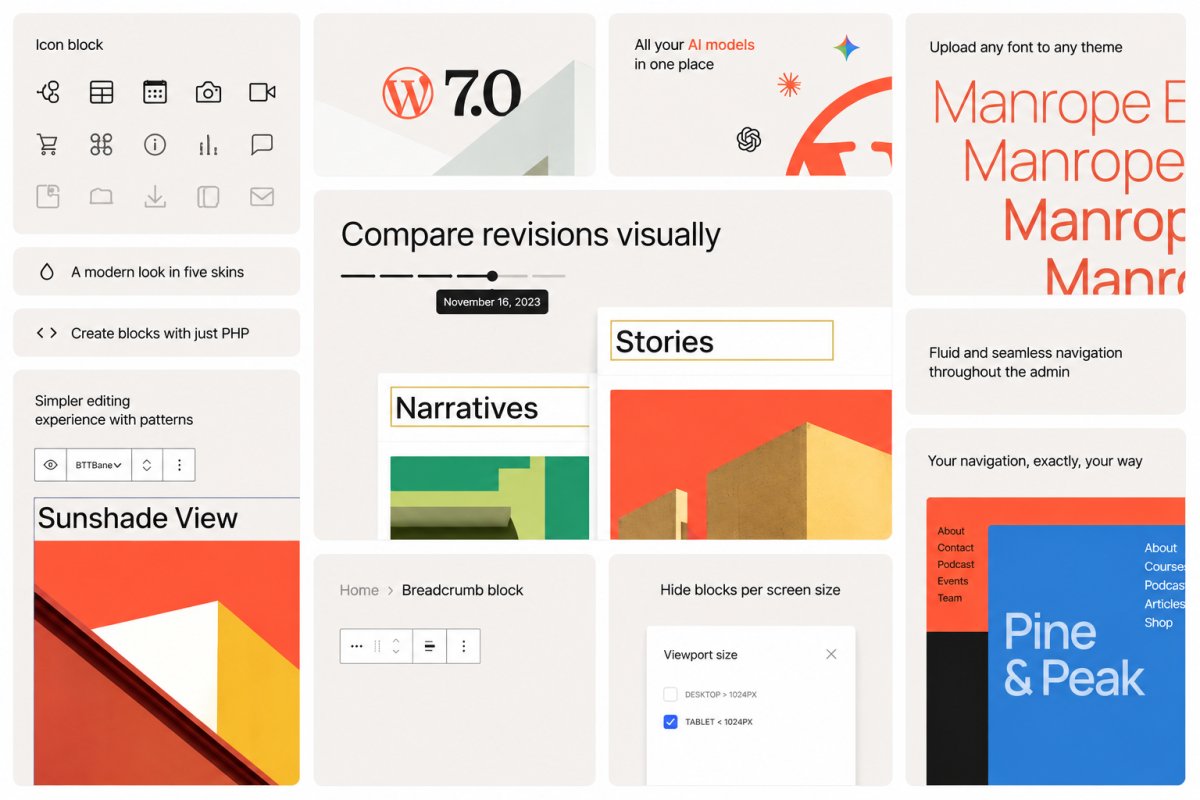
WordPress 7.0 “Armstrong” has landed. This major release makes WordPress more connected and easier to shape around the way you work.
WordPress 7.0 includes both immediate editor improvements and deeper foundational changes. Some improvements are visible right away, like visual revisions, responsive controls, and a cleaner dashboard. Others work behind the scenes are more foundational, giving plugins, tools, and AI services a more consistent way to work with WordPress over time.
The result: A release that makes everyday site work smoother and opens the door to optional AI tools that actually feel a part of WordPress.
For a deeper technical look, check out the WordPress 7.0 Source of Truth.
What’s new in WordPress 7.0
WordPress 7.0 brings updates across AI, editing, design, performance, accessibility, and developer tooling. These changes affect how you build, update, and manage your sites.
WordPress 7.0 updates include:
- AI foundations: The AI Client, Connectors API, and Connectors screen give WordPress a more consistent way to connect with AI providers and external services.
- Editing and admin improvements: Visual revisions, a refreshed dashboard, smoother transitions, Command Palette access, and broader font management make everyday site work clearer.
- Flexible design controls: Custom navigation overlays, responsive block visibility, and pattern editing make it easier to shape pages without adding workarounds.
- New and improved blocks: Breadcrumbs, Icons, gallery lightbox improvements, Heading block updates, and block-level styling controls bring more practical tools into the editor.
- Performance, accessibility, and developer updates: Under-the-hood improvements support faster loading, better editor stability, stronger accessibility, and more consistent foundations for plugins and custom builds.
Building a foundation for AI workflows
WordPress 7.0 introduces a new shared AI layer designed to make AI tools feel more native across WordPress.
Instead of every plugin building its own separate AI setup, WordPress now includes a common system for connecting tools and services. Plugins can communicate with AI models such as Claude, ChatGPT, and Gemini through the new AI Client. The Connectors screen provides site owners with a single place to manage those integrations.
Note: These AI features are optional and need to be enabled by the site owner. Nothing is automatically shared with AI services when WordPress 7.0 is installed.

The optional AI plugin already brings features like title and excerpt generation, image generation and editing, and suggested alt text directly into the editor. As more plugins build on the same system, AI tools across WordPress become easier to use, manage, and extend.
On WordPress.com, this builds on AI tools already available across the platform, including the AI Assistant, Claude connections, and WordPress Studio workflows.
Want to understand how this all fits together? Take a closer look at how WordPress 7.0 is building the foundation for AI-powered sites.
Creative freedom inside the editor
Visual revisions make it easier to understand changes in a post or page. Instead of scanning a dense comparison view, you can review revision history with visual markers, navigate versions, and restore the one you want with greater confidence.
The dashboard also feels more modern and cohesive. WordPress 7.0 introduces a new default admin color scheme, smoother screen transitions, and a Command Palette shortcut in the top admin bar for faster access to tools.
Font management is also easier. The Font Library now works across block, hybrid, and classic themes, giving more sites one place to browse, install, upload, and manage fonts.
A new canvas for every screen
Designing for mobile used to mean making compromises. WordPress 7.0 changes that with a dedicated canvas for navigation overlays, responsive block visibility, and simpler pattern editing.
Navigation overlays now have their own editing canvas, allowing mobile menus to go beyond a simple list of links. You can start with a template or build your own overlay with blocks, columns, typography, and custom close buttons.
Responsive block visibility lets you choose which blocks appear on desktop, tablet, or mobile. That makes it easier to create cleaner layouts for different devices while keeping alternate versions available as you iterate.
Patterns are also simpler to update. A pattern can behave like a single block, so you can swap text and images or adjust styles without digging through every nested block. Advanced controls are still available when you need them.
Flexible design tools for richer layouts
WordPress 7.0 brings more practical control into the editor, making it easier to shape pages without relying on extra tools for every small design need.
The new Breadcrumbs block helps visitors understand where they are on a site, while the Icon block adds simple visual cues from a built-in library. Gallery lightbox improvements make image browsing smoother, and Heading block updates make it easier to work with page structure.
The same idea carries through to layout and styling. Responsive block visibility lets you choose which content appears on different screen sizes, while block-level CSS gives more control over individual blocks when a page needs a custom touch.
Taken together, these updates make WordPress feel more flexible in the places site owners work most: building pages, refining layouts, and helping visitors move through a site more easily.
A stronger platform for WordPress development
WordPress 7.0 provides developers with a more consistent foundation for building plugins, blocks, patterns, and site-editing experiences.
The release includes expanded APIs, PHP-only block registration, a more extensible Site Editor, and routing improvements that make it easier for plugins to build custom Site Editor pages.
These updates will not be visible to every site owner on day one, but they matter because they shape what WordPress developers can build next. Better foundations mean better tools, workflows, and site experiences over time.

Built by the WordPress community
WordPress 7.0 is a reminder of how open source software keeps evolving through shared contribution. The release reflects work from more than 875 contributors around the world. That community work is part of what makes WordPress different.
WordPress 7.0: Fully Managed on WordPress.com
WordPress.com is here to bring the best of every new WordPress release to you fast and without the setup.
WordPress 7.0 is no different. The new AI foundations build on tools already live across the platform, including the AI Assistant, Claude connections, and Studio workflows.
And on select plans, real-time collaboration is already available, letting teams work on the same site simultaneously, before it’s widely available elsewhere.
All of it backed by the security, performance, and support that comes with a fully managed platform.
You bring the vision. We handle everything else.