dailynewsnblog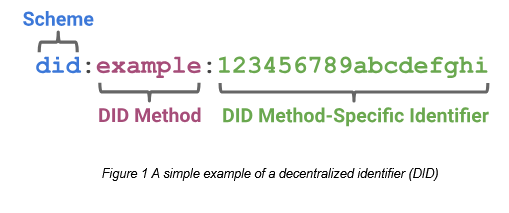
Decentralized Identifiers (DID) is a World Wide Web Consortium (W3C) specification for, well, distributed identities. The idea is to have an identity that belongs to you and does not belong to any particular service or website.
%20v1.0.png)
“In contrast to typical, federated identifiers, DIDs have been designed so that they may be decoupled from centralized registries, identity providers, and certificate authorities.
“Specifically, while other parties might be used to help enable the discovery of information related to a DID, the design enables the controller of a DID to prove control over it without requiring permission from any other party.”
In my work developing CList I want to enable content and messaging federation – so that people can follow and talk to each other – without being dependent on a specific platform. So I want people to be able to create and use DIDs to help them find and follow each other.
But how? None of the usual services really support DIDs. User identities in pretty much every platform you can think of are platform specific. It’s so pervasive that even the W3C has to define a type of DID, did:web, to correspond to a specific web server location. But even with this, most popular services won’t generate a DID for you (with the notable exception of Bluesky, which creates – but limits – user DIDs).
I approached this work in three major steps:
– first, I created a simple mechanism allowing people to create their own DIDs.
– next, I developed a way for people to add DIDs to their RSS feeds
– and finally, I wrote an RSS reader that detects these DIDs
Let’s look at each of them.
Creating the DID
A DID can be complex, but for our purposes we really don’t need a lot of complexity. Let’s have a look at my DID:
https://kvstore.mooc.ca/users/downes/did.json
Yes, I’m sharing it with you. It’s a public document. But that’s OK – I can change it, remove it, whatever. And I control what does into it. Here are some relevant sections:
Context
  "@context": [
    "https://www.w3.org/ns/did/v1",
    "https://w3id.org/security/suites/jws-2020/v1"
  ],
Nothing fancy here. I’m declaring that I’m using the W3C definition of DIDs and I’m describing the security suite I’m using.
Also Known As
This is a way to link multiple DIDs together to form a single identity. I found it necessary to do this to allow for the use of the Bluesky DID as well as to support a did:key which allows me to sign comments, annotations or posts. I also use it to help me transfer my identioty from one website to another.
  "id": "did:web:kvstore.mooc.ca:users:downes",
  "alsoKnownAs": [
    "did:key:z6MktjWjn5QHWHN7chfryeYQ6CK5Efb9RWQMaz2Ed1jf92LE",
    "did:web:kvstore.mooc.ca:users:downes",
    "did:web:kvstore.downes.ca:users:downes",
"at://downes.bsky.social"
 ],
Verification Method
This allows me to use my DID to do two things:
- “authentication” – proves I am who I say I am (login challenges)
- “assertion” – proves I authored something (content signing)
Services
Here I list the services I use, and who I am on those services. It’s not all the services I use – just the ones I want to admit to publicly.
"service": [
    {
      "id": "did:web:kvstore.mooc.ca:users:downes#kvstore",
      "type": "KVStore",
      "serviceEndpoint": "https://kvstore.mooc.ca"
    },
    {
      "id": "did:web:kvstore.mooc.ca:users:downes#downes-mastodon-social",
      "type": "SocialWebAccount",
      "serviceEndpoint": "downes@mastodon.social"
    },
    {
      "id": "did:web:kvstore.mooc.ca:users:downes#oldaily-mastodon-social",
      "type": "SocialWebAccount",
      "serviceEndpoint": "oldaily@mastodon.social"
    },
    {
      "id": "did:web:kvstore.mooc.ca:users:downes#downes-cosocial-ca",
      "type": "SocialWebAccount",
      "serviceEndpoint": "downes@cosocial.ca"
    },
{
      "id": "did:web:kvstore.mooc.ca:users:downes#11679714",
      "type": "Blog",
      "serviceEndpoint": "11679714"
    },
    {
      "id": "did:web:kvstore.mooc.ca:users:downes#Downes-leftish-media",
      "type": "Blog",
      "serviceEndpoint": "Downes@leftish.media"
    }
  ]
The first service I use is the DID hosting service. I’m using the one attached to CList, which is kvstore.mooc.ca. I have also listed my three Mastodon accounts – two on mastodon.social and one on cosocial.ca. I also list my Blogger and WordPress accounts. I do not list my Bluesky account here; it goes up in the AlsoKnownAs section.
And that’s it! Now, if these services wanted, they could complete the circle by allowing me to record my DID on their services – they could then verify it against this file, see that I’ve declared the service, and we would have a nice distributed sort of identity federation.
But they don’t do that.
Adding DID to RSS Feeds
You can’t just toss a DID into an RSS feed and expect it to work. An RSS feed is a structured document intended to be machine-readible, so that your DID can be automatically extracted by a feed reader.
After some consideration of alternatives, I decided to use the Atom author tag to do it, first, because the syntax is the same for both RSS and Atom, and second, because it allows me to place both the author’s name and the DID into the same context.
So here’s what they look like:
RSS:
Atom:
As you can see, I use the link tag, specifying both the author name and DID as the URL. Look up that URL, you see the DID I described in the previous section.
The WordPress Plugin
It’s easy for me to put my DID in my own RSS feeds, because I’m the person who creates them, using software that I wrote myself. But what about the rest of the world?
There’s a lot of RSS feeds I can’t fix, but as they say, 80% of the web runs on WordPress, and I can fix that. So (with the help of ChatGPT) I wrote a plugin that allows you to put your DID into your user profile, and which inserts it into your RSS and Atom feeds.
It doesn’t generate the DID – you need a DID generator for that (use CList, or Bluesky, or whatever). You will find a DID element when you edit the profile; put it in and everything is automatic after that.
Here’s more information about the plugin and a link where you can download it: https://clist.mooc.ca/wordpress/README.html You can find the source on GitHub: https://github.com/Downes/CList/tree/main/wordpress/author-did-feeds-v0.1.2/author-did-feeds
Adding DID to Mastodon
Mastodon doesn’t formally support DID, but it does allow you to put data into custom fields. Edit your profile, add a new custom field, and enter the data:

The DID URL does exceed the recommended 40 character limit, but there’s not much to be done about that. With luck, it will mostly be visible in any case.
An RSS reader that Reads DIDs
In addition to connecting to various social network and content sharing services, CList contains an RSS reader. That means that if people have put their DID into their RSS feed, it’s possible to find them.
I haven’t written this part yet, so I don’t know exactly how it’s going to work. But here are some potential uses I can put it to:
- persistent author identity across multiple websites and services;
- verification of authorship independently of a publishing platform;
- linking posts to a broader decentralized identity infrastructure;
- future support for signed posts or signed feeds;
- decentralized federated annotation network;
- distinguishing between display names and machine-readable author identifiers.
There’s a lot we can do with this, but I wanted to get this part out there so people can think of the possibilities.