dailynewsnblog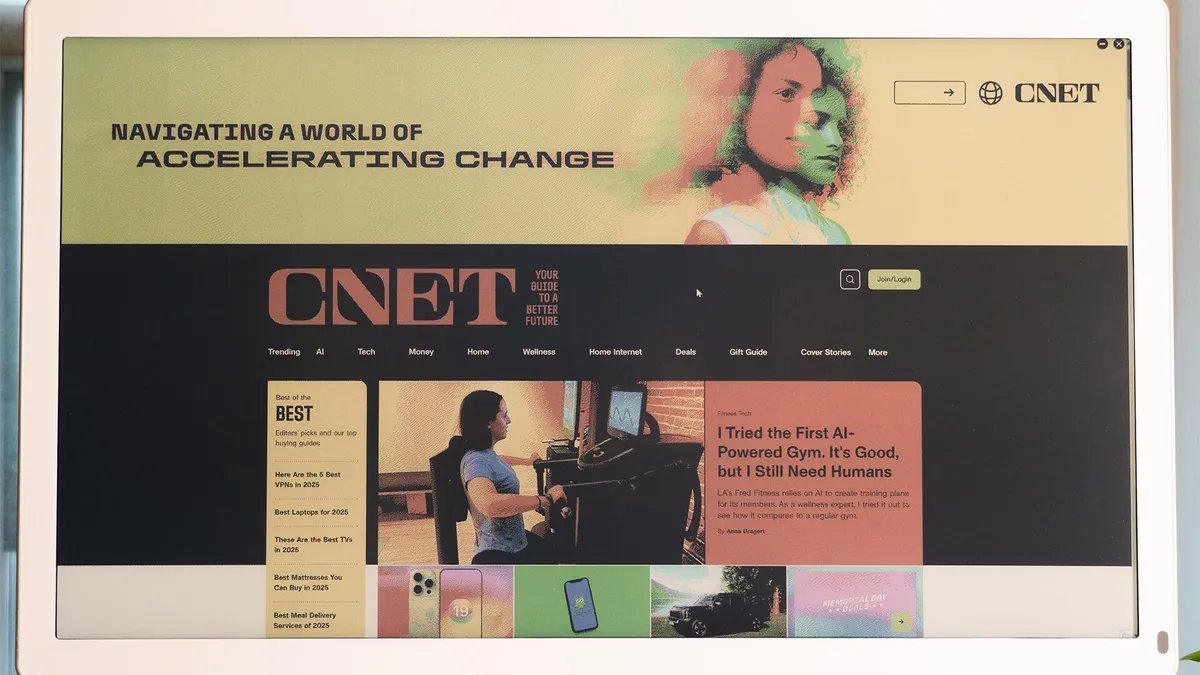

Pros
- Easy-to-see in very bright environments
- Many input source options
Cons
- E Ink benefits diminished by color LCD layer
- Low color pixel density
- Unsatisfying speakers
- Underwhelming design
E Ink has come a long way. There are now a lot of cool applications of it, from pocketable e-readers like the Boox Palma 2 to fully fledged Android tablets with color layers like the Boox Note Air 4C. There’s plenty of appeal in a display that doesn’t require a glowing backlight. There’s less eye strain, no blue light concerns and easy viewing, even in direct sunlight.
The Bigme B251 monitor plays into that appeal with a 25.3-inch color E Ink display. It sounds and looks promising, but at $1,499, it needs to deliver on that promise. Unfortunately, I can’t say it does.
Not the display you’re hoping for
Testing the Bigme B251 may be my first time using an E Ink monitor, but it is far from my first time testing an E Ink device. I’ve seen the black-and-white contrast improve considerably over the years, but E Ink displays with a color layer lag behind. The B251 is one of these, putting a color LCD layer over an E Ink layer. This negatively impacts the brightness as a result.
One of the key promises of E Ink is that you can rely on ambient light to illuminate the display, so you don’t need a built-in backlight like a traditional monitor. The problem is that the color layer dims the display so much that you need lighting unless you’ve got your back to a wall of sunlit windows.
For me, even in a comfortably lit room near a sunny window, the Bigme B251 was too dim without its lighting. That lighting is gentle on the eyes and has an adjustable color temperature.
While 3,200×1,800 resolution on a 25.3-inch display should be decent, clarity still ends up an issue because of the color layer and ghosting. Even the text clarity of black-and-white content isn’t up to snuff, with text showing noticeable pixelation.
Black text on a white background is the best-case scenario, but white text on a black background is barely legible. Bigme claims a 300ppi E Ink resolution and a 150ppi color resolution, but I’m skeptical. This should be as sharp as a 15.3-inch display at 1200p, but I’m using one side-by-side with the Bigme, and the latter doesn’t look as sharp.
The B251 offers a few different image modes to help nudge it in the right direction when viewing different types of content. For web browsing, there’s the aptly named “web” mode. There are also modes for text, images, and video. Each has some customization available for contrast and saturation, but they have locked refresh rates.
The “image” mode offers the best clarity, but it has a very slow refresh rate, maybe about 1Hz. Mousing around is virtually impossible. Though “video” mode is smoother, it’s incredibly blotchy. The videos themselves appear somewhat fluid, but the rest of the display becomes largely unusable, especially as ghosting artifacts persist permanently if a pixel isn’t refreshed with new content.
The “text” and “web” modes offer a nice middle ground, but still aren’t completely satisfying. Outside of the “image” mode, the others have a heavy reliance on dithering, making for a messy, grainy-looking screen for a lot of content. That’s not a great look for such a pricey gadget.
An otherwise mixed bag
At least the Bigme B251 has a lot of connection options.
Beyond the screen itself, the Bigme B251 monitor is middling. It has a reasonable variety of ports: HDMI, Mini HDMI, DisplayPort and USB-C, plus some USB hub capabilities. Wireless streaming to the monitor is also possible, though I didn’t find it quite as compelling as Bigme’s promotional content suggested. For instance, I couldn’t get my phone to fill the entire height of the monitor when it was in vertical orientation.
The B251 comes with a small remote for quickly adjusting settings. Even though it’s a basic remote, it’s quite useful since the monitor’s built-in controls feel cheap and have hard-to-read labels.
The monitor hardware looks pretty enough, with a simple white-and-silver color scheme that harks back to some old all-in-one Mac systems. At over an inch thick, the white bezels are undeniably large for 2026, but they’re pleasantly curved and uniform. Unfortunately, those bezels and the whole back case of the monitor feel like they’re built from far too cheap a plastic for a $1,500 monitor.
The bezel is thin by 2026 standards.
The stand has some actual metal, one of the only parts that is, but this is offset by the neck portion having a plastic plate painted silver to look like metal. On the bright side, the stand offers plenty of position flexibility with tilt, pivot, height and rotation adjustments.
The B251 includes speakers, but they don’t sound great. There’s some obnoxious resonance in the case, even at medium volumes, which is hard to accept for a monitor at this price.
Just one more nail in the coffin: the B251 uses an external power brick. The monitor isn’t small overall, nor thin by any means, and it only needs 60 watts. Relying on a desk-cluttering external power brick feels entirely unnecessary.
Final thoughts
The dream of a great-looking E Ink monitor that can be lit simply by room lighting, showing sharp, easy-on-the-eyes content, isn’t dead, but the Bigme B251 doesn’t accomplish it. While this monitor gives you a lot more screen space than you might get from E Ink tablets, it’s an all-too-compromised experience for a device with a considerable price premium.
I did find it gentle to look at, but that was offset by the extra strain on my eyes to parse the rough-edged text. I had to figure out where my mouse cursor was, thanks to the low refresh rate, and try to make out whatever was going on in areas where any color is involved.
If you want easy-on-the-eyes E Ink, I’ve spent days writing and browsing the web on a black-and-white Boox Note Air and color Boox Tab Ultra C. While much smaller than the B251, the experience was altogether better. Plus, their portability means you can just bring them right out into the sunshine and avoid backlighting altogether.