dailynewsnblog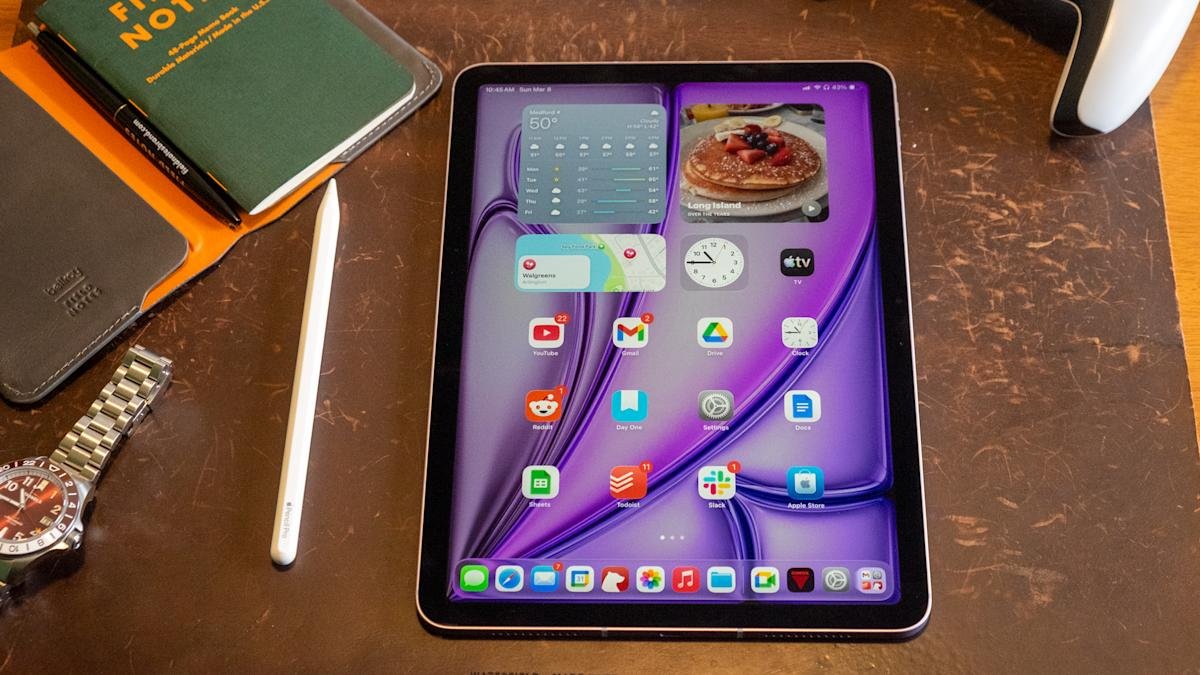
Perhaps one of the most surprising things about the Apple Silicon era is how quickly Apple now updates its products. Take the iPad Air, for example. It’s been less than two years since the company released the M2-powered iPad Air in 11- and 13-inch sizes. We’re already on our third iPad Air iteration, one with the M4 inside. That’s the same chip that was inside the iPad Pro that was unveiled alongside that M2-powered Air in 2024. (The Pro was updated with an M5 last fall.)
Just as I said a year ago when Apple unveiled the iPad Air M3, this latest model doesn’t fundamentally change the formula. The Air is a notable step up over the basic iPad, with a more powerful processor, more RAM, a better display and superior accessories like the Apple Pencil Pro and Magic Keyboard. The Air line is also the only way to get a 13-inch iPad without spending $1,300 or more.
But without more substantial updates this year, I find myself less enthused by it than I was when the 13-inch model M2 model arrived in 2024. That’s primarily because Apple has stuck with the same display for another year. As best I can tell, the 11-inch iPad Air that I’m reviewing has the same screen in 2026 as it did when the redesigned version with no Home button was released in late 2020. Other features that feel like they should be table stakes at this point, like Face ID, are also restricted to iPads that cost at least $1,000. For better or worse, the Air is a very mature product with few surprises. But on the other hand, if you have an iPad older than the 2024 refresh, the iPad Air M4 will provide a solid performance improvement.

Apple / Engadget
Aside from chip updates, the iPad Air hasn’t changed much in the last few years. But it’s still a great tablet for those who want more than the basic iPad.
- Powerful M4 chip
- Better screen and performance than the base iPad
- iPadOS 26 provides a significantly improved multitasking system
- Robust, well-constructed hardware
- It’s time for a better screen
- No Face ID
- Can get expensive quickly, especially with accessories
- The device color options could be brighter!

Apple’s iPad Air M4 and the Magic Keyboard accessory. (Nathan Ingraham for Engadget)
The M4 still has power to spare
Before we start answering existential questions, though, let’s quickly recap what’s new with the iPad Air. It still starts at $599 for an 11-inch version with 128GB of storage; the 13-inch models starts at $799. The one I tested came in an extremely light purple color with 1TB of storage and 5G connectivity and costs $1,249. Seriously Apple, don’t be afraid of putting a little more saturation in these colors next time! As mentioned, the iPad Air now has a more powerful M4 chip as well as 50 percent more system memory (12GB, up from 8GB on last year’s model). If you’re coming from an iPad older than the 2024 model, you’ll likely notice solid performance gains, and the M4 is so performant that I imagine this iPad will be more than powerful enough for years to come.

It looks purple-ish in the right light, I swear. (Nathan Ingraham for Engadget)
I ran some Geekbench 6 benchmarks to quantify the difference between the iPad Air M4 and last year’s M3 model — unsurprisingly, the biggest gains came in the GPU. Single-core and multi-core scores were 23 percent and 12 percent higher, respectively. But the GPU score was a whopping 39 percent higher with the M4 compared to the M3. Don’t get me wrong, the single-core and multi-core performance improvements the M4 offers are impressive. But tasks that hit the GPU hard, like gaming and AI (of course) should see notable improvements.
In practice, the iPad Air M4 feels quite similar to the M3 model. That’s due in large part to my relatively modest workflow. I jump between numerous apps all day, but none of them are exactly taxing to a chip like the M4. My day mostly consists of Slack, Google Docs, a ton of Safari tabs, utilities like Messages and Todoist, constant streaming music and other lightweight apps like Gmail and Trello. But if you’re coming from an M1 iPad Air, the M4 should feel significantly faster for almost everything you do.

Apple’s iPad Air M4 playing the video game ‘Control.’ (Nathan Ingraham for Engadget)
Unsurprisingly, the iPad Air flies through games from the App Store as well. I tried my usual more casual fare like Balatro, Mini Motorways and Powerwash Simulator from Apple Arcade and those were all quite smooth. But I wanted to push things a bit more, so I downloaded Resident Evil 2 as well as a pre-release build of Control Ultimate Edition which is slated to hit iOS in the coming months. Both games looked and played great, with highly detailed environments and pretty quick action that didn’t slow the iPad Air down in the least. I could tell the graphics aren’t as sharp as on my PS5, but both games were impressive considering they’re running on extremely portable hardware with no fans.
I also tried some generative AI apps, even though that’s not really something I’m interested in. For apps like Apple’s own Image Playground, the M4 is extremely speedy. It ripped through my goofy queries (an orange kitten dressed up like an astronaut) in a matter of seconds. When I compared it to the iPad Pro M5, the Air barely lagged behind it. However, the M4 couldn’t quite keep up with more advanced image generation tools. The Draw Things iPad app lets you download and run a host of local models to create images, and the M4 definitely couldn’t keep up with the M5. The iPad Pro M5 was typically more than twice as fast as the Air. We already knew the M5 was an AI beast, so I’m not knocking the Air for its performance at all — it’s just worth knowing that if you really want to push the envelope, you’ll probably be better off with an iPad Pro.

Apple’s iPad Air M4, Apple Pencil Pro and Magic Keyboard. (Nathan Ingraham for Engadget)
The other main change is Apple’s in-house networking chips are on board here. The N1 covers Wi-Fi 7, Bluetooth 6 and Thread, while the C1X handles cellular connectivity if you buy a 5G-capable model. Again, this doesn’t change the experience of using the iPad Air in any major way, but having the newest Wi-Fi and Bluetooth protocols on board is good for future usage, regardless of who built the chip. In my testing, the C1X on Verizon’s 5G network was extremely fast around the suburbs of Boston and didn’t seem any slower (or any faster) than other devices I have running on the same carrier. That’s fine, as other Apple devices I’ve tried with the C1X (like the iPad Pro) are solid and reliable, which is the most important thing.
A very familiar experience
Other than these new chips, the iPad Air is identical to the last two models I’ve reviewed. (This year, Apple sent an 11-inch Air M4 to review, while the last two were the newer 13-inch. But other than the larger screen, those tablets are the same.) Same screen, same cameras, same 10-hour estimated battery life, same USB-C 3 port. Naturally, it supports the $129 Pencil Pro that Apple introduced alongside it in 2024, and it works with the revamped Magic Keyboard Apple released last year. That keyboard remains quite expensive at $269 ($319 for the 13-inch model), but for me it’s a must-buy accessory if I want to use my iPad for any “real work.” The Pencil, on the other hand, is not something I personally need, but it’s an excellent tool for anyone interested in visual art or written notes. There are a plethora of excellent apps in both categories, and the iPad app ecosystem at large remains unmatched.
Battery life also hits what I’d expect out of an iPad. I don’t get 10 hours the way that I test it — I used the iPad Air as my main machine, all day for several days. In that scenario, I got between seven and eight hours of battery life. That’s more than enough that I’d take it with me for half a day or more and not worry about charging, but not so long that I’d be totally comfortable without a charger for much longer. In a more casual, mixed-use setup, most iPads get closer to the 10-hour mark and I expect that’ll be the case here as well. Of course, if you’re playing games, editing videos or doing heavier generative AI tasks, expect battery life to drop noticeably.
I’d be remiss if I didn’t quickly mention iPadOS 26, which arrived last fall. It runs on iPad Air models all the way back to 2019, so it’s not a reason alone to upgrade. But, it improved the multitasking experience on iPads to a significant degree. It still feels native to the iPad, but there are so many Mac-like flourishes that it’s a lot easier for me to use as my main computer now. That said, it really shines on larger-screen iPads; the 11-inch model still feels best to me when running an app fullscreen or two apps side-by-side feels most comfortable to me.

Apple’s iPad Air M4 and Magic Keyboard. (Nathan Ingraham for Engadget)
My major lament for the iPad Air remains the screen. Apple’s LCD Retina display still looks great in a vacuum — it’s a lovely standard screen, with bright colors and sharp text. But Apple’s continued insistence on gatekeeping a screen with a higher refresh rate for iPads that cost $1000 or more gets more frustrating every year. It bothers me less on a product like the MacBook Air. But with an iPad, you’re literally touching and interacting with that screen as the main interface. Having the fluidity of a 120Hz refresh rate simply makes everything feel more responsive to your touch.
The consolation is that even Apple’s standard displays still feel very smooth, so unless you’re directly comparing an iPad Air to an iPad Pro you likely won’t notice the difference. I mostly forgot about it in my time reviewing this device, only reminded of it when I went back to the iPad Pro.
I also wish that Apple would implement more advanced display tech. Last year, I imagined that the mini-LED display used in the iPad Pro in 2021 and 2022 would be a great step up for the Air. It wouldn’t be as good as the tremendous OLED screen in the iPad Pro, but it would still offer HDR and significantly increased brightness and contrast. Alas, we’re stuck with a plain old LCD again this year. Again, that’s mostly fine, but playing games like Control made me wish for more contrast, and movies do not have nearly the same visual pop on the Air as they do on the Pro.

Apple’s iPad Air M4. (Nathan Ingraham for Engadget)
Wrap-up
If it’s not obvious, I very much wish that Apple would bring some of its more advanced technology to the iPad Air. But at this point, I have to accept that the Air is what it is. In the same way that the MacBook Air hasn’t changed substantially since the M2 model arrived in 2022, the same goes for the iPad Air. Both products still have displays that haven’t been cutting edge for years, and that’s just the way it is.
Once I started comparing the iPad Air to its Mac counterpart, my negative feeling mostly subsided. I think the MacBook Air is a great laptop and wouldn’t hesitate to recommend it to many people. Sure, its screen isn’t cutting edge, but it’s good enough for its target audience. And the many positives that it has outweigh a few places where Apple cut corners. The same can be said for the iPad Air.
The iPad Air offers a lot of important upgrades over the basic $349 iPad, which is saddled with the A16 chip from 2022. The Air will be a better performer for much longer, and other niceties like a better screen and accessory support are worth considering. And it doesn’t threaten the iPad Pro, which costs $400 more; between its screen, improved performance, superior industrial design and numerous other small benefits, it’s pretty easy to see what you get for your money in all cases.
So while I wish Apple would push the envelope with the iPad Air and give me something that feels more like a Pro-lite, I understand why it hasn’t yet. The iPad Air isn’t an exciting gadget at this point, but I still think it’s the best iPad for most people.