dailynewsnblog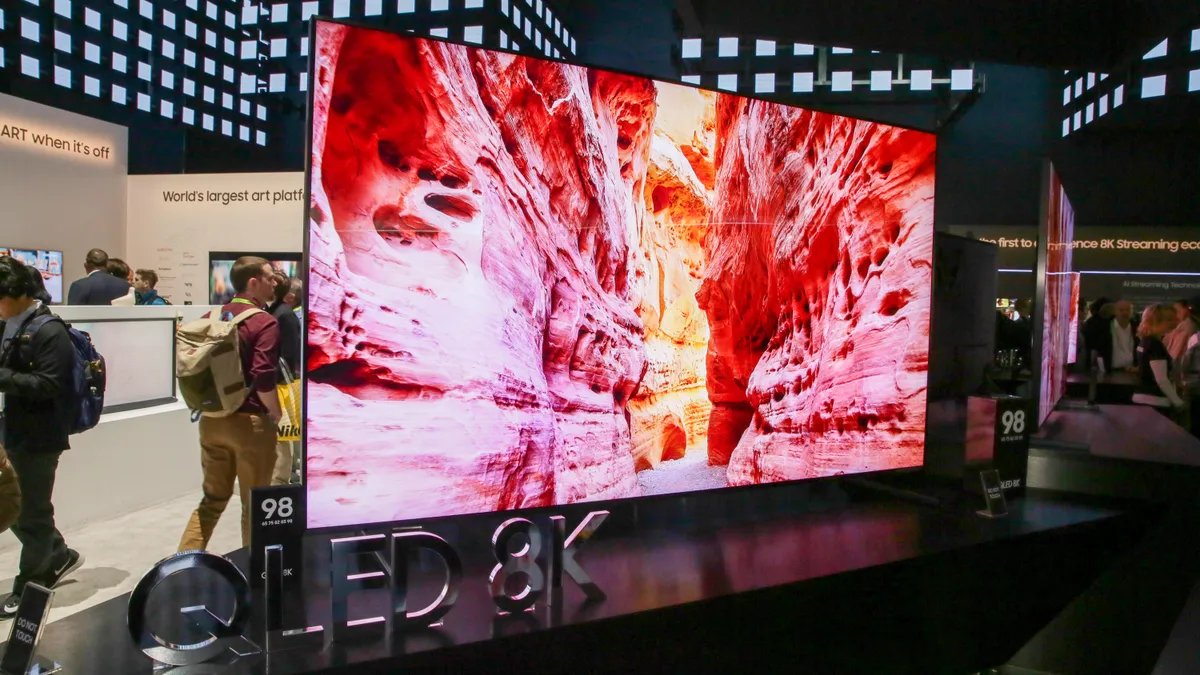
Nearly all modern TVs are 4K resolution: 3,840×2,160 pixels. Older and smaller TVs might be HD, aka 1,920×1,080 or less. But there are a handful of TVs you can buy right now that are 8K resolution, or 7,680×4,320. That’s four times the number of pixels as Ultra HD 4K TVs. However, our picks for the best TVs don’t include 8K models because they’re expensive and their overall performance is worse than cheaper 4K TVs.
Should you consider an 8K TV? In a word: no. In several words: not yet — and maybe not ever. You’re better off buying a high-quality 4K TV for far less money, and it’ll look better with all the content you can actually watch. Given that most manufacturers, essentially all except Samsung, have discontinued their 8K models in recent years, we don’t expect 8K TVs to become more popular anytime soon. And considering how difficult and expensive it is to produce native 8K content (4K is barely the norm even in 2026), 8K TVs aren’t something you should view as future-proofing, either. Not convinced? Let’s dive in.
Read more: PS5 and Xbox Series X Can Game in 8K Resolution. Should You Care?
Enlarge Image
This chart shows the relative number of pixels in each major resolution format. It’s not an actual size comparison — this is a chart, not a visual mockup — though it is to scale if you click on it. From largest to smallest: 8K (tangerine); 4K Cinema at a 1.78:1 aspect ratio (black); Ultra HD (white); 2K Cinema at a 1.78:1 aspect ratio (green); Full HD 1080p (red); and 720p (blue). For more detail (pun intended), check out 4K vs. 8K vs. 1080p: TV resolutions explained.
Is it worth buying an 8K TV?
Here’s a quick summary of our current thinking regarding 8K TVs in early 2026.
- From what we’ve seen, there’s little, if any, image quality improvement over 4K TVs.
- Any improvement we’ve seen requires sitting very close to a very large screen, and only with certain content.
- To get the most out of any 8K TV, you need actual 8K content (and there basically isn’t any).
- The latest Xbox and Playstation consoles promise 8K resolution, but that’s potentially misleading.
- Most brands have discontinued their 8K models.
- The best 4K TVs will look better overall (resolution is only one aspect of image quality, and not the most important).
To reiterate, beyond their high price, one of the biggest reasons 8K TVs fall short of expectations is the lack of 8K TV shows or movies to watch on them. And while the latest gaming consoles can theoretically do 8K (maybe), 8K games today are basically nonexistent. The best you can get in most cases is 4K, so all those extra pixels of an 8K TV won’t be used to their fullest potential.
Now that you’ve slid your wallet back into your pocket, sit back and soak in everything there is to know about 8K TVs today.
What is 8K, and is it better than a 4K TV?
A traditional HDTV from a few years ago is 1080p, meaning it has 1,920 pixels horizontally and 1,080 vertically. Many digital cinema projectors — the kind used in movie theaters — have a resolution of 2,048 x 1,080. Because Hollywood often refers only to horizontal resolution, this format is called “2K,” but it’s effectively very similar to the 1080p HDTV you have at home.
The term “4K” comes from the digital cinema world, where it refers to a horizontal resolution of 4,096 pixels — hence “4K.” On the TV side, however, manufacturing efficiencies led to a format that doubles both the horizontal and vertical resolution of 1080p HDTV, resulting in 3,840 x 2,160 pixels. This format is commonly called “4K,” even though the technical term is Ultra HD. In total, it contains four times as many pixels as 1080p HD.
Which brings us to 8K. You guessed it: It has twice the horizontal and vertical resolution of 4K, for a whopping 7,680 x 4,320 pixels — or 33,177,600 pixels total. That’s not just four times the resolution of 4K, but an incredible 16 times more pixels than 1080p. Put another way, you could display 16 full-resolution 1080p videos on an 8K screen at the same time with no loss of quality. I’m not sure why you’d want to do that, but hey, why not?
Read more: 4K vs. 8K vs. 1080p: TV Resolutions Explained
TV and projector resolutions
| Resolution name | Horizontal x vertical pixels | Total pixels | Other names | Found on |
|---|---|---|---|---|
| 8K | 7,680×4,320 | 33,177,600 | 8K Ultra HD, Ultra High Definition (UHD), Super Hi-Vision, UHD-2 | Some high-end TVs |
| 4K | 3,840×2,160 | 8,294,400 | Ultra High Definition (UHD) | Nearly all modern TVs, some projectors |
| 1080p | 1,920×1,080 | 2,073,600 | High Definition (HD) | Smaller, less expensive and older TVs, most projectors |
| 720p | 1,280×720 | 921,600 | High Definition (HD) | Very small and older TVs |
The Consumer Technology Association’s 8K Ultra HD logo.
One thing to look for in a new 8K TV is the official logo and specification. This goes beyond raw pixel count and helps ensure the TV meets at least a minimum performance standard. The goal is to avoid a repeat of the early HD and 4K days, when some first-generation TVs couldn’t even accept a full HD — or later, a 4K — signal. The Consumer Technology Association outlines the following minimum requirements a TV must meet to wear the 8K Ultra HD logo:
- At least 7,680 pixels horizontally and 4,320 vertically
- At least one HDMI input capable of accepting that resolution, at 50 or 60 fps (depending on region), with HDR
- The ability to upconvert lower resolution signals to 8K
- The ability to receive and display 10-bit content
Can the human eye even see 8K?
Technically, yes — but the difference will be very subtle at best.
As we’ve explained many times with 4K TVs, there’s a point of diminishing returns when it comes to resolution. The human eye can only perceive so much detail, and pixels beyond that threshold are essentially wasted. To benefit from higher resolutions (and their proportionally smaller pixels) you need to sit closer, buy a larger TV or both.
It’s rare for most people to have a TV large enough — or to sit close enough — to justify even 4K resolution. At that point, 8K becomes excessive overkill, at least for a TV. For massive, theater-size displays like Samsung’s Wall or Sony’s Crystal LED, 8K would be impressive. But when 4K is already difficult to distinguish from 1080p, the jump from 4K to 8K from 10 feet away is virtually impossible to see.
That said, because 8K TVs are currently the most expensive offerings from most companies, they often have features which help them produce stunning images that are completely divorced from resolution. So most 8K TVs, with the likely exception of the “cheap” models, will usually look great, regardless of their pixel count.
Read more: Best home projectors for 2026
The Samsung QN900D 8K QLED TV serves up slim styling and a host of AI-enhanced picture modes.
8K content: Can I actually watch anything in 8K?
Without 8K content to watch, an 8K TV is just a 4K TV with a few thousand dollars stuck to it with duct tape. Samsung talks up fancy “AI” upscaling technology on its TVs, designed to improve the look of mere 4K and 1080p sources on an 8K screen. And other TV makers like Sony and LG have touted their own 8K special sauces. But to get the most out of all those 33 million-plus pixels, the incoming source needs to be 8K, too.
There are three main aspects to getting any new format, including 8K, into your home:
1. Content recorded in the new format
2. Transmission of the new format (broadcast, streaming, etc.)
3. Playback of the new format
An 8K TV represents the last part of the system: playback. That’s the easy part. Any TV manufacturer can design and produce a TV with any resolution it wants. It simply uses its own resources. Creating content in the new resolution, meanwhile, is a lot tougher. While the number of 8K-capable cameras has dramatically increased in the last few years, they’re still expensive to buy or rent. In most cases, these cameras are used to create 4K content instead. There are lots of reasons it’s a great idea to capture in 8K. The end result, however, is 4K, and that’s because of the second part of the process: transmission.
Read more: How I Built My Dream 8K-Capable Video Editing PC
The Red Monstro 8K VV “Brain” has a 35.4-megapixel CMOS sensor, can record 8K video at 60 fps, has over 17 stops of dynamic range, and costs — brace yourself — $54,500. You’d still need lenses and more to use it as a camera.
Ultra HD 4K streaming requires a lot of data, and you need a very fast internet connection to stream it reliably. Streaming 8K is on an entirely different level, well beyond what many households can support. With only a tiny fraction of viewers able to take advantage of it — and higher costs for storage, processing and delivery — mainstream streaming services have been slow to adopt higher resolutions.
Which is all to say, don’t expect 8K versions of your favorite streaming shows anytime soon. And without 8K content, the main benefit of an 8K TV is at least partially wasted.
Do Xbox Series X or PlayStation 5 have 8K games?
Both Sony and Microsoft announced that their current-generation gaming consoles, the PlayStation 5 and the Xbox Series X, would both be capable of outputting 8K resolution via future updates. Sounds like a great excuse to buy an 8K TV, right? Not so fast.
First, and most importantly, you will not need an 8K TV to play games on these consoles. They’ll work just fine on most 1080p and all 4K TVs. If you can connect a PS4 or Xbox One to your current TV, it’ll work with a PS5 or Xbox Series X.
Secondly, games will need to be specifically written to take advantage of 8K, something that’s not particularly common. There are a handful of games for the PS5 that can run at 8K, but none so far for the Xbox. Even if your TV says a game is 8K, that may not be the resolution the console is actually rendering. It’s far more common for the console to build the game’s visuals at a lower resolution, 1440p or 4K at best, and convert to 8K to send your TV. This is the same thing your TV does automatically. In fact, many games already do this, allowing consoles to play 4K games at a reasonable frame rate.
Long story short, few games will look much different on an 8K TV than they will on a 4K TV. There is limited time and money when you develop a game (well, most games), and few developers will want to invest those limited resources on something only a handful of people will be able to enjoy. Far more likely are games rendered in 4K with higher frame rates, something else made possible by the latest version of HDMI and available on the new consoles.
Read more: 120Hz Gaming: Best TVs for PS5 and Xbox Series X
Where can I stream 8K? Do Netflix or YouTube support it?
Getting the 8K onto your new 8K TV is also a bit of a challenge. Ideally, the TV’s internal apps for Netflix, Amazon Prime Video and other streamers would be 8K-compatible. You’d think that’d be a given, but it wasn’t in the early days of 4K and still isn’t with 8K, even after years of 8K TVs being on the market.
Furthermore, there’s no 8K content from any major streaming service available yet. The main exceptions are YouTube, as shown in the video below, and Vimeo. There was also a service called The Explorers, which was exclusive to 8K Roku TVs, but like most 8K efforts, it appears to have been discontinued as of 2026. Eventually, ATSC 3.0, also known as Next Gen TV, might allow 8K to be broadcast over the air, but we’re a long way from that. There are no 4K Next Gen TV broadcasts yet, so 8K is infinitely far in the distance.
How fast does your internet need to be to stream 8K?
8K also presents another issue for the early adopter: The bandwidth required is immense. Most 4K content streaming companies recommend you have an internet connection in the 20Mbps range. 8K, even with everything else the same, has four times as many pixels.
That doesn’t translate directly to a fourfold increase in data or bandwidth, but as a rough estimate, a connection in the 40 to 50Mbps range wouldn’t be surprising. Maybe you, cutting-edge CNET reader, have that kind of speed — but most people don’t.
What kind of HDMI cable do I need for 8K?
A visual representation of how much more bandwidth HDMI 2.2’s 96Gbps gives compared to earlier versions.
One thing we already have sorted is the physical connection, in case any 8K media streamers hit the market or are needed for the PS5 and Xbox Series X. HDMI 2.1 is capable of 8K resolutions and more. The even newer HDMI 2.2 has even greater bandwidth. But before you rush out and stock up on HDMI 2.2-compatible cables, keep in mind these are only needed if you have an 8K source, which other than a PC or the PS5, don’t exist.
All of the major 8K TV makers say that their sets have at least HDMI 2.1 inputs capable of handling the 48Mbps bandwidth required for the highest resolution and frame rate combinations (8K and 60 frames per second and 4K at 120fps).
Read more: When is the Best Time to Buy a TV?
Is 8K TV a gimmick?
To put on my cynic hat, increasing resolution is one of the easiest ways to create the appearance of higher performance. That’s likely what TV makers are banking on by releasing 8K TVs when there’s essentially no content and no real 8K infrastructure.
Given how easy it was to market 4K as “better looking than 1080p,” some TV makers are implying the same thing with 8K. But resolution is just one aspect of overall picture quality, and not one of the most important ones. Improving other aspects, such as contrast ratios, overall brightness for HDR, more lifelike colors and so on, offer better image improvements — but they’re significantly harder to implement. This is especially true for LCD, which all 8K TVs use. There are currently no 8K OLED TVs.
It’s relatively easy to create a higher-resolution LCD panel, but improving the other aspects of performance for that tech is a greater challenge. Not “more” pixels but “better” pixels. This is why OLED is a thing, and why many companies are researching new technologies such as true direct-view quantum dot displays.
Direct-view quantum dot display.
Bottom line: Don’t wait for 8K
If you’re thinking about buying a new TV, don’t let 8K influence your purchase. For that matter, if your current TV works, you should probably hold on to it, regardless. We’re many, many years away from any sort of widespread 8K content, if we ever get it. We arguably don’t have widespread 4K content, and no one is talking about scrapping 4K to go directly to 8K.
The other aspect is a warning that will be seconded by countless 4K early adopters: There’s no guarantee these early 8K TVs will end up being compatible with any future 8K standard. There are tens of thousands of 4K TVs that can’t play any current 4K media content.
Lastly, even as prices drop, you’re almost certainly better off with a 4K TV for the same amount of money. They offer better picture quality overall and only lack the bragging rights that you have more pixels than your neighbor. But if that’s your thing, go for it.
Note: This article was first published in 2018 and is regularly updated with new info and links (including a hardening of our opinion that 8K TVs aren’t worth it).
In addition to covering cameras and display tech, Geoff does photo essays about cool museums and other stuff, including nuclear submarines, aircraft carriers, 10,000-mile road trips.
Also, check out Budget Travel for Dummies, his travel book, and his bestselling sci-fi novel about city-size submarines. You can follow him on Instagram and YouTube.